心智圖資源庫 HTML CSS
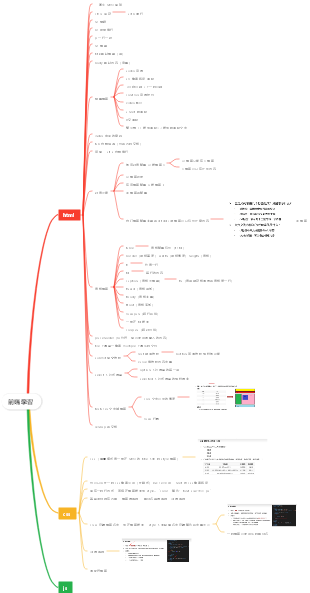
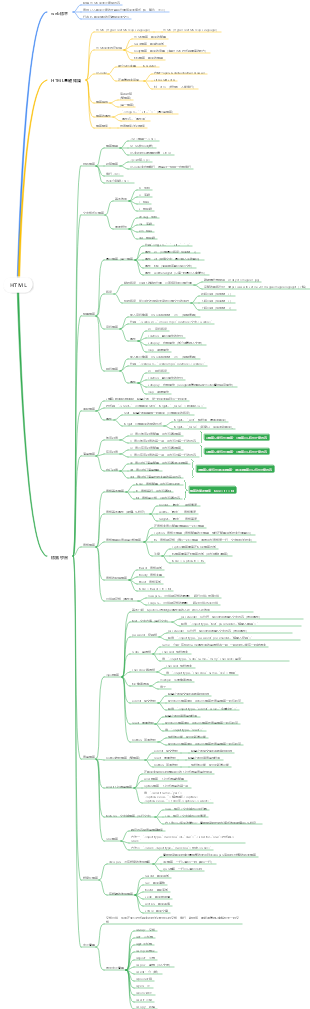
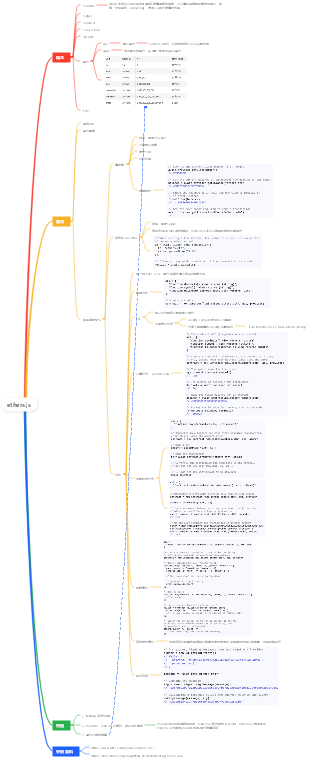
html和css的常用基礎,CSS是層疊樣式表cascading style sheets,html是超文本標記語言hyper text markup language。
編輯於2023-08-22 15:01:32This is a mind map about bacteria, and its main contents include: overview, morphology, types, structure, reproduction, distribution, application, and expansion. The summary is comprehensive and meticulous, suitable as review materials.

This is a mind map about plant asexual reproduction, and its main contents include: concept, spore reproduction, vegetative reproduction, tissue culture, and buds. The summary is comprehensive and meticulous, suitable as review materials.
This is a mind map about the reproductive development of animals, and its main contents include: insects, frogs, birds, sexual reproduction, and asexual reproduction. The summary is comprehensive and meticulous, suitable as review materials.
This is a mind map about bacteria, and its main contents include: overview, morphology, types, structure, reproduction, distribution, application, and expansion. The summary is comprehensive and meticulous, suitable as review materials.
This is a mind map about plant asexual reproduction, and its main contents include: concept, spore reproduction, vegetative reproduction, tissue culture, and buds. The summary is comprehensive and meticulous, suitable as review materials.
This is a mind map about the reproductive development of animals, and its main contents include: insects, frogs, birds, sexual reproduction, and asexual reproduction. The summary is comprehensive and meticulous, suitable as review materials.
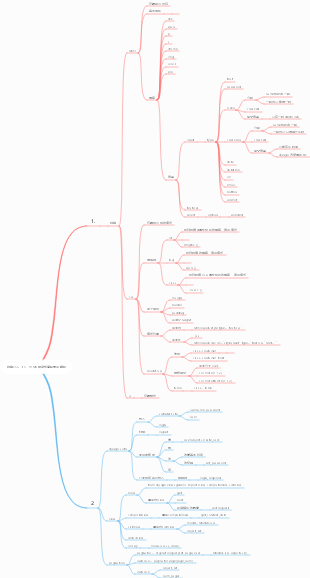
HTML CSS
CSS概念
cascading style sheets
層疊樣式表
CSS語法
註解
/* */
選擇符{屬性:屬性值;屬性:屬性值;屬性:屬性值;......屬性:屬性值;}
CSS常見選擇符
基本
標籤
標籤名{}
id
特點
唯一性
#box{}
class
特點
一對多
多對一
.red{}
偽類
:hover
:link
:active
:visited
通配符
*
複合
群組
選擇符1,選擇符2,....{}
包含
選擇符1 選擇符2 ...{}
指定
選擇符1選擇符2...{}
CSS常見屬性
文字
font-size
color
line-height
text-align
font-weight
bold
normal
lighter
bolder
font-style
normal
italic
font-family
font-varient
normal
small-caps
text-indent
text-decoration
underline
overline
line-through
none
text-transform
uppercase
lowercase
capitalize
text-overflow
letter-spacing
word-spacing
盒模型
margin
支持四值法
支援單一方向定義
支援取值為負
不支援背景圖
垂直相鄰合併
父親盒子overflow:hidden
子盒子float
border
特點
支援背景圖
支援單一方向
不支援四值法
邊框楔形
三角形
border:100px solid transparent;
border-top-color:red;
height:0;
width:0;
屬性
border-width
border-style
solid
實線
dashed
線狀虛線
dotted
點狀虛線
double
雙線
border-color
padding
支持四值法
支援單一方向
支援背景圖
不支援取值負數
需減對應寬高(怪異盒不需要)
content
width
height
浮動
float
left
right
none
clear
left
right
none
both
放在不想被浮動影響的盒子上
定位
相對
relative
特點
不脫標佔位
相對自己定位
可以用於細微位置的移動
可以用於絕對定位的參考物
絕對
absolute
特點
脫標不佔位
相對包含塊定位
不寫座標留原位
子絕父相
固定
fixed
特點
相對視窗定位
脫標不佔位
不寫座標留原位
黏性
sticky
特點
需要結合座標使用
相當於相對定位和固定定位的結合
不脫標佔位
靜態
static
特點
不脫標佔位
不支援座標屬性
不支援層級屬性
元素類型
分類
區塊級
獨佔一行
可設定寬高
行高可撐開高度
浮動之後會橫向排列
內聯
在一行顯示
不能設定寬高
行高撐不開高度
浮動之後可以設定寬高
不支援text-indent
不支援盒模型相關屬性,垂直方向失效
轉換
display
block
inline-block
inline
none
隱藏元素
list-item
清單類型
table-cell
單元格類型
應用
不定寬導航水平居中
ul {text-align:center}
li {display:inline-block;}
單行居中多行靠左
.all {text-align:center;}
.all p {display:inline-block;text-align-left};
圖片間隙
img{display:block;
img{vertical-align:top/middle/bottom;}
.all{font-size:0;}
圖片垂直居中
方法1
.all {height:400px;line-height:400px;}
img{vertical-align:middle;}
方法2
img{vertical-align:middle;}
span{vertical-align:middle;width:0;height:100%;display:inline-block}
表格相關
border-spacing
邊框間隙
border-collpase
邊框合併
table-layout
固定表格佈局
值
fixed
固定表格佈局
auto
自動表格佈局
empty-cells
無內容儲存格顯示
值
hide
無內容儲存格隱藏
show
無那日單元格顯示
背景相關
background-color
background-image
url();
background-repeat
repeat
no-repeat
repeat-x
repeat-y
background-position
水平 垂直
px
%
top right bottom left
background-attachment
scroll
相對盒子
fixed
相對視窗
清單相關
list-style:none
css3
選擇符
基本
標籤
id
class
*
層級
後代
(空格)
子代
>
相鄰兄弟
一般
~
偽類
動態偽類
:hover
:link
:active
:visited
:focus
結構偽類
孩子系列
:nth-child()
:first-child
:last-child
:only-child
:nth-last-child()
兒子系列
:nth-of-type()
:first-of-type
:last-of-type
:only-of-type
:nth-last-of-type()
:root
:empty
:not()
否定偽類
:not
語言偽類
:lang
目標偽類
:target
需要結合錨點連結使用
放在目標上
加了id的是目標
UI元素狀態偽類
:disabled
:enabled
:read-only
:read-write
:checked
屬性
[attr]
[attr=val]
[attr^=val]
[attr$=val]
[attr*=val]
[attr~=val]
[attr|=val]
偽元素(內聯)
::after {content:""}
::before {content:""}
::first-line
::first-letter
::selection
權重
*
0.1
標籤
1
class
10
偽類
10
屬性
10
id
100
內聯
1000
!important
10000
屬性
圓角半徑
border-radius
盒子陰影
box-shadow
inset
內陰影
向右
向下
模糊程度
擴展程度
陰影顏色
文字陰影
text-shadow
向右
向下
模糊程度
變形
transform(2D)
translate()
rotate()
scale()
skew()
transform(3D)
定義景深
perspective
定義變形類型
transform-style:preserve-3d;
3D變形
translate3d
rotatex
rotatey
rotatez
scale3d
定義變形起點
transform-origin
過渡
transition
漸變
線性漸變
background:linear-gradient(0deg, #000, #000)
徑向漸變
background:radial-gradient(半徑 at 位置, #000, #000)
半徑:主/次
位置:x/y
線性漸變平鋪
background:repeating-linear-gradient(0deg, #000 5px, #000 10px)
徑向漸變平鋪
background:repeating-radial-gradient(半徑 at 位置, #000 5px, #000 10px)
動畫
動畫的聲明
@keyframes 名字{}
動畫調用
animation: 名字 .5s linear 0s infinite alertnate forwords
佈局方式
彈性盒佈局
容器
display:flex
flex-direction
column
row
column-reverse
row-reverse
flex-wrap
wrap
no-wrap
wrap-reverse
justify-content
flex-start
flex-end
center
space-between
space-around
space-evenly
align-items
stretch
flex-start
flex-end
center
baseline
alegn-content
stretch
flex-start
flex-end
center
space-between
space-around
space-evenly
專案
flex
flex-shrink
flex-grow
flexbasis
align-self
stretch
flex-start
flex-end
center
baseline
order
網格佈局
容器
display:grid
grid-template-columns
200px 200px 200px
20% 50% 30%
repeat(3,200px)
repeat(auto-fill,20%)
1fr 1fr 1fr
1fr 1frr 1minmax(200px,1fr)
grid-template-rows
200px 200px 200px
20% 50% 30%
repeat(3,200px)
repeat(auto-fill,20%)
grid-gap
row-gap
column-gap
grid-template-areas
justify-content
align-content
justify-items
align-items
專案
grid-area
grid-column
grid-column-start
grid-column-end
grid-row
grid-row-start
grid-row-end
多列佈局
columns
columns:5 200px;
column-count
column-width
column-gap
column-rule
column-span
column-fill
媒體查詢
<link mate="screen and (min-width:960px) and (max-width:1200px)">
@media screen and (min-width:960px) and (max-width:1200px)
盒模型
box-sizing
border-box
怪異盒模型
特點
padding border在width height內
content-box
標準盒模型
特點
width height不包含padding border
相容
內容
Trident
Gecko
Webkit
Blink
Presto
前綴
-moz-
-ms-
-webkit-
-o-
術語
漸進增強
先低後高,以低版本功能的實現為主,為高版本添加酷炫效果
優雅降級
先高後地,以高版本功能的效果為主,需要處理低版本的兼容
其他
字體圖示
http://www.iconfont.cn
錨連結
<a href="#one"></a>
跳轉
<a name="one"></a>
<div id="one"></div>
居中方法
定位
方法1
父親盒子
position:relative;
子盒子
position:absolute;
top:50%;
left:50%;
margin-left:-寬一半;
margin-top:-高半;
margin:auto
方法2
父親盒子
position:relative;
子盒子
position:absolute;
top:0;
bottom:0;
left:0;
right:0;
margin:auto
方法3
父親盒子
position:relative;
子盒子
position:absolute;
top:calc(50% - 高半);
left:calc(50% - 寬半);
方法4
父親盒子
position:relative;
子盒子
position:absolute;
top:50%;
left:50%;
translate(-50%,-50%);
彈性盒
方法1
父親盒子
display:flex;
子盒子
margin:auto;
方法2
父親盒子
displayflex;
justify-content:center;
align-items:center;
方法3
父親盒子
display:flex;
justify-content:center;
子盒子
align-self:center
網格
方法1
父親盒子
display:grid;
justify-content:center;
align-content:center;
方法2
父親盒子
display:grid;
子盒子
margin:auto;
轉行內區塊
方法1
父親盒子
line-height: 高;
text-align:center;
父親盒子
display:inline-block;
vertical-align:middle;
line-height:高;
方法2
父親盒子
text-align:center;
子盒子
display:inline-block;
vertical-align:middle;
父盒偽元素::after
content:"";
display:inline-block;
vertical-align:middle;
width:0;
height:100%;
方法3
父親盒子
text-align:center;
vertical-align:middle;
display:table-cell;
子盒子
display:inline-block;
多行文字垂直居中
父親盒子
vertical-align:middle;
display:table-cell;
程式碼片段
省略號
固定寬
width
不換行
white-space:nowrap;
溢出隱藏
overflow:hidden
省略號
text-overflow:ellipsis
行動端佈局
vieport
視口,行動端預設980
dpr
裝置像素比
佈局方式
百分比佈局
等比縮放佈局
單位
em
自身的倍數或是父盒子字號的倍數
rem
根(html)字號的倍數
vw
百分之一的視窗寬
vh
百分之一的視口高
vmin
百分之一的短邊
vmax
百分之一的長邊
BFC
可觸發的屬性
float
left
right
overflow
hidden
scroll
auto
position
absolute
fixed
display
inline-block
table-cell
table-caption
flex
應用
margin-top穿透問題
高度塌陷問題
寬高自適應
寬度自適應內容
float
position
inline-block
高度自適應內容
高度塌陷
子盒子浮動,父盒子高度為0的現象
解決
固定高
優點
簡單
缺點
無法自適應
父親盒子加overflow:hidden
優點
可自適應
缺點
溢出隱藏
在浮動下面添加一個空盒子,並設定clear:both;
優點
可以自適應
不溢出隱藏
缺點
需要多加載一個盒子
萬能清浮法,給父盒子加::after{content:"";display:block;clear:both;}
優點
可自適應
頒布溢出隱藏
也不需要多載一個盒子
高度自適應窗口
html,body{height:100%;}
HTML5
特點
基本結構更簡潔
語法放鬆
標籤語意化
即使沒有樣式,也能呈現清晰結構
方便搜尋引擎優化
便於團隊合作,程式碼的後期維護修改
無障礙性
未來功能
新增語義標籤
大語意
header
footer
main
nav
section
article
aside
小語意
figure
figcaption
mark
canvas
video
屬性
controls
autoplay
muted
loop
src
支援格式
mp4
ogg
webm
width
height
audio
屬性
controls
autoplay
muted
loop
src
支援格式
mp3
ogg
wav
details
summary
source
智慧表單
新增屬性
required
必填項
autofocus
自動對焦
placeholder
佔位符
autocomplete
是否開啟歷史記錄
值
on
off
pattern
正規驗證
新增控制項
tel
url
number
min
max
step
range
min
max
step
color
search
date
month
week
time
datatime-local
html常見標籤
文字類
標題
h1
一般用於放logo
h2
一般用於放欄目標題
h3
h4
h5
h6
段落
p
修飾類
加粗
b
strong
語意強
傾斜
i
em
語意強
底線
u
ins
語意強
刪除線
s
del
語意強
上下標
sup
上標
sub
下標
表格類
標籤
table
tr
td
th
列標題
caption
表格標題
行分組
thead
tbody
tfoot
列分組
colgroup
屬性
rules
群組分割線
值
all
cols
rows
none
groups
width
height
border
bgcolor
align
水平對齊方式
值
left
right
center
valign
垂直對齊方式
值
top
middle
bottom
baseline
colspan
rowspan
cellspacing
cellpadding
表單類
表單域
form
method
提交方式
值
get
不安全
可分享
處理資料小於2KB
受網址列長度影響
效率高
獲取數據的過程
post
傳送資料的過程
不限大小
相對安全
效率低
不可分享
action
目標地址
值
(跳轉的地址)
name
target
打開方式
值
_blank
新視窗打開
_self
目前視窗打開
表單控制項(type)
文字
text
密碼
password
單選
radio
每組需要有相同的name屬性值
多選
checkbox
下拉
select>option
文字域
textarea
按鈕
image
button
submit
reset
file
相關屬性
name
名
value
值
multiple
多選
checked
預設勾選
selected
下拉式選單預設勾選
readonly
只讀
disabled
停用
列表類
有序
ol>li
屬性
type
值
1
a
A
i
I
start
無序
ul>li
屬性
type
值
circle
disc
square
none
自訂
dl>dt dd
路徑相關
圖片
img
屬性
scr
title
alt
width
height
超連結
a
屬性
href
title
target
路徑
相對
同級
./
直接寫
上一級
../
下一級
資料夾
文件
絕對
從磁碟機開始的
D:\.......
從網頁頁面使用的
https://img.......
差別
相對
有參照物
不能跨磁碟符
絕對
沒有參照物
本地的不能跨電腦(除非電腦的路徑一致)
其他
br
強制換行
hr
水平線
div
span
字元實體
>
<
©
®
文法
雙標籤
<標籤名稱 屬性="屬性值"></標籤名稱>
單一標籤
<標籤名 屬性="屬性值" />
標籤,標記,元素
html基本結構
文檔聲明頭
告訴瀏覽器我的文檔類型是html
字元編碼
charset="utf-8"
頁面標題
title
html概念
hyper text markup language
超文本標記語言