Galería de mapas mentales Operating Systems for PCs
Los sistemas operativos para PC son el software central de una computadora, incluyendo Windows, Mac OS y Linux. Windows destaca por su facilidad de uso y amplia compatibilidad, ideal para usuarios personales y empresariales; Mac OS es conocido por su estabilidad y diseño estético, preferido por profesionales creativos; Linux atrae a usuarios técnicos por su código abierto y alta personalización. Cada sistema tiene ventajas únicas y escenarios de uso, y elegir el adecuado mejora la eficiencia y la experiencia del usuario.
Editado a las 2023-10-03 05:42:26,Mind Map of Operating Systems
Definitions: Symbian is a discontinued mobile operating system (OS) and computing platform designed for smartphones. Originally developed by Symbian Ltd., it became a popular choice among mobile phone manufacturers in the early 2000s. Symbian was known for its robustness and versatility in supporting a wide range of devices. Symbian was a mobile operating system (OS) and software platform designed for smartphones. It was initially developed by Symbian Ltd. and later owned by Nokia. Symbian OS was known for its flexibility and compatibility with a variety of mobile devices. It gained popularity in the early 2000s but eventually declined in usage as more modern mobile operating systems like iOS and Android became dominant.
Advantages: Device Compatibility: Symbian was designed to run on a variety of mobile devices, making it a versatile operating system adopted by multiple phone manufacturers. Multitasking Capability: Symbian OS had early support for multitasking, allowing users to run multiple applications simultaneously, a feature that was not as common in some competing mobile platforms of its time.
Versions: Symbian OS 9.1: This version, released in 2005, brought improvements in performance, security, and added support for Wi-Fi and 3G connectivity. Symbian^3: Introduced in 2010, Symbian^3 aimed to modernize the OS with better graphics, a more intuitive user interface, and enhanced support for touchscreen devices. However, by this time, Symbian faced increasing competition from iOS and Android.
Disadvantages: User Interface (UI): Symbian's user interface was often criticized for being less intuitive and visually appealing compared to some of its competitors, especially as smartphones with more sophisticated interfaces became popular. Slower Adaptation to Touchscreens: Symbian initially struggled to adapt to the trend of touchscreen smartphones. While touch support was added later, it faced challenges in competing with more modern touchscreen-centric operating systems.
Features: Customizability: Symbian offered a high level of customizability, allowing users to personalize their devices by installing various applications, themes, and widgets. Security: Symbian implemented security features to protect user data and the operating system from malware and unauthorized access.
Advantages: Ecosystem Integration: iOS is tightly integrated with the Apple ecosystem, providing a seamless experience across devices. This includes features like AirDrop, Handoff, and iCloud, enabling users to easily share data and work across Apple devices. App Store Quality Control: The App Store on iOS is known for its strict app review process, ensuring a higher level of app quality and security. Users can trust that apps available on the App Store meet certain standards.
Versions: iOS 14: Introduced in 2020, iOS 14 brought significant changes to the home screen, allowing users to add widgets for the first time. It also introduced the App Library for better app organization, App Clips for quick access to specific app features, and enhancements to privacy features. iOS 15: Released in 2021, iOS 15 focused on improved FaceTime capabilities, a redesigned notification system, and new features like Focus mode for minimizing distractions. It also included enhancements to privacy controls and the introduction of Live Text for interacting with text in photos. iOS versions are typically named numerically, and Apple releases regular updates to introduce new features, security patches, and improvements to the operating system.
Disadvantages: Closed Ecosystem: The closed nature of iOS can be a limitation for users who prefer more customization. Apple controls both the hardware and software, limiting certain aspects of device customization compared to more open platforms. Price: Apple devices, which run on iOS, tend to be relatively more expensive compared to some Android alternatives, limiting accessibility for budget-conscious consumers.
Features: Face ID and Touch ID: iOS devices incorporate advanced biometric authentication methods, such as Face ID (facial recognition) and Touch ID (fingerprint recognition), providing secure and convenient ways to unlock devices and authenticate transactions. Siri: Apple's virtual assistant, Siri, is deeply integrated into iOS, allowing users to perform various tasks using voice commands, from setting reminders to sending messages.
Definitions: iOS is a mobile operating system developed by Apple Inc. exclusively for its hardware, including iPhones, iPads, and iPod Touch devices. Known for its user-friendly interface and seamless integration with other Apple products and services, iOS is designed to offer a cohesive and secure user experience. iOS provides a user-friendly and consistent experience across Apple's ecosystem. It is a closed-source operating system, meaning it is exclusive to Apple devices.
Definitions: Android is an open-source mobile operating system developed by a consortium of developers known as the Open Handset Alliance and commercially sponsored by Google. It is designed primarily for touchscreen mobile devices, such as smartphones and tablets. Android is known for its flexibility, allowing device manufacturers to customize the OS, and it has a vast ecosystem of apps available through the Google Play Store.
Versions: Android 11: Introduced in 2020, Android 11 focused on improved communication between devices, enhanced privacy controls, and new features like chat bubbles for messaging apps. Android 12: Released in 2021, Android 12 brought a major visual overhaul called "Material You," allowing users to personalize the system's color scheme. It also included improvements in privacy features and performance enhancements.
Features: Customization: Android allows extensive customization of the user interface, enabling users to personalize their devices with widgets, themes, and various settings. Multitasking: Android supports multitasking, allowing users to run multiple applications simultaneously and switch between them seamlessly.
Advantages: Open Source: Android's open-source nature allows device manufacturers to customize the OS according to their preferences. It fosters innovation and diversity in the Android ecosystem. App Ecosystem: Android boasts a vast and diverse app ecosystem through the Google Play Store, offering millions of applications covering various categories and functionalities.
Disadvantages: Fragmentation: Due to the open nature of Android, different device manufacturers often use different versions of the OS and modify it to suit their devices. This can lead to fragmentation, making it challenging for developers to create apps that work seamlessly across all Android devices. Security Concerns: Android faces security challenges due to its openness. Users may be exposed to malware and other security threats, especially when downloading apps from third-party sources.
Advantages: User-Friendly: Ubuntu is known for its ease of use and user-friendly interface, making it accessible to both beginners and experienced Linux users. The GNOME desktop environment, used in the default version of Ubuntu, offers a clean and intuitive user experience. Community Support: Ubuntu has a large and active user community that provides extensive online documentation, forums, and support. This community-driven approach ensures that users can find help and solutions to common issues quickly.
Versions: Ubuntu 20.04 LTS (Focal Fossa): Ubuntu 20.04 LTS, released in April 2020, is a long-term support (LTS) version known for its stability and reliability. It features the GNOME 3.36 desktop environment and offers five years of support, making it suitable for enterprise and server environments. Ubuntu 22.04 LTS (Jammy Jellyfish) - Hypothetical Future Release: As of my last knowledge update in September 2021, this version had not been officially released. However, Ubuntu follows a regular release cycle, with LTS versions released every two years, so version 22.04 LTS would likely be a future LTS release continuing Ubuntu's commitment to long-term support. Please check the official Ubuntu website or sources for the latest information on releases beyond my last update.
Features: Software Center: Ubuntu includes a Software Center that allows users to easily browse, install, and update software applications. It provides a user-friendly interface for managing software packages. Security Updates: Ubuntu is known for its robust security model and timely security updates. The operating system offers automated security patching to help keep the system secure against vulnerabilities.
Disadvantages: Limited Software Selection: While Ubuntu provides access to a vast repository of software, some proprietary or specialized software may not be readily available, which can be a disadvantage for users with specific software requirements. Resource Intensive: The default Ubuntu desktop environment (GNOME) can be resource-intensive, requiring a relatively modern computer with sufficient RAM and processing power to run smoothly. Users with older hardware may experience slower performance.
Disadvantages: Resource Intensive: Running virtual machines can be resource-intensive, especially in terms of CPU, memory, and storage. Performance can be affected if the host computer does not have sufficient resources to allocate to the VMs. Steep Learning Curve: Virtualization, in general, can have a learning curve, and VirtualBox is no exception. Configuring and managing virtual machines may require some technical expertise, particularly for complex setups.
Features: Snapshot and Cloning: VirtualBox allows users to take snapshots of virtual machines at specific points in time. These snapshots can be used for backup or to revert a VM to a previous state. Virtual machines can also be cloned to create identical copies. Guest Additions: VirtualBox provides guest additions or tools that enhance the performance and integration of guest operating systems with the host. These tools enable features like seamless mouse integration, shared folders, and better display resolution.
Versions: VirtualBox 6: VirtualBox 6 was a significant release, introducing features like support for hardware virtualization on macOS hosts, improved graphics support, and increased performance enhancements. It also brought better compatibility with the latest operating systems and hardware. VirtualBox 7 (Hypothetical Future Release): Oracle might have released new versions or updates beyond that date, so it's advisable to check Oracle's official website or sources for the latest information on VirtualBox versions.
Advantages: Cross-Platform Compatibility: VirtualBox is available for multiple host operating systems, including Windows, macOS, Linux, and Oracle Solaris. This cross-platform support makes it versatile and accessible to users on various platforms. Free and Open Source: VirtualBox is distributed under an open-source license (GNU General Public License), which means it is free to download, use, and customize. This makes it a cost-effective virtualization solution for both personal and enterprise use.
Divided in two parts:
Versions (Linux Distributions): Ubuntu: Ubuntu is a popular, user-friendly Linux distribution known for its ease of use and regular release cycle. It comes in multiple flavors, including Ubuntu Desktop for personal computers and Ubuntu Server for server environments. Fedora: Fedora is a community-driven Linux distribution sponsored by Red Hat. It focuses on delivering cutting-edge technologies and features, making it a great choice for enthusiasts and developers. Fedora Workstation is aimed at desktop users, while Fedora Server targets server deployments.
Features: Package Management: Linux distributions typically use package managers (e.g., apt, yum, dnf) that simplify software installation, updates, and dependency management. Users can easily download and install software from centralized repositories. Customizability: Linux allows users to customize their system extensively. Users can choose from various desktop environments, themes, and software options to tailor their Linux experience to their preferences.
Disadvantages: Complexity for Beginners: Linux can have a steeper learning curve for beginners, especially those accustomed to graphical user interfaces (GUIs) in other operating systems. Command-line usage may be required for certain tasks. Limited Commercial Software Support: While Linux offers many open-source alternatives to commercial software, it may lack support for some specialized or industry-specific applications commonly found on other platforms like Windows.
Advantages: Open Source: Linux is open-source software, which means its source code is freely available to anyone. This fosters collaboration, transparency, and a large community of developers who contribute to its development and improvement. Stability and Reliability: Linux is known for its stability and reliability, making it a popular choice for servers and critical systems. It can run for extended periods without requiring frequent reboots, reducing downtime.
Versions: macOS Big Sur: macOS Big Sur was released by Apple in November 2020. It introduced a significant visual overhaul with updated icons, refined menus, and enhanced widgets. It also improved performance and introduced new features like the Control Center for quick access to settings. macOS Monterey: macOS Monterey is the successor to macOS Big Sur, released in October 2021. It added features like Universal Control, which allows users to control multiple Apple devices with a single mouse and keyboard, and enhanced cross-device functionality for improved productivity and collaboration.
Features: Siri: macOS includes Siri, Apple's virtual assistant, which allows users to perform various tasks using voice commands, such as searching the web, sending messages, setting reminders, and controlling system settings. Time Machine: Time Machine is a built-in backup and recovery feature that makes it easy for users to back up their entire system, including files, applications, and settings, and restore them to a previous state if needed.
Advantages: User-Friendly Interface: macOS is renowned for its intuitive and aesthetically pleasing user interface, offering features like the Dock, Mission Control, and Spotlight for easy navigation and organization of files and applications. Hardware and Software Integration: macOS is tightly integrated with Apple hardware, leading to optimized performance and seamless compatibility with other Apple devices and services, such as iPhone, iPad, iCloud, and Apple Watch.
Disadvantages: Limited Hardware Options: macOS is only officially supported on Apple hardware, limiting users' choices when it comes to selecting a Mac computer. This can lead to higher upfront costs compared to building or purchasing a Windows PC. Software Ecosystem: While macOS has a robust selection of software applications, some specialized or industry-specific software may have limited availability compared to Windows, which has a larger software library.
Versions: Windows 10: Windows 10 was released in 2015 and became one of Microsoft's most popular operating systems. It introduced a range of features, including the Start Menu's return, improved security, and regular updates delivered through the Windows as a Service (WaaS) model. Windows 11: Windows 11 is a more recent version of the Windows operating system, officially released in October 2021. It features a redesigned Start Menu, improved performance, a new taskbar layout, and enhanced gaming capabilities, among other updates and visual enhancements.
Features: Virtual Desktops: Windows includes a feature called "Virtual Desktops," allowing users to create and switch between multiple desktop environments, each with its own set of open windows and applications. This helps with organizing and multitasking. Cortana: Some versions of Windows incorporate Cortana, a virtual assistant that can perform tasks and answer questions using voice commands or typed text, similar to other voice-activated virtual assistants like Siri and Google Assistant.
Disadvantages: Security Vulnerabilities: Windows has historically been a target for malware and security threats due to its widespread use. Users need to be vigilant about security measures, such as antivirus software and regular updates, to mitigate risks. Cost: Microsoft Windows typically comes with a licensing fee, which can add to the overall cost of a PC, especially for businesses or individuals who need multiple licenses.
Advantages: Wide Compatibility: Windows enjoys broad compatibility with a wide range of software and hardware, making it a versatile choice for various computing needs. Many software applications are developed primarily for the Windows platform. User-Friendly Interface: Windows offers an intuitive and user-friendly graphical interface that is easy to navigate, making it accessible to users of all skill levels.
Definitions: Ubuntu: Ubuntu is a popular open-source Linux distribution based on Debian. It is known for its user-friendly interface and extensive community support. Ubuntu is designed for desktops, servers, and cloud environments, making it a versatile operating system. Linux Distribution: A Linux distribution, or distro, is a complete operating system package that includes the Linux kernel, a selection of software, desktop environment, and system management tools. Ubuntu is one such Linux distribution.
Definitions: Oracle VirtualBox: Oracle VirtualBox, often referred to as simply "VirtualBox," is an open-source, cross-platform virtualization software developed by Oracle Corporation. It allows users to create and manage virtual machines (VMs) on their computers, enabling them to run multiple operating systems simultaneously on a single physical machine. Virtual Machine (VM): A virtual machine is a software emulation of a physical computer. Virtual machines created using VirtualBox behave like independent computers, complete with their own operating systems and software, running within a host operating system.
Definitions: Linux: Linux is a free and open-source Unix-like operating system kernel that serves as the core component of various Linux distributions (distros). It was created by Linus Torvalds in 1991 and has since become a popular choice for servers, embedded systems, and desktop computers. Linux Distribution (Linux Distro): A Linux distribution, or distro, is a complete operating system that includes the Linux kernel along with a collection of software applications, libraries, and tools. Popular Linux distros include Ubuntu, Fedora, Debian, and CentOS.
Definitions: macOS: macOS is the proprietary operating system developed by Apple Inc. for its Macintosh line of computers. It is known for its user-friendly interface, Unix-based architecture, and tight integration with Apple hardware and software products. Unix-Based Operating System: macOS is built on a Unix-based foundation, which provides stability, security, and compatibility with a wide range of software and development tools.
Definitions: Microsoft Windows: Microsoft Windows, commonly referred to as "Windows," is a widely used family of operating systems developed by Microsoft Corporation. It provides a graphical user interface (GUI) and a suite of software tools that enable users to interact with and manage computer hardware and software resources on personal computers and servers. Graphical User Interface (GUI): Windows is known for its GUI, which is a visual interface that allows users to interact with their computers using icons, buttons, windows, and menus, making it user-friendly and accessible.
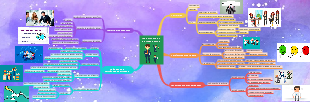
Operating Systems for Smart Devices
Android
iOS
Symbian
Operating Systems for PCs
WINDOWS
MAC OS
LINUX