 Wondershare EdrawMind
MindMap Gallery Cisco Certified CCNA Networking Basics
- 103
- 2
- 2
Cisco Certified CCNA Networking Basics
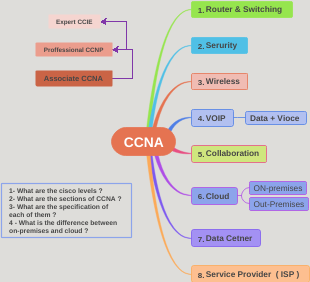
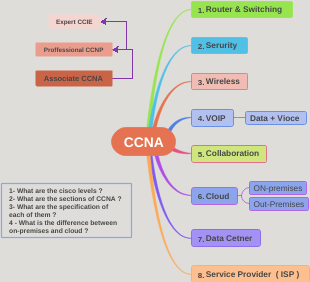
Cisco certifications include CCNA, CCDA, CCNP, CCDP, CCSP, CCIP, CCVP, CCIE (which are further divided into routing and switching; voice; storage network; security; telecom operators), etc. with different levels, different content, and different directions. Among various certifications, the three most commonly used and in high social demand are CCNA, CCNP, and routing and switching CCIE. This article mainly summarizes the knowledge of Cisco CCNA network cognition
Edited at 2023-06-25 11:38:03
- bacteria
This is a mind map about bacteria, and its main contents include: overview, morphology, types, structure, reproduction, distribution, application, and expansion. The summary is comprehensive and meticulous, suitable as review materials.
- Plant asexual reproduction
This is a mind map about plant asexual reproduction, and its main contents include: concept, spore reproduction, vegetative reproduction, tissue culture, and buds. The summary is comprehensive and meticulous, suitable as review materials.
- Reproductive development of animals
This is a mind map about the reproductive development of animals, and its main contents include: insects, frogs, birds, sexual reproduction, and asexual reproduction. The summary is comprehensive and meticulous, suitable as review materials.
Cisco Certified CCNA Networking Basics
- bacteria
This is a mind map about bacteria, and its main contents include: overview, morphology, types, structure, reproduction, distribution, application, and expansion. The summary is comprehensive and meticulous, suitable as review materials.
- Plant asexual reproduction
This is a mind map about plant asexual reproduction, and its main contents include: concept, spore reproduction, vegetative reproduction, tissue culture, and buds. The summary is comprehensive and meticulous, suitable as review materials.
- Reproductive development of animals
This is a mind map about the reproductive development of animals, and its main contents include: insects, frogs, birds, sexual reproduction, and asexual reproduction. The summary is comprehensive and meticulous, suitable as review materials.
- Recommended to you
- Outline
Cisco Certified CCNA Networking Basics
network concept
Concept map
cyber physical components
Resource sharing function and its advantages
User applications in the network
E-mail (Outlook POP3 Yahoo, etc.)
Web browser (IE Firefox, etc.)
Instant messaging (Yahoo IM Microsoft Messenger, etc.)
Collaborative work (Whiteboard, Netmeeting, WebEx, etc.)
Database (file server)
Impact of user applications on the network
batch application
FTP TFTP, inventory updates, etc.
No direct human-computer interaction required
Bandwidth is important, but not critical
interactive applications
human-computer interaction
Inventory query, database update
Because humans are waiting for a response from the machine, response time is important, but not critical
real-time applications
VoIP and video
interaction between people
End-to-end latency is key
Network characteristics
rate
cost
safety
Availability
Scalability
reliability
Topology
Network topology
Types of physical topology
Bus topology
The signal is received by all devices on the bus
ring topology
The signal propagates along the ring.
Single point of failure.
Dual ring topology
The signal travels along the ring in the opposite direction.
More elastic than single ring.
star topology
Data is transmitted through the central node.
Single point of failure, but not like a ring that affects others
Extend star topology
More flexible than star topology
partial connection topology
Balancing fault tolerance and networking costs
fully joined topology
Highly fault-tolerant and expensive
Compared
OSI seven-layer model
TCP/IP VS OSI model
The OSI reference model defines the network functions of each layer.
The physical layer defines the electrical, mechanical, procedural, and functional procedures used to activate, maintain, and deactivate physical links (lines) between end systems.
The data link layer defines how data is formatted and transmitted and controls how physical media is accessed.
(Mac address, switch)
The network layer provides connectivity and path selection between two hosts, even if they are on separate networks
(IP address, router)
The transport layer fragments the data on the sending host and reassembles the data on the receiving host.
TCP/UDP protocol
The session layer establishes, manages, and terminates sessions between two communicating hosts. duplex
The presentation layer ensures that information sent by the application layer of one system can be read by the application layer of another system.
image media
The application layer provides network services for user applications, such as e-mail, file transfer, and terminal emulation.
TCP/IP
TCP/IP is currently the most widely used protocol, and its popularity stems from its flexible addressing scheme, availability on most operating systems and platforms, and rich set of tools required to connect to the Internet.
The TCP/IP protocol stack includes the network access layer, Internet layer, transport layer and application layer.
The OSI model and the TCP/IP protocol stack are similar in structure and function, including their
Physical layer, data link layer, network layer and transport layer.
The OSI model divides the application layer of the TCP/IP protocol stack into three independent layers (Session layer, presentation layer and application layer).
TCP/IP protocol
Characteristics of Internet Protocol (IP)
Works at the network layer of OSI
no connection protocol
Each packet is processed independently
hierarchical addressing
best effort transmission
No data recovery function
IP PDU header
IP address format: dotted decimal
IP address range
127 (01111111) is a Class A address, reserved for loopback testing and cannot be assigned to the network.
Private IP Address - LAN
DHCP
DNS
An application in the TCP/IP protocol stack A method of translating human-readable names into IP addresses
TCP/UDP
UDP characteristics
Works at the transport layer of the OSI and TCP/IP models
Provides applications with access to the network layer without the overhead of reliability mechanisms
is a connectionless protocol
Provides limited error detection
Provide best-effort transmission
No data recovery function
Unreliable, but efficient
UDP header
TCP characteristics
Works at the transport layer of TCP/IP
Provide applications with access to the network layer
connection-oriented protocol
Full duplex working mode
error detection
Packet sorting
Acknowledgment of packet reception
Data recovery function
Reliable, but inefficient because it requires three handshakes
TCP header
three handshakes
Hub (HUB)
The entire Hub is a collision domain because all packets are broadcast to every port of the Hub
The switch is more efficient than the HUB because only each port is a collision domain and information transfer is direct port-to-port.
The Hub broadcasts any packet and the switch port delivers it port to port. But for broadcast data, the switch will still broadcast to each port
A segment is a network connection consisting of a single network cable. Due to signal attenuation, The range of Ethernet cables and segments is limited by physical distance. A hub can extend network segments; it receives bit streams, amplifies electrical signals, and Transmits these bits through its port to other devices on the network. If two or more hosts in a segment transmit data at the same time, a conflict will occur. Because the Hub is an entire large conflict domain.
switched LAN technology
bridge
Works on the second layer of the OSI model
Isolate conflict domains, do not isolate broadcast domains
fewer ports
Forwarding is slow
switch
Works on the second layer of the OSI model
Forward, filter or broadcast data frames
more ports
Fast forwarding
LAN Switch
Higher port density
Larger data frame buffer
Support different port speeds
Fast internal exchange
Exchange mode:
Cut-through
Quick, no check
Store-and-forward
slow, store, check
Fragment-free forwarding (Fragment-free)
A type of straight-through forwarding
Send only when 64 bytes are reached
characteristic
Notice
1
, the switch does not care about the IP address, only the MAC address
2
. The ARP cache in the switch is a mapping of ports to MAC addresses, and has nothing to do with IP addresses.
3
. The ARP cache table in the switch continuously records the source port and source MAC by reading the source port and source MAC when forwarding data packets, instead of querying through ARP broadcast.
Data frame exchange
router
Compared
VLAN
VLAN = Broadcast Domain = Logical Network (Subnet
Broadcasts will not cross VLANs
Cisco device configuration methods
Supports multiple configuration methods. Network port, control port, AUX remote dialing
The configuration takes effect in the device memory.
Cisco IOS User Interface Features
The command line interface (CLI) is used to enter commands. Operations vary on different devices. The user enters or pastes the Post the command. There are different prompts in different command modes. The Enter key allows the device to analyze and execute the command make. The two main EXEC modes are user mode (user mode) and privileged mode (privileged mode).
show running-config and show startupconfig commands
spanning tree
STP
Root bridge selection method
Compare bridge ID (smaller one first)
Compare MAC addresses (smaller ones first)
How to select BLK
Prioritize blocking links with low bandwidth
If the bandwidth is the same, the one with a higher port number will be closed.
Configuration commands
Modify priority to set root bridge
SW2(config)#spanning-tree vlan 1 priority? <0-61440> bridge priority in increments of 4096
SW2(config)#spanning-tree vlan 1 priority 4096
View spanning tree priorities
SW2(config)#do show spanning-tree VLAN0001 Spanning tree enabled protocol ieee Root ID Priority 32769 Address aabb.cc00.0600 Cost 100 Port 2 (Ethernet0/1) Hello Time 2 sec Max Age 20 sec Forward Delay 15 sec Bridge ID Priority 32769 (priority 32768 sys-id-ext 1) Address aabb.cc00.0700 Hello Time 2 sec Max Age 20 sec Forward Delay 15 sec Aging Time 15 seconds Interface Role Sts Cost Prio.Nbr Type ------------------ ---- --- --------- -------- ------- -------------------------- Et0/1 Root LRN 100 128.2 Shr Et0/2 Altn BLK 100 128.3 Shr Et0/3 Desg FWD 100 128.4 Shr Et1/0 Desg FWD 100 128.5 Shr Et1/1 Desg FWD 100 128.6 Shr Et1/2 Desg FWD 100 128.7 Shr Et1/3 Desg FWD 100 128.8 Shr Et2/0 Desg FWD 100 128.9 Shr Et2/1 Desg FWD 100 128.10 Shr Et2/2 Desg FWD 100 128.11 Shr Et2/3 Desg FWD 100 128.12 Shr Et3/0 Desg FWD 100 128.13 Shr Et3/1 Desg FWD 100 128.14 Shr Et3/2 Desg FWD 100 128.15 Shr Et3/3 Desg FWD 100 128.16 Shr
MST
Configuration steps
MST—one spanning tree per instance
1. Configuration instance
2. Configure the MST version number
3. Configure the MST name to be consistent
Configure instance VLANx priority
Configuration commands
SW1
SW1(config)#spanning-tree mode mst SW1(config)#spanning-tree mst configuration SW1(config-mst)#instance 1 vlan 1,3,5 SW1(config-mst)#instance 2 vlan 2,4,6 SW1(config-mst)#revision 1 SW1(config-mst)#name MST-1 SW1(config-mst)#exit SW1(config)#spanning-tree mst 1 root primary SW1(config)#spanning-tree mst 2 root secondary
SW1
SW2(config)#spanning-tree mode mst SW2(config)#spanning-tree mst configuration SW2(config-mst)#instance 1 vlan 1,12,3 SW2(config-mst)#instance 2 vlan 2,4,6 SW2(config-mst)#revision 1 SW2(config-mst)#name MST-1 SW2(config)#spanning-tree mst 2 root primary SW2(config)#spanning-tree mst 1 root secondary
View MST configuration information
SW2(config-mst)#show current Current MST configuration Name[MST-1] Revision 2 Instances configured 3 Instance Vlans mapped ----------------------------------------------------- -------------------------- 0 11,13-4094 1 1,3,5,7,9,12 2 2,4,6,8,10 -------------------------------------------------- --------------------------
PVST and PVST are compatible, but PVST and MST are not compatible (MST is based on instance spanning tree, and PVST is based on VLAN spanning tree, so you cannot have both.
View command
Spanning tree viewing command
do show spanning-tree
Spanning tree security (BPDU protection)
BPDU guard
The access interface filters BPDUs and will be filtered as long as the rules are violated.
IOU1(config)#int e0/0 IOU1(config-if)#switchport mode access IOU1(config-if)#spanning-tree bpduguard enable
BPDU filter
The access interface filters BPDUs. BPDUs received are filtered by default, but the interface status is not affected.
IOU1(config)#int e0/0 IOU1(config-if)#switchport mode access IOU1(config-if)#spanning-tree bpdufilter enable
root guard
Root bridge protection is done on the trunk of all switches in the LAN.
IOU1(config)#int e0/0 IOU1(config-if)#spanning-tree guard root
link aggregation technology
Configuration steps
Close the ports that need to be aggregated
Select aggregation protocol (manual on / automatic lacp)
open port
(Layer 3) Close the Layer 2 port
(Layer 3) Configure IP address
Layer 2 configuration commands
SW2(config)#int ran e0/0-1 SW2(config-if-range)#shutdown SW2(config-if-range)#channel-group 1 mode on SW2(config-if-range)#no shutdown
Layer 3 configuration commands
SW2(config)#int ran e0/0-2 SW2(config-if-range)#shutdown SW2(config-if-range)#channel-group 1 mode on Creating a port-channel interface Port-channel 1 SW2(config-if-range)#no shutdown SW2(config-if-range)#exit SW2(config)#int port-channel 1 SW2(config-if)#no switchport SW2(config-if)#ip address 192.168.1.1 255.255.255.0 SW2(config-if)#exit
Troubleshooting the switch
Use layered thinking for troubleshooting
Switches work on the second layer of the OSI model.
The switch provides physical interfaces.
Problems with switches usually manifest themselves at Layer 1 and Layer 2.
There may be Layer 3 issues involved when accessing the switch's management functions.
Switch media issues
Media problems usually arise from the following possibilities:
The cable is damaged.
New sources of electromagnetic interference emerge
TEMPEST
Traffic patterns change.
Install new equipment.
excessive noise
Suggested steps:
Use the show interface command to view the status of the device's Ethernet interface. If the output letter
Information showing a large number of CRC errors but not many collisions indicates excessive noise.
Check the cable for damage.
If using 100Base-TX, confirm whether Category 5 or Category 5e cables are used.
late conflict(
Late Collision
Suggested steps:
Use a protocol analyzer to check for late conflicts. Late collisions are unlikely to occur in a properly designed Ethernet network.
Late collisions often occur when the Ethernet cable is too long or there are too many repeaters in the network.
Check the distance between the first and last host in a segment.
Duplex issues (important)
Duplex mode:
Setting one end to full duplex and the other to half duplex will result in an error.
One end is set to full duplex and the other is set to auto-negotiation:
If auto-negotiation fails, the other end will work in half-duplex mode
results in an error.
One end is set to half-duplex and the other to auto-negotiation:
If auto-negotiation fails, the other end will work in half-duplex mode.
Both ends work at half-duplex, error-free.
Both ends are set to auto-negotiate:
If the negotiation fails, one end works in full duplex and the other end works in half duplex. For example:
A 1G Ethernet interface works in full-duplex mode by default, while a 10/100M Ethernet interface works in half-duplex mode by default.
If negotiation fails, both parties work in half-duplex mode.
Half-duplex on both ends, no errors.
Rate problem
Rate mode:
Setting one end to one rate and the other to another rate results in errors.
One end is set to a higher speed and the other end is set to auto-negotiation.
If auto-negotiation fails, the end configured for auto-negotiation will work at the lowest rate it can support.
results in an error.
Both ends are set to auto-negotiate:
If automatic negotiation fails at both ends, both ends will work at the lowest rate they can support.
No errors
firewall
Default port
Register port
0-1023: Controlled by IANA, reserved for known services
1024-49151: Registered port listed by IANA, used by regular users
These ports can be used by ordinary user processes or programs executing.
49152-65535: Dynamic and/or dedicated ports.
Hackers prefer port 445
Firewall (key)
Firewall architecture
UTM
WAF
Application Firewall (WAF) and Anti-Denial Service Gateway
Web application firewall is specifically designed to implement a series of security policies for HTTP/HTTPS.
A product that provides protection for web applications.
The WEB application firewall is located at the front end of the portal server farm.
Strengthen the security protection capabilities of the portal through anti-scanning, anti-injection, anti-cross-site scripting, anti-backdoor attack and other security strategies to minimize the possibility of the website being invaded by hackers
The anti-denial service attack gateway can promptly detect various types of attack traffic in the background traffic.
Quickly intercept the attack traffic according to the attack type to ensure the passage of normal traffic.
NGFW
Gartner first defined NGFW in 2009:
Must have standard firewall functionality,
Such as network address translation, stateful inspection, VPN and functions required by large enterprises such as - IPS, AV,
Behavior management and other functions PAN is the pioneer of NGFW and introduces the concepts of App, User and Ccontent.
4 rules for firewalls
• Silent rule • Silent rules, do not record junk logs and unimportant logs, and reduce the amount of logs •Stealth rule • Stealth rules that prevent unauthorized systems from accessing the firewall software •Cleanup rule • Cleanup rules, recording violations of previous rules, are the last basic rule • Negate rule • Negative rules, which do not allow administrators to set any broad rules in the firewall and strictly restrict Control which systems can be accessed and how
ACL
ACL application
Allow (Permit) or deny (Deny) packets flowing through the router.
Allow or deny access to the router via vty lines.
Without ACLs, packets can be transmitted to any part of the network
ACL principle
ACL configuration
Keywords
192.168.1.1 0.0.0.0, which can be abbreviated by using the IP address with the keyword in front (host 192.168.1.1)
0.0.0.0 255.255.255.255 Ignore all address bits and use the keyword any to abbreviate the expression
in interface
out outgoing interface
Standard ALC (1-99)
Allow a single network segment to pass
R2(config)#access-list 1 permit 192.168.1.0 0.0.0.255 R2(config)#int e0/0 R2(config-if)#ip access-group 1 out
Deny specific hosts
config)#access-list 1 deny 192.168.1.2 0.0.0.0
config)#access-list 1 permit 0.0.0.0 255.255.255.255
Allow all hosts except 192.168.1.2 (hidden deny all)
config)#int e0/0
config-if)#ip access-group 1 out
Deny specific network segments
config)#access-list 1 deny 192.168.1.0 0.0.0.255
config)#access-list 1 permit any
config)#int e0/0
config-if)#ip access-group 1 out
Control VTY access
config)#access-list 1 permit 192.168.1.0 0.0.0.255
config)#line vty 0 4
config-vty)#access-class 1 in
Named ACL instance
config)#ip access-list standard name-acl
config-std-nacl)#deny host 192.168.1.1
config-std-nacl)#permit 192.168.0.0 0.0.255.255
config-std-nacl)#int e0/0
config-if)#ip access-group name-acl out
Extended ACL (100-199)
Deny FTP traffic from specific network segments
config)#access-list 101 deny tcp 192.168.1.0 0.0.0.255 192.168.2.0 0.0.0.255 eq 21
config)#access-list 101 permit ip any any (allow all passes except the above)
config-std-nacl)#int e0/0
config-if)#ip access-group 101 out
NAT and PAT
network address translation (NAT, Network Address Translation)
An IP address is local or global. Local (Local) IPv4 address is only visible on the internal network. Global IPv4 address is visible on external networks
port address translation (PAT, Port Address Translation)
Translate the source address of the internal network
Configure and check static NAT
ip nat inside source static local-ip global-ip
Configure an inside local address and an inside global address (inside global address) static conversion relationship.
ip nat inside
Indicates that the interface is connected to the internal network (inside)
ip nat outside
Identify the interface connected to the external network (outside)
show ip nat translations
View NAT translation table
S-NAT
S-NAT (many-to-one)
config)#access-list 1 permit 192.168.1.0 0.0.0.255
config)#ip route 0.0.0.0 0.0.0.0 S2/0
config)#ip nat inside source list 1 interface S2/0 overload
S-NAT (many-to-many)
config)#ip nat source list 1 pool x-name
config)#ip nat pool x-name 172.16.16.1 172.16.16.2 netmask 255.255.255.0
S-NAT (static NAT)
config)#ip nat inside source ststic 192.168.1.1 172.16.16.1
ip nat internal source static internal network address external network address
S-NAT (static PAT)
config)#ip nat source static tcp 172.16.16.2 80 int e0/0 80
ip nat source static service external network address port number internal network access port corresponding to internal network
Authentication protocol
PPP authentication protocol
PPP Overview
PPP uses the LCP protocol to control the negotiation of link parameters. Using NCP protocol, PPP can carry multiple network layer protocols
PPP session establishment process:
1.
Link establishment phase (negotiated by LCP protocol)
2.
Verification phase (optional)
There are 2 PPP authentication protocols: PAP and CHAP
3.
Network layer protocol phase (negotiated by NCP protocol)
PAP
The password is sent over the wire in clear text Two handshakes (i.e. verification is completed through 2 messages) Unable to prevent replay attacks
CHAP
What is sent on the line is not the actual password, but the hash value. Because both parties have set the same password in advance, you only need to verify the hash value. Although the username is different, only the password is verified. Three-way handshake (that is, verification is completed through 3 messages)
The central router challenges the remote routers in the form of an encryption key that is unique for each connection. The remote router uses this key to encrypt the username and password and submits them to the central router. After receiving it, the central router decrypts and verifies it using the key issued to that connection.
Compared