心智圖資源庫 HTML
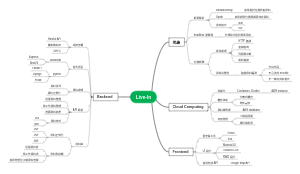
關於HTML的心智圖,分享了 網頁樣式、標籤及屬性的知識,有興趣的可以看看喲。
編輯於2023-05-27 23:46:10This is a mind map about bacteria, and its main contents include: overview, morphology, types, structure, reproduction, distribution, application, and expansion. The summary is comprehensive and meticulous, suitable as review materials.

This is a mind map about plant asexual reproduction, and its main contents include: concept, spore reproduction, vegetative reproduction, tissue culture, and buds. The summary is comprehensive and meticulous, suitable as review materials.
This is a mind map about the reproductive development of animals, and its main contents include: insects, frogs, birds, sexual reproduction, and asexual reproduction. The summary is comprehensive and meticulous, suitable as review materials.
This is a mind map about bacteria, and its main contents include: overview, morphology, types, structure, reproduction, distribution, application, and expansion. The summary is comprehensive and meticulous, suitable as review materials.
This is a mind map about plant asexual reproduction, and its main contents include: concept, spore reproduction, vegetative reproduction, tissue culture, and buds. The summary is comprehensive and meticulous, suitable as review materials.
This is a mind map about the reproductive development of animals, and its main contents include: insects, frogs, birds, sexual reproduction, and asexual reproduction. The summary is comprehensive and meticulous, suitable as review materials.
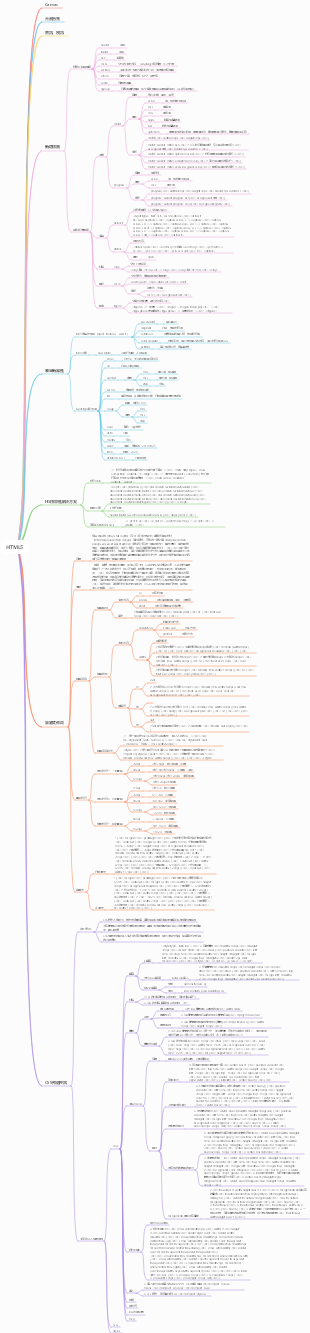
HTML
網頁樣式<br>
選擇器
標籤選擇器<br>
標籤名稱{屬性名稱:屬性;屬性名稱:屬性}<br>
類別選擇器<br>
.標籤名{屬性名:屬性;屬性名:屬性}<br>
ID選擇器<br>
#id{屬性名稱:屬性;屬性名稱:屬性}<br>
<pre class="prettyprint linenums prettyprinted"><code class="language-html"><span class="tag"><h1 style="font-size:18px">行內式的使用方法</h1>< /span></code></pre>
<span style="font-family: 'Wawati SC';">標籤名,.類名,#ID</span><span style="font-family: 'Wawati SC';"><span style=" font-family:Wawati SC">{</span>並收集選擇器</span><span style="font-family:Wawati SC">}</span>
<span style="font-family:Wawati SC">標籤名.類別名稱{交集選擇器}</span>
<span style="font-family: 'Wawati SC';">外部標籤名稱內部標籤名稱</span><span style="font-family: 'Wawati SC';"><span style="font-family :Wawati SC">{</span>後代選擇器</span><span style="font-family:Wawati SC">}</span>
引入CSS樣式的方式<br>
行內樣式<br>
嵌入樣式<br>
<pre class="prettyprint linenums prettyprinted"><code class="language-html"><span class="tag"><head><style type="test/css"> h1{屬性名稱:屬性;}< /style></head></span></code></pre>
導入樣式<br>
<link href="樣式檔名" type="text/css連結檔案的格式" rel="stylesheet"文件的外部樣式表/><br>
規定目前文件與被連結文件之間的關係,只有stylesheet被所有瀏覽器所適用
子主題
CSS的屬性<br>
類型
字體類型:font-family<br>
字體渲染:text-shadow<br>
字體大小:font-size<br>
字體風格:font-style<br>
oblique微斜<br>
italic傾斜<br>
字體粗細:font-weight<br>
字體大寫:font-variant<br>
字體屬性:font
font{風格 粗細 大小 類型}<br>
文字修飾樣式:text-decoration<br>
底線:underline<br>
刪除線:line-through<br>
顏色:color<br>
背景<br>
背景顏色:background-color<br>
背景圖像:background-image<br>
背景圖片重複方式:bakground-repeat<br>
背景圖片X,Y軸起始位置:background-position<br>
背景關聯:background-attachment:fixed(背景不隨著文字滾動)<br>
區塊
單字間距:word-spacing
字母間距:letter-spacing<br>
垂直與文字對其方式:vertical-align,text-align<br>
首行縮排:text-indent<br>
顯示方式:display<br>
行高:line-height
盒子模型<br>
定義寬高:width,height<br>
內邊距上下左右:padding-top,right,bottom,left<br>
外邊距上下左右:margin-top,right,bottom,left<br>
margin:0px auto;網頁居中<br>
邊框:border<br>
邊框風格:style;邊框厚度:width;邊框顏色上下左右<br>
<pre>border-style:點dotted 實solid 雙double 虛dashed; </pre>
display控制元素的顯示與隱藏<br>
display:block將元素顯示為區塊級元素,前後設定換行<br>
display:inline將元素顯示為航跡元素,先後不換行<br>
display:none將元素隱藏<br>
浮動<br>
float<br>
clear清除浮動<br>
both清除左右浮動<br>
overflow盒子溢出處理<br>
visible內容會被裁剪,被裁剪得內容出現在盒子外部<br>
hidden內容會被裁剪,其餘內容不可見<br>
定位
position
velative相對定位<br>
將出現在它所在的位置上,讓這個元素「相對於」它的起點進行移動
absolute絕對定位<br>
設定為絕對定位的元素框從文件流完全刪除,並相對於其包含區塊定位,包含區塊可能是文件中的另一個元素或初始包含區塊。元素原先在正常文件流程中所佔的空間會關閉,就好像該元素原來不存在一樣。元素定位後產生一個區塊級框,而不論原來它在正常流中產生何種類型的框。
z-index設定層次<br>
清單
項目編號類型:list-style-type<br>
項目編號圖:list-style-image<br>
項目標記位置:list-style-position<br>
inside標記顯示在裡面<br>
onside標記顯示在外頭<br>
超連結偽類<br>
未點選造訪時超連結樣式 a:link
點擊訪問後超連結樣式 a:visited
滑鼠懸浮其上的超連結樣式 a:hover
滑鼠點選未釋放的超連結樣式 a:active
設定滑鼠形狀:cursor<br>
預設遊標:default<br>
超連結的指標:pointer<br>
span{cursor:pointer;}
指示程式正在忙碌:wait<br>
指示可用的幫助:help<br>
指示文字:text
標籤及屬性<br>
<html> 與 </html> 之間的文字描述網頁
<head> 與 </head> 之間的文字是網頁頭部可見內容<br>
<title> 與 </title> 之間的文字是網頁標題<br>
<body> 與 </body> 之間的文字是可見的頁面內容
<h1> 到 </h6> 之間的文字被顯示為標題
<p> 與 </p> 之間的文字被顯示為段落
<br/> 換行 <hr/> 水平線<br>
<em> 與 </em> <i> 與 </i>之間的文字為斜體<br>
<strong> 與 </strong> 之間的文字加重<br>
<img/> 與 </img>HTML 影像是透過 <img> 標籤進行定義的。
<pre><img src="圖片位址" width="寬度" height="長度" <code>alt="</code><code>用來為影像定義一串預備的可替換的文字"</ code> title="滑鼠懸停出文字"/></pre>
<a> 與 </a> HTML 連結是透過 <a> 標籤進行定義的。
·······
錨連結(跳到指定標籤):<a href="#name"></a><p name="name"></p>
特殊符號
空格<br>
> 大於號
< 小於號
© 版權符號©
www.w3school.com.cn
<meta> 與 </meta> 定義編碼格式<br>
UTF-8,GB2312,GBK<br>
<meta charset="UTF-8"></meta><br>
<link> 與 </link> 用於引入CSS樣式<br>
清單
<ul><li> 與 </li></ul> 無序列表<br>
屬性type:disc實心圓,square方塊,circle空心圓<br>
<ol><li> 與 </li></ol> 有序列表<br>
屬性type:1aAIi<br>
<dl><dt><dd> 與 </dd>備註</dt></dl> 定義清單<br>
<table> 與 </table> 表格標籤,裡面可以嵌套列表<br>
<th> 與 </th> 定義表頭<br>
<tr> 與 </tr> 定義表格的行<br>
<td> 與 </td> 定義表格的單元<br>
<thead> 與 </thead> <tbody> 與 </tbody> <tfoot> 與 </tfoot>。 。 。
屬性(水平對齊align:left左對齊,center居中,right右對齊;absmiddle圖片居中對齊<br>垂直對齊valign:top頂端對齊,middle居中對齊,bottom底端對齊,baseline基線對齊)
<table border="1" cellspadding="單元格與內容的間距" cellspacing="單元格與單元格直接的間距‘’"></table>
水平合併colspan,列表合併rowspan<br>
<frameset> 與 </frameset>(寫在body外面)
屬性(定義框架橫向排序cols="200px,*,100px"縱向排序rows)<br>
<frame src="其他網頁位址" name="名字,方便跳轉"/>
<iframe> 與 </iframe>
<form> 與 </form> 表單標籤,裡面可以巢狀表單元素<br>
<pre><form action="提交的網站" method="GET或POST"></pre>
<p>如果表單提交是被動的(例如搜尋引擎查詢),且沒有敏感資訊。當您使用 GET 時,表單資料在頁面網址列中是可見的</p><p>如果表單正在更新數據,或包含敏感資訊(例如密碼)。 POST 的安全性更加,因為在頁面網址列中被提交的資料是不可見的。 </p>
<input name="元素名稱" type="類型" value="值" size="顯示寬度" maxlength="字元長度" checked="是否選取" disabled="disabled停用" readonly="readonly唯讀"> <br>
<em><input type="text"></em> 定義用於<em>文字輸入</em>的單行輸入字段
<pre><input type="text" name="lastname"></pre>
<em><input type="password"></em> 定義<em>密碼框</em>。
<pre><input type="password" name="lastname"></pre>
<em><input type="radio"></em> 定義<em>單選按鈕</em>。
<pre><input type="radio" name="sex"(相同單選按鈕的name要一致) value="female">Female</pre>
<em><input type="checkbox" name="複選框之間的name要一致"></em> 定義<em>複選框</em>。
<em><input type="submit"></em> 定義<em></em><em>提交</em>表單的按鈕。
<em><input type="reset"></em> 定義<em></em><em>重設</em>表單的按鈕。
<em><input type="button"></em> 定義<em></em><em></em>表單的普通按鈕。
<pre><button type="button" onclick="alert('Hello World!')">Click Me!</button></pre>
<em><input type="file"></em> 定義<em></em><em>檔案選擇框</em>。
<input type="hidden">隱藏域<br>
<em><select></em> 定義<em>下拉清單</em><em><em><option></em> 定義待選擇的選項</option></select></em>
<pre><select name="cars" size="每次出現的長度"><br><option value="volvo"<em></em> selected = "selected"(預設選取)>Volvo</ option><br><option value="saab">Saab</option><br><option value="fiat">Fiat</option><br><option value="audi">Audi</option> <br></select></pre>
<em><textarea></em> 元素定義多行輸入欄位(<em>文字域</em>)</textarea>
<pre><textarea name="message" rows="10" cols="30"><br>這是預先定義的文字內容<br></textarea></pre>
<em><datalist></em> 元素規定預先定義選項清單。 <option value="預先定義內容"></datalist>
<datalist id="browsers"><br> <option value="Internet Explorer"><br> <option value="Firefox"><br> <option value="Chrome"><br> <option value=" Opera"><br> <option value="Safari"><br></datalist>
<fieldset域><legend域標題>語意化表單</legend></fieldset><br>
關聯表單<br>
<pre id="line1"><span><<span class="start-tag">label</span> <span class="attribute-name">for</span>="<a class="attribute -value">male</a>"></span><span>男</span><span></<span class="end-tag">label</span>></span><span ><br></span><span><<span class="start-tag">input</span> <span class="attribute-name">type</span>="<a class="attribute -value">radio</a>" <span class="attribute-name">name</span>="<a class="attribute-value">gender</a>" <span class="attribute- name">id</span>="<a class="attribute-value">male</a>"<span>/</span>></span></pre>