心智圖資源庫 HTML5
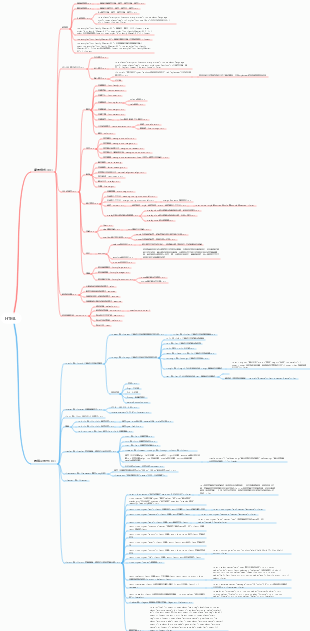
HTML5的心智圖,內容有 新增標籤、表單新屬性、H5相容性解決方案、響應式佈局、CSS預處理器。
編輯於2023-05-27 23:45:56This is a mind map about bacteria, and its main contents include: overview, morphology, types, structure, reproduction, distribution, application, and expansion. The summary is comprehensive and meticulous, suitable as review materials.

This is a mind map about plant asexual reproduction, and its main contents include: concept, spore reproduction, vegetative reproduction, tissue culture, and buds. The summary is comprehensive and meticulous, suitable as review materials.
This is a mind map about the reproductive development of animals, and its main contents include: insects, frogs, birds, sexual reproduction, and asexual reproduction. The summary is comprehensive and meticulous, suitable as review materials.
This is a mind map about bacteria, and its main contents include: overview, morphology, types, structure, reproduction, distribution, application, and expansion. The summary is comprehensive and meticulous, suitable as review materials.
This is a mind map about plant asexual reproduction, and its main contents include: concept, spore reproduction, vegetative reproduction, tissue culture, and buds. The summary is comprehensive and meticulous, suitable as review materials.
This is a mind map about the reproductive development of animals, and its main contents include: insects, frogs, birds, sexual reproduction, and asexual reproduction. The summary is comprehensive and meticulous, suitable as review materials.
HTML5
Canvas
元素拖曳
音訊、視訊
新增標籤
語意化結構標籤
header
頁眉
footer
頁尾
nav
主導航
main
文件的主要內容,(whatwg沒有語義,IE不支援)
section
頁面中的一節或文章中的一段,通常會帶有標題
article
定義文章、部落格、貼文、留言等
aside
定義側邊欄
hgroup
包裹連續的標題,如文章主標題和副標題的組合(w3c將其刪除)
其他新增標籤
狀態
meter
意義
表示狀態,電池、溫度
屬性
value
值,預設最大值是1
max
最高值
min
最低值
high
較高預警閾值
low
較低預警閾值
optimum
最優值,預設是中間,最優值綠色,離最優值近黃色,離最優值遠紅色
樣式
meter{<br> width:400px;<br> height:30px;<br>}
meter::-webkit-meter-bar{<br> /* 可以設定總體邊框,空白區域背景等 */<br> backgroud:#fff;<br> border:1px solid #ccc;<br>}
meter::-webkit-meter-optimum-value{<br> /* 設定最優值範圍內的樣式 */<br>}
meter::-webkit-meter-suboptimum-value{<br> /* 湊合 範圍內的樣式 */<br>}
meter::-webkit-meter-even-less-good-value{<br> /* 糟糕 範圍內的樣式 */<br>}
progress
意義
進度條
屬性
value
值,預設最大值是1
max
最大值
樣式
progress{<br> width:400px;<br> height:30px;<br> border:1px solid #ccc;<br>}
progress::-webkit-progress-bar{<br> background: #fff;<br>}
progress::-webkit-progress-value{<br> background: green;<br>}
清單
datalist
百度搜尋框,以下的輸入提示
<input type="text" list="searchOption"><br><datalist id="searchOption"><br> <option value="a"></option><br> <option value="ab"> </option><br> <option value="abc"></option><br> <option value="abcd"></option><br> <option value="aaa"></option>< br> <option value="acc"></option><br> <option value="bcc"></option><br> <option value="cdd"></option><br></datalist >
details
展開內容
<details open><br> <summary>大前端</summary><br> <p>HTML5</p><br> <p>CSS3</p><br> <p>JavaScript</p>< br> </details>
屬性
open
註解
ruby
文字上帶拼音
<ruby>魑 <rt>chi</rt></ruby><br> <ruby>魅 <rt>mei</rt></ruby>
標記
mark
文字著色,搜尋結果標記關鍵字
Lorem ipsum <mark>dolor sit</mark> amet,
樣式
背景色、字體
mark {<br> background: red;<br> }
影像
figure
文章內的插圖,獨立的內容<br>
<figure> <!--插圖--><br> <img src="images/trump.jpg" alt=""><br> <figcaption>美國總統</figcaption> <!--配圖說明- -><br> </figure>
表單新屬性
form表單控制項(input、textarea、select...)
placeholder
提示顯示
required
必填,無需設定值
autofoucs
閃爍焦點的輸入框,無需設定值
autocomplete
自動完成,提示先前輸入的內容,值可設定為off/on
pattern
寫正規表示式,表單驗證
form元素
novalidate
不進行校驗,不用填值
input type新加值
必含@,並@的前後都有內容
url
必須以http開頭
number
參數
min
最小值,閉區間
max
最大值,閉區間
step
步長
search
搜尋框,無特殊功能
tel
電話號碼,pc端無特殊功能,行動端會彈出數字鍵盤
range
範圍,預設0-100
參數
min
max
step
color
顏色,bgr格式
date
日期
month
年月
week
星期,第幾週:2019-W25
time
時間:23:20
datetime-local
日期時間
H5相容性解決方案
設定meta
<!--設定IE總是使用最新的文件模式進行渲染--><br> <meta http-equiv="X-UA-Compatible" content="IE=Edge"><br> <!--優先使用webkit ( Chromium ) 核心進行渲染, 針對360等殼瀏覽器--><br> <meta name="renderer" content="webkit">
創建元素
<script><br> (function () {<br> document.createElement('header');<br> document.createElement('footer');<br> document.createElement('nav');<br> document.createElement('article');<br> document.createElement('aside');<br> document.createElement('section');<br> document.createElement('main');<br> document. createElement('figure');<br><br> })();<br> </script>
js放在前面
header,footer,nav,article,aside,section,main {<br> display: block;<br> }
直接呼叫html5shiv.js
<!--[if lt IE 9]><br> <script src="js/html5shiv.min.js"></script><br> <![endif]--><br>
響應式佈局
定義
伊森·馬科特(Ethan Marcotte)在2010年首先提出了響應式網頁設計(RWD,Responsive Web Design)這個術語。在他的一篇文章《Responsive Web Design · An A List Apart Article》中他將已有的三種髮開技巧(彈性圖片,彈性網格佈局,媒體與媒體查詢) 進行了整合,命名為響應式網頁設計。 <br><br>那什麼才是真正的響應式設計?馬科特說,真正的響應式設計方法不僅僅是根據可視區域大小而改變網頁佈局,而是要從整體上顛覆當前網頁的設計方法,是針對任意設備的網頁內容進行完美佈局的一種顯示機制。
優勢
- 開發、維護、營運成本優勢:頁面只有一個,只是針對不同的解析度、 不同的設備環境進行了一些不同的設計,所以在開發、維護和營運上, 相對多個版本,能節省成本。 <br>- 相容性優勢:行動裝置新的尺寸層出不窮,客製化的版本通常只適用於某些規格的設備,如果新的設備解析度變化較大,則往往無法相容,而開發新的版本需要時間,這段時間內的存取就是個問題, 但是響應式Web設計可以提前預防這個問題。 <br>- 操作靈活:響應式設計是針對頁面的,可以只對必要的頁面進行改動,其他頁面不受影響。 <br>
媒體查詢
媒體類型
主要內容
all
所有設備
screen
用於電腦螢幕、平板、手機等
用於印表機和列印預覽
寫法
/*媒體查詢 滿足某種條件*/<br> @media print {<br> h1 {<br> font-size: 100px;<br> color: red;<br> }<br> }
媒體特性
主要內容
orientation
設備使用方向
landscape
水平方向
portrait
垂直方向
width
視窗寬度
/*指定某個寬度*/<br> /*視窗寬度是800px像素*/<br> @media (width:800px) {<br> h1 {<br> color: red;<br> background: # 54ABD4;<br> }<br> }<br>
/*設定範圍, 設定小於600px*/<br> /* 最大寬度是600px 小於等於600px*/<br> @media (max-width: 600px) {<br> h1 {<br> font-size: 100px ;<br> color: red;<br> }<br> }
/*設定範圍大於等於1000px*/<br> @media (min-width: 1000px) {<br> h1 {<br> font-size: 200px;<br> color: yellow;<br> }<br> }
運算符
且
and
/* 大於等於600 且小於等於1000px*/<br> @media (min-width: 600px) and (max-width:1000px) {<br> h1 {<br> font-size: 100px;<br> color : red;<br> background: #333333;<br> }<br> }<br>
或
,
/*小於等於400 或大於等於1100*/<br> @media (max-width: 400px),(min-width: 1100px) {<br> body {<br> background: pink;<br> }<br > h1 {<br><br> }<br> ul {<br><br> }<br> }
非
not
/*not 配合媒體類型來做*/<br> /*不是螢幕*/<br> @media not screen {<br><br> }
媒體查詢用法
<!-- 第一種用法link可以指定media屬性, 載入不同的css--><br> <link rel="stylesheet" href="normal.css"><br> <link rel="stylesheet" href ="mobile.css" media="(max-width:640px)">
<style><br> /*第二種在imort 導入css的後面跟上媒體類型不建議使用*/<br> /*import url('style.css') print;*/<br><br> <br> /*推薦第三種@media*/<br> @media screen and (max-width: 640px) {<br><br> }<br><br> </style>
斷點設定
常用設定一,三個斷點
768px
小於768px,超小螢幕,手機
992px
大於768小於992px,小螢幕,平板
1200px
大於992px小於1200px,中等螢幕
大於1200px大螢幕
常用設定二,四個斷點
576px
小於572,超小螢幕
768px
577-768,小螢幕
992px
769-992,中等螢幕
1200px
993-1200,大螢幕
>1200,超大螢幕
推薦設定三,兩個斷點
640px
<=640px,小螢幕
1024px
641-1024,中等螢幕
>1024,大螢幕
端優先
行動優先
* {<br> margin:0;<br> padding:0;<br> }<br> /*預設設定的樣式是行動端的樣式*/<br> .container {<br> margin: 0 auto;< br> width: 100%; /*行動裝置寬度是100% < 768px*/<br> height: 300px;<br> background: #54ABD4;<br> }<br><br> /*當寬度>= 768px 的時候*/<br> /*作用f範圍768~991 */<br> @media screen and (min-width: 768px){<br> .container {<br> width: 750px;<br> } <br> }<br><br> /*當寬度>=992 的時候*/<br> /* 992 ~ 1199*/<br> @media screen and (min-width: 992px) {<br> . container {<br> width: 970px;<br> }<br> }<br><br> /*當螢幕》= 1200px*/<br> /*作用範圍: >= 1200*/<br> @media screen and (min-width: 1200px) {<br> .container {<br> width: 1170px;<br> }<br> }
PC優先
* {<br> margin:0;<br> padding:0;<br> }<br> /*默人最大視口寬度的演示> 1200*/<br> .container {<br> margin: 0 auto ;<br> width: 1170px;<br> height: 300px;<br> background: #54ABD4;<br> }<br><br> /*當寬度<= 1200的時候*/<br> /* 作用於993 ~ 1200 */<br> @media screen and (max-width: 1200px) {<br> .container {<br> width: 970px;<br> }<br> }<br><br><br > /*當寬度<= 992的時候*/<br> /* 769 ~ 992 */<br> @media screen and (max-width: 992px) {<br> .container {<br> width: 750px; <br> }<br> }<br><br><br> /*當寬度<= 768的時候*/<br> @media screen and (max-width: 768px) {<br> .container {< br> width: 100%;<br> }<br> }
CSS預處理器
為什麼用?
CSS語法不夠強大,無法嵌套書寫,導致模組化開發中需要書寫許多重複的選擇器
沒有變數和合理的樣式重複使用機制,邏輯上相關的屬性值必須以字面量的形式重複輸出,難以維護
CSS預處理器提供CSS缺少的樣式層重複使用機制,減少冗餘程式碼,提高樣式程式碼的可維護性
主流的CSS預處理器
Less
編譯
js編譯
<style type="text/less"><br> // 定義變數<br> @width: 400px;<br> @height: 300px;<br> @color: #888;<br><br> #box {<br> position: absolute;<br> left: 50%;<br> top: 50%;<br> width: @width;<br> height: @height;<br> margin-left: -@width /2;<br> margin-top: -@height/2;<br> border: 2px solid @color;<br> }<br><br> </style><br> <script src="js/ less.js"></script>
考拉koala編譯
index.less寫入
// 定義變數<br>@width: 500px;<br>@height: 300px;<br>@color: #f90;<br><br><br>#box {<br> position: absolute;<br > left: 50%;<br> top: 50%;<br> width: @width;<br> height: @height;<br> margin-left: -@width/2;<br> margin-top: -@height/2;<br> border: 2px solid @color;<br>}
命令列編譯
安裝
npm install less -g
使用
lessc bootstrap.less bootstrap.css
註解
/*css 的註解 變成css的時候,這個註解還在*/
// less 的註解 編譯成css的時候,沒了
變數
用途
當css屬性值
//把 less 變數當 css屬性的值<br> width: @len;
當屬性名
// less變數當屬性名稱的時候 @{變數名稱}<br> @{bg}: @basecolor;
當選擇器
// less 變數當選擇器的時候 @{變數}<br>#@{activeclass} {<br> width: 100px;<br> height: 100px;<br>}
變數作用域
/*<br>less 變數的作用域<br>第一步: 使用變量,在本作用域找, 找到了, 使用最後面的定義<br>第二步: 本作用域找不到,去上級作用域找<br>*/
// less 的作用域<br>@var: 100px;<br>#box {<br> @var:20px;<br><br> .inner {<br> @var: 50px;<br> width: @var; /*60*/<br> background-color: #ccc;<br> @var: 60px;<br><br> li {<br> background: red;<br> }<br> }< br><br> width: @var; /*20*/<br>}<br><br>.list {<br> height: @var; /*100*/<br>}
混搭mixins
定義
類似JavaScript的函數,可重複調用
類別
普通混合
// 普通混合跟類別選擇器一樣<br>.center-box01 {<br> position: absolute;<br> left: 50%;<br> top: 50%;<br> width: 400px;<br> height: 300px;<br> margin-left: -200px;<br> margin-top: -150px;<br> background-color: #ccc;<br>}<br><br>.box01 {<br> border: 1px solid #999;<br> text-align:center;<br><br> // 呼叫混合<br> .center-box01();<br>}<br>
不帶輸出的混合
//不帶輸出的混合編譯後css裡不會輸出<br>.center-box02() {<br> position: absolute;<br> left: 50%;<br> top: 50%;<br> width: 400px;<br> height: 300px;<br> margin-left: -200px;<br> margin-top: -150px;<br> background-color: #ccc;<br>}<br>.box02 {<br> // 呼叫混合<br> .center-box02();<br><br> border:1px solid #ccc;<br>}<br>.list {<br> // 呼叫不含參數的混合, 可以省略()<br> .center-box02;<br>}
帶參數的混合
// 帶參數的混合<br>.center-box03(@width, @height, @bgcolor) {<br> position: absolute;<br> left: 50%;<br> top: 50%;<br> width: @width;<br> height: @height;<br> margin-left: -@width/2;<br> margin-top: -@height/2;<br> background-color: @bgcolor;< br>}<br><br>.box03 {<br> //.center-box03(600px, 200px, red);<br> .center-box03(1000px, 500px, #369);<br>}
帶有預設參數值的混合
// 混合參數預設值有預設值的參數放在後面<br>.center-box04(@width, @height:100px, @bgcolor: gray) {<br> position: absolute;<br> left: 50% ;<br> top: 50%;<br> width: @width;<br> height: @height;<br> margin-left: -@width/2;<br> margin-top: -@height/2 ;<br> background-color: @bgcolor;<br>}<br><br>.box04 {<br> .center-box04(200px, 100px);<br> //.center-box04(200px, 100px , red);<br> //.center-box04(800px);<br>}
// 參數預設值,<br>.center-box05(@width:1000px, @height, @bgcolor) {<br> position: absolute;<br> left: 50%;<br> top: 50%;< br> width: @width;<br> height: @height;<br> margin-left: -@width/2;<br> margin-top: -@height/2;<br> background-color: @bgcolor ;<br>}<br><br>.box05 {<br> //.center-box05(400px, 300px, green);<br><br> // 呼叫混合的時候,指定哪個值給哪個參數無所謂順序要指定全指定<br> //.center-box05(@height:500px, @bgcolor:red);<br> .center-box05(@bgcolor:blue, @height:500px, @width:400px) ;<br>}
@arguments獲取所有實參
/*<br>transition: 1s width,height linear 1s<br>*/<br>// @arguments 取得所有的實參<br>.transition(@duration, @property:all, @timing-function:linear , @delay:0s) {<br> -webkit-transition: @arguments;<br> -moz-transition: @arguments;<br> transition: @arguments;<br>}<br><br>.box06 { <br> //.transition(2s);<br> //.transition(2s, width);<br> .transition(2s, width, ease, 1s);<br>}<br>.box06 {< br> // 參數之間除了用逗號隔開也可以用分號<br> // 一般用逗號, 某個參數的值裡麵包含逗號,用分號去隔開參數<br> .transition(2s; width,height; ease; 1s);<br>}
條件判斷
配合mixins使用
// 條件判斷<br><br>.arrow-set(@width:5px) {<br> width: 0;<br> height: 0;<br> overflow: hidden;<br> border-style: solid ;<br> border-width: @width;<br>}<br><br>.arrow(@direction, @width:5px, @color:#000) when (@direction=up){<br> . arrow-set(@width);<br> border-color: transparent transparent @color transparent;<br>}<br><br>.arrow(@direction, @width:5px, @color:#000) when ( @direction=down){<br> .arrow-set(@width);<br> border-color:@color transparent transparent transparent;<br>}<br><br>.arrow(@direction, @width: 5px, @color:#000) when (@direction=left){<br> .arrow-set(@width);<br> border-color:transparent @color transparent transparent;<br>}<br><br >.arrow(@direction, @width:5px, @color:#000) when (@direction=right){<br> .arrow-set(@width);<br> border-color:transparent transparent transparent @color ;<br>}<br><br><br>// 呼叫混合<br>.box {<br> //.arrow(up, 100px);<br> //.arrow(down, 100px); <br> //.arrow(left, 100px);<br> .arrow(right, 100px, red);<br>}
導入
// 導入混合 如果導入的是less文件,可以省略 後綴<br>@import "mixins/mixins";<br>@import "variables";<br>@import "base";
// css 語法, 直接輸出到 css<br>@import "style.css";
嵌套
操作符
less內建函數
map
Sass
Stylus