MindMap Gallery HTML tag development attribute selector notes mind map
Share the full version of HTML tag development attribute selector notes! The content covers common tags, table tag sets, form tag sets, various CSS styles and selectors, and various attributes. I hope it will be helpful to you.
Edited at 2023-02-26 11:23:20This is a mind map about bacteria, and its main contents include: overview, morphology, types, structure, reproduction, distribution, application, and expansion. The summary is comprehensive and meticulous, suitable as review materials.

This is a mind map about plant asexual reproduction, and its main contents include: concept, spore reproduction, vegetative reproduction, tissue culture, and buds. The summary is comprehensive and meticulous, suitable as review materials.
This is a mind map about the reproductive development of animals, and its main contents include: insects, frogs, birds, sexual reproduction, and asexual reproduction. The summary is comprehensive and meticulous, suitable as review materials.
This is a mind map about bacteria, and its main contents include: overview, morphology, types, structure, reproduction, distribution, application, and expansion. The summary is comprehensive and meticulous, suitable as review materials.
This is a mind map about plant asexual reproduction, and its main contents include: concept, spore reproduction, vegetative reproduction, tissue culture, and buds. The summary is comprehensive and meticulous, suitable as review materials.
This is a mind map about the reproductive development of animals, and its main contents include: insects, frogs, birds, sexual reproduction, and asexual reproduction. The summary is comprehensive and meticulous, suitable as review materials.
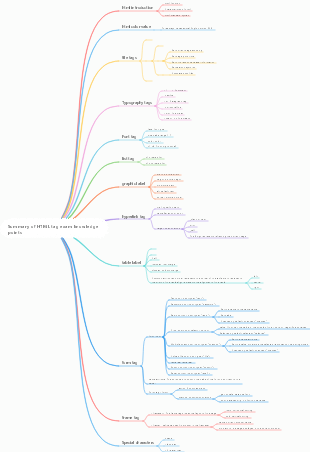
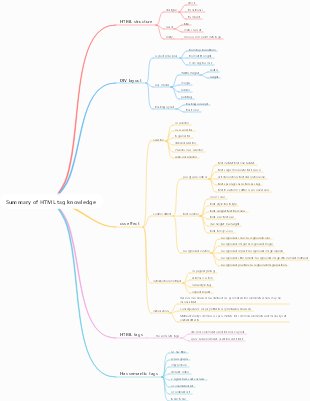
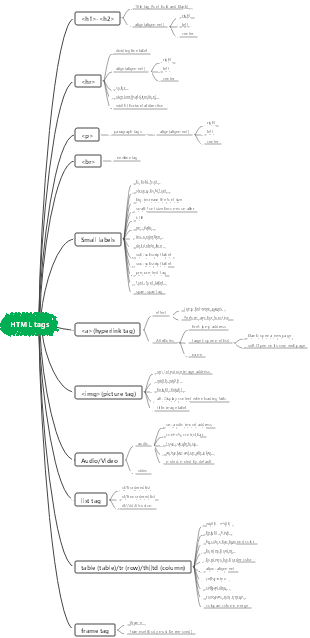
HTML tag development attribute selector notes mind map
Usually tags,
<html>Beginning and end,</html>
<body>Content,</body>
Font wrap, added after the font,
<b>Bold font,</b>
<strong>Bold font,</strong>
<i>Italic font,</i>
<s>Strikethrough,</s>
<sup>Superscript</sup> is usually used for numbers,
<sub>Subscript</sub> Same as above,
<font>Font properties,
<img src="Picture path"/>Place the picture,
<h1-h6> Title font size, maximum size 1, minimum size 6,
<a href="#">Hyperlink,</a>
<p>Paragraph, block-level element,</p>
<div>Paragraph, block-level element,</div>
table label set,
represents one grid, Add in to
ordered list, Don't add it
ordered list, Add in to Inside,
Unordered list, usually used for navigation, You don’t have to add it
unordered list, Add in to within the tag,
form label set,
<form action=""method="post">Create the beginning and end of the form,</from>
<input type="text" value="" name="uname"/>Text box, any word can be filled in front, usually as user name.
<input type="password" value="" name="upwd"/>Password box,
<input type="submit" value=""/>Submit button, (type="reset") is a cancel button,
<input type="radio" name="sex" value="Male/Female">Radio select box, usually written as male or female.
<input type="checkbox" value="" name="lists[content]"/>checkbox,
<select name="age" size="" multiple=""></select>Option list,
<option value=""></option> option list, added outside the <select> tag,
<frameset cols="Number of columns plus column width" rows="Number of rows plus distance">Create a box,</frameset>
<frame name="" src=""/>Add pictures in the box,
<textarea>Filled in frame,</textarea>
<input type="file" name="face">Browse box, upload avatar, etc.
<label for="The name of the text box,"></label> is written above the input box. Click the name cursor to display it in the input box.
CSS various styles and selectors,
<style type="text/css"></style> is written in <head>. CSS attributes are written in <style> tag.
<link rel="stylesheet" type="text/css" href="The name of the created document,"/> is written in the <head> tag, the CSS attributes are written in the created document, and the format of the document is written as XX .CSS,
Add <style> and CSS attributes to the tag to use the CSS attributes.
*{}All tags use this attribute,
In <style>, write the name of the tag that needs to use attributes, for example: h1{ },
ID selector, add the name of the ID to the tag, and then use the # sign to represent the ID, written in the <style> tag, for example: <div id="1"></div>, written in the tag, # 1{ },
For the class selector, add <calss="name"> in the tag and write it in the <style> tag. . represents the class, for example: <p class="2">, if written in the tag it is .2{ } ,
various properties,
list-style:none can remove the black dots in front of the unordered list.
bgcolor:red;#000000, background color,
cellpadding cell margin, usually written as 0,
cellspacing cell spacing, usually written as 0,
colspan spans rows,
rowspan spans columns,
colorcolor,
face font style,
size font size,
width width,
height height,
border border width,
align alignment,
left is on the left,
centercenter,
right on the right,
weight:bold font bold, attribute in CSS,
letter-spacing text spacing,
word-spacing word spacing,
text-align text alignment,
text-indent first line indent,
line-height line height,
text-decoration underline, none cancel,
When the hover mouse moves to a hyperlink, the color changes.
background background, position positioning, make the picture left, center or right,
display:inlin turns block-level elements into row-level elements, and block turns row-level elements into block-level elements.
The inner patch in the padding can change the location of the font.
toptop,
leftleft,
rightright,
bottom bottom,
Margin outer patch can change the position of pictures and backgrounds.
toptop,
leftleft,
rightright,
bottom bottom,
float float, clear: both clear float,
left to the left,
center to the middle,
righ to the right,
no-repeat prohibits image duplication,
image:url() adds an image to the background,
margin:0 auto; div centered left and right,
maxlength: characters that can be entered,
border-bottom:lpx #969696 dashed;dashed line,