MindMap Gallery HTML basic tags
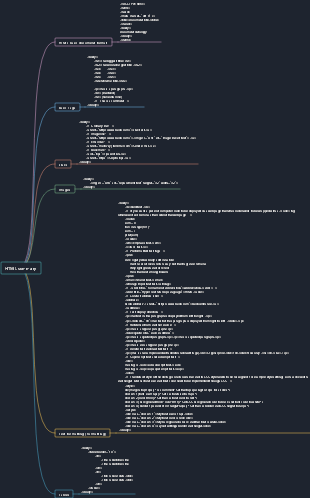
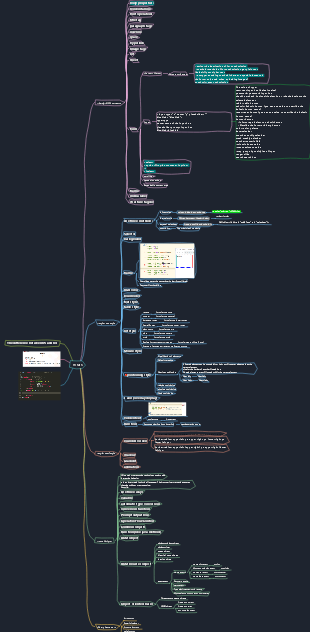
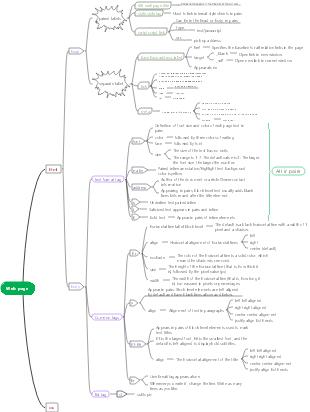
A new introduction to HTML basic tags! The content includes the composition, basic structure, web page editing tools, HTML media elements, blocks and lines in HTML pages, basic web page information, etc. Interested friends can download and collect it.
Edited at 2023-02-26 01:27:03This is a mind map about bacteria, and its main contents include: overview, morphology, types, structure, reproduction, distribution, application, and expansion. The summary is comprehensive and meticulous, suitable as review materials.

This is a mind map about plant asexual reproduction, and its main contents include: concept, spore reproduction, vegetative reproduction, tissue culture, and buds. The summary is comprehensive and meticulous, suitable as review materials.
This is a mind map about the reproductive development of animals, and its main contents include: insects, frogs, birds, sexual reproduction, and asexual reproduction. The summary is comprehensive and meticulous, suitable as review materials.
This is a mind map about bacteria, and its main contents include: overview, morphology, types, structure, reproduction, distribution, application, and expansion. The summary is comprehensive and meticulous, suitable as review materials.
This is a mind map about plant asexual reproduction, and its main contents include: concept, spore reproduction, vegetative reproduction, tissue culture, and buds. The summary is comprehensive and meticulous, suitable as review materials.
This is a mind map about the reproductive development of animals, and its main contents include: insects, frogs, birds, sexual reproduction, and asexual reproduction. The summary is comprehensive and meticulous, suitable as review materials.
HTML basic tags
The composition of a web page
HTML part (<html>content</html>)
JS part (<script>Special effects</script>)
CSS part (<style>style</style>)
basic structure
<! DOCTYPE html> Statement
<title>Webpage title</title>
html web page
<head>head part
<body>Main part
<body>Web page content, which can be text, images, etc.</body>
Web page editing tools
notebook
Dreamweaver
Notepad++
Hbuilder
VScodr
Basic information of web page
Solutions to garbled characters
Add <meta> tag to the head section
<meta charset="gb2312">
Simplified Chinese: gb2312
Traditional Chinese:big5
Pure English web page: iso-8859-1
Comply with international standards: UTF-8
Page background color or background image
bgcolor="#FFCCFF""
Web page background color
background="back_image.GIF""
Web page background image
Semanticization of basic tags on web pages
title
<h1>
paragraph
<p>...</p>
picture
<img>
newline
<br>
horizontal line
<hr>
<hr size="5">Thickness value of line
color="red" line color
width="300"/>line width
title tag
<h1>Level 1 title</h1> <h2>Level 2 title</h2> <h3>Level 3 title</h3> <h4>Fourth level heading</h4 <h5>Five-level headings</h5> <h6>Six-level headings</h6>
<h1> is the largest, followed by <h2> and so on...
It is recommended to include keywords when using <h1> tags and <h2> tags, and it is recommended to appear only once. <h3>, <h4>, and <h5> tags have little SEO effect and it is recommended not to use them indiscriminately.
image tag
*.jpg
*.gif
*.png
*.bmp
Basic grammar of images
<img src="image tag"
image location
width="300"
image width
height="150"
image height
alt="Celebrity concert opening">
Indicative text added to the image, mouse Move the image to display informative text
list tag
Unordered list-type attribute sets bullets
Bullets: disc (default), square and circle
Implemented with <ul> tag
Use <li> tag to represent list items
Ordered list-type attribute sets the order of items
Project order: 1 (default), A, a, I, i
Implemented with <ol> tag
Use <li> tag to represent list items
Define class table - no bullets and display order
No bullets and display order
Implemented with <dl tag>
Define list items with <dt> tag
Define content with <dd> tag
Preformatted text labels
Tag:<pre>…</pre>
Example:<pre>…… </pre>
hyperlink
<a> tag
<a href="path"
link path
target="target window position">"
Description: In which window the link opens
Link text or image</a>
Note: Jump to the corresponding page after stand-alone
Common values: _self, _blank
Link to other pages
Relative path: Specifies the file location relative to the current file
Example: To link to a page in the same directory (C:\HTML), write <a href="doc1.html>
Absolute path: Specify the complete path from the root directory to the file
Example: To link to a page in the same directory (C:\HTML), write <a href="c:\html\doc2.html>
Link to this page
Anchor tags: used to allow users to "jump" to a certain part of the document.
Define anchor tag:<a name="helpme">Newcomers on the road to guide men</a> Link to anchor tag location: <a href="#helpme">[Newcomer on the Road]</a>
Note: If the page is not long enough, the anchor link will not jump. At this time, just add some more page content to make the page longer.
Blocks and lines in HTML pages
row-level labels
Features: Can be kept on the same line as other elements, cannot wrap automatically, cannot set width and height
Common line-level tags: a, span, strong, u (underline), em (emphasis), i (italic), sub (subscript), sup (superscript)
block-level tags
Features: Cannot be kept on the same line as other elements (occupies one line), can automatically wrap, and can set width and height
Common row-level tags: div, p, h1-h6, ul, li, dl (definition list, similar to ul...li), dt (defines the items in the definition list), dd (defines the content of the item, matched with dt)
Block-level tags commonly used in layout
Section tag <div>
<div> tags can be embedded in tags such as <p> and used as ordinary block elements.
Table:<table> Line: <tr>…</tr> Column (cell):<td>…</td>
Form:<from> … </from>
Inline block-level tags
Features: Can be kept in one line with other elements, and can also set width and height
Common tags: textarea, input, img, button
HTML media elements
Video element:<video>…</video>
Example:<video src="video path"
Description: Specify the path of the video file to be played
controls></video>
Description: Provides controls for play, pause and volume
Common attributes of video tag
1.autoplay appears, and the video will be played immediately after it is ready.
2. When controls appear, the controls are displayed to the user, such as the play button.
3.loop appears, then start playing again after the media file completes playing.
4.muted appears, the audio of the video is muted.
5.src URL of the video to be played
Audio elements:<audio>…</audio>
<audio src="audio element"
Description: Specify the path of the audio file to be played
controls></audio>
Description: Provides controls for play, pause and volume
Autoplay attributes:autoplay
<video autoplay> … … </video>
Common attributes of source tag
1.src specifies the URL of the media file 2.type specifies the media type of the resource
Explanation: 1. You can write multiple source tags and specify the type, which is compatible with different browser decoding support. But src can only write one 2. The attribute values of the type attribute of the source tag include video/ogg, video/mp4, video/webm