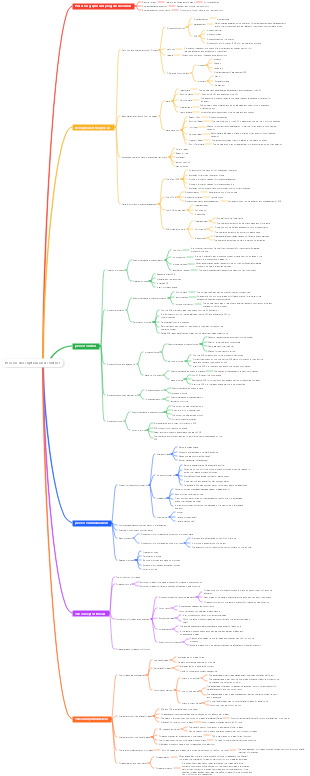
MindMap Gallery Computer operating system—input and output management
This article is about some basic concepts of computer operating system IO, with a detailed introduction and comprehensive description. I hope it can help interested friends learn.
Edited at 2023-12-01 15:12:41This is a mind map about bacteria, and its main contents include: overview, morphology, types, structure, reproduction, distribution, application, and expansion. The summary is comprehensive and meticulous, suitable as review materials.

This is a mind map about plant asexual reproduction, and its main contents include: concept, spore reproduction, vegetative reproduction, tissue culture, and buds. The summary is comprehensive and meticulous, suitable as review materials.
This is a mind map about the reproductive development of animals, and its main contents include: insects, frogs, birds, sexual reproduction, and asexual reproduction. The summary is comprehensive and meticulous, suitable as review materials.
This is a mind map about bacteria, and its main contents include: overview, morphology, types, structure, reproduction, distribution, application, and expansion. The summary is comprehensive and meticulous, suitable as review materials.
This is a mind map about plant asexual reproduction, and its main contents include: concept, spore reproduction, vegetative reproduction, tissue culture, and buds. The summary is comprehensive and meticulous, suitable as review materials.
This is a mind map about the reproductive development of animals, and its main contents include: insects, frogs, birds, sexual reproduction, and asexual reproduction. The summary is comprehensive and meticulous, suitable as review materials.
I/O management
I/O management overview
I/O device classification
Classified by usage characteristics
Human-computer interaction external devices
storage device
Network communication equipment
Transmission rate
low speed device
medium speed equipment
high speed equipment
information exchange unit
block device
Fast transmission and addressable
character device
The transmission is slow, not addressable, and uses an interrupt-driven approach.
I/O controller
The main function
Accept and identify instructions issued by the CPU (control register)
Report the status of the device to the CPU (status register)
Data exchange (data register temporary data)
Address recognition (implemented by I/O logic)
composition
Interface between CPU and controller (implementing communication between controller and CPU)
I/O logic (responsible for identifying commands issued by the CPU and issuing commands to the device)
Interface between controller and device (implementing communication between controller and device)
Two register addressing methods
Memory mapped I/O
Unified addressing of registers and memory in the controller
The controller can be operated using instructions that operate on memory
Register independent addressing
Registers in the controller are individually addressed
Special instructions need to be set to operate the controller
I/O control mode
Program direct control
Disadvantages: CPU and I/O devices can only work serially, resulting in extremely low CPU utilization.
Interrupt driven mode
Allow I/O devices to actively interrupt the operation of the CPU and request services, This frees up the CPU so that it can continue to do other useful work after sending read commands to the I/O controller.
Disadvantages: Since each word of data must be transferred between the memory and the I/O controller through the CPU As a result, the interrupt-driven method still consumes more CPU time.
DMA (direct memory access) method
Establish a direct data path between I/O devices and memory to fully access the CPU
Features
The basic unit is the data block
The data transferred is sent directly from the device to the memory, or vice versa
CPU intervention is only required when transferring the beginning and end of one or more consecutive data blocks The transfer of the entire block of data is completed under the control of the DMA controller
channel mode
The I/O channel is a processor specifically responsible for input/output. It is a development of the DMA method, which can further reduce CPU intervention. That is, the intervention of reading (or writing) a data block is reduced to the intervention of reading (or writing) a group of data blocks and related control and management. At the same time, it can realize the parallel operation of CPU, channel and I/O device.
The channel instruction type is single and does not have its own memory. The channel program executed by the channel is placed in the memory of the host. The channel shares memory with the CPU.
I/O software hierarchy
User level I/O software
Interface implemented for user interaction
device independence software
Perform operations common to all devices
Distribution and recycling of equipment
Map logical device names to physical device names
Protect your device
Buffer management
error control
Provides logical blocks of uniform size that are independent of the device, shielding differences in information exchange unit size and transmission rate between devices
Provide a unified interface to the user layer
device driver
Related to hardware, responsible for specifically implementing the operating instructions issued by the system to the device.
Interrupt handler
Used to handle interrupt related matters
hardware
Consists of a mechanical component (the device itself) and an electronic component (the device controller/adapter)
Device Controller Functions
Recognize or accept commands from the CPU or channel
Realize data exchange
Discover and log status information about the device or itself
Device address identification
I/O core subsystem
I/O scheduling concepts
Determine a good order to perform I/O requests
Caches and buffers
single buffer
Device - (T) - Buffer - (M) - Workspace - (C) - Processing
When the buffer is full, data will be sent to the work area. When the work area is full, the buffer will be empty at the same time.
Assume the initial state, the work area is full and the buffer is empty: The average time taken to process a piece of data is Max (C, T) M
double buffering
Assume the initial state, buffer 1 is full, buffer 2 is empty, and the work area is empty: The average time taken to process a piece of data is Max (T, C M)
Buffer 1 is full and data is being loaded into buffer 2. At this time, data can be fetched from buffer 1. Data can only be retrieved when the buffer is full
circular buffer
Multiple buffers are linked into a circular queue, with the in pointer pointing to the first empty buffer and the out pointer pointing to the first full buffer.
buffer pool
three queues
empty buffer queue
input queue
output queue
Four working buffers
Work buffer used to accommodate input data, work buffer used to extract input data
Work buffer used to contain output data, work buffer used to extract output data
Buffer versus cache
Buffer concept
Generally use memory as a buffer
Ease the speed conflict between the CPU and the device and reduce the frequency of interrupts to the CPU Solve the problem of data granularity mismatch and improve the parallelism between CPU and I/O devices
Features
When the data in the buffer is not empty, data cannot be flushed into the buffer and data can only be transferred out of the buffer.
When the buffer is empty, data can be rushed into the buffer, but the buffer must be filled before data can be transferred out of the buffer.
Equipment distribution and recycling
Factors that should be considered
intrinsic properties
Exclusive devices, shared devices, virtual devices (SPOOLing)
allocation algorithm
First come, first served, higher priority first, shorter tasks first
safety
Safe distribution method
Unsafe allocation method
Static allocation and dynamic allocation
Dynamic allocation is performed according to execution needs during process execution.
Data structures in device allocation management
Device Control Table (DCT)
Each device corresponds to a DCT, key fields: type/identifier/status/pointer to COCT/waiting queue pointer
Controller Control Table (COCT)
Each controller corresponds to a COCT, key fields: status/pointer to CHCT/waiting queue pointer
Channel Control Table (CHCT)
There is a pointer to the connected controller table, and the head and tail pointers of the PCB queue of the process waiting for the channel.
System Device Table (SDT)
Record the status of all devices in the entire system, each device corresponds to an entry
Key fields
Device type/identifier/DCT/driver entry
One channel controls multiple controllers, one controller controls multiple devices
Device Allocation Steps
1. Find SDT based on the physical device name requested by the process 2. Find DCT and allocate equipment according to SDT 3. Find the COCT according to the DCT and assign the controller 4. Find CHCT and assign channels based on COCT
Only when the device, controller, and channel are all successfully allocated, the device will be considered successfully allocated, and then the I/O device can be started for data transmission.
shortcoming
Users must use the "physical device name" when programming. If a physical device is changed, the program will not run. If the requested device is busy, the process must wait even if there are other devices of the same type in the system.
Improvements to the device allocation step
Users use logical device names to apply for devices when programming, and the OS is responsible for mapping from logical device names to physical device names.
Logical device table settings
There is only one LUT in the entire system: the logical device names used by each user are not allowed to be repeated.
One LUT per user: the logical device name of each user can be repeated
SPOOLing
offline technology
Peripheral controller Higher-speed equipment—tape
Function: Alleviate the speed conflict between the device and the CPU, and realize pre-input and slow output.
SPOOLing
Simulating offline technology using software methods
input wells and output wells
storage area
input process and output process
input buffer and output buffer
input buffer
Temporarily store data sent from the input device
output buffer
Temporarily store data from the output well
Shared printer
Use SPOOLing technology to "virtualize" exclusive printers into shared printers