MindMap Gallery revit architectural ideas
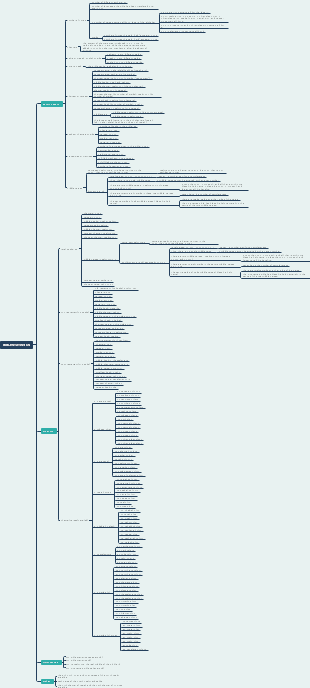
Regarding the architectural ideas of Revit, "family" is the most basic graphics unit of Revit, also called primitive, similar to groups in SU and blocks in CAD.
Edited at 2023-10-29 16:27:47This is a mind map about bacteria, and its main contents include: overview, morphology, types, structure, reproduction, distribution, application, and expansion. The summary is comprehensive and meticulous, suitable as review materials.
This is a mind map about plant asexual reproduction, and its main contents include: concept, spore reproduction, vegetative reproduction, tissue culture, and buds. The summary is comprehensive and meticulous, suitable as review materials.
This is a mind map about the reproductive development of animals, and its main contents include: insects, frogs, birds, sexual reproduction, and asexual reproduction. The summary is comprehensive and meticulous, suitable as review materials.
This is a mind map about bacteria, and its main contents include: overview, morphology, types, structure, reproduction, distribution, application, and expansion. The summary is comprehensive and meticulous, suitable as review materials.
This is a mind map about plant asexual reproduction, and its main contents include: concept, spore reproduction, vegetative reproduction, tissue culture, and buds. The summary is comprehensive and meticulous, suitable as review materials.
This is a mind map about the reproductive development of animals, and its main contents include: insects, frogs, birds, sexual reproduction, and asexual reproduction. The summary is comprehensive and meticulous, suitable as review materials.
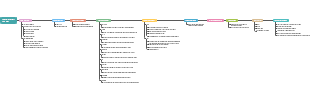
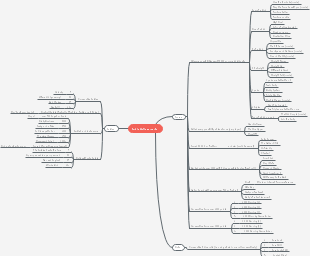
Revit architectural idea diagram
architecture
elevation
elevation drawing
1. Building option benchmark, draw directly in elevation
2. Modify, copy
3. Shortcut keys CC, CO
axis network
Grid drawing
1. Architectural option benchmark, drawn directly in the axis grid
2. Shortcut key GR
list
Detailed table statistics
1. Create a detailed list in the view options
2. Project Browser Details/Quantity
Pillar
Column placement
1. Architecture, pillars in a structure
2. Pillars in the project browser family
3. Shortcut key CL
wall
wall drawing
1. Select wall in the building or structure option
2. The wall in the project browser family
3. Shortcut key WA
floor slab
floor drawing
1. Select floor drawing in the building or structure tab
2. Floors in the project browser family
3. Shortcut key SB
loose water
Scattered water drawing
1. Building tab to build built-in model
doors and windows
Door and window placement
1. In the Building tab, select door or window placement.
2. Just place the door or window in the project browser family
stairs
Stairs drawing
1. Select the staircase in the building option and adjust the drawing according to the parameters provided in the drawing.
2. Convert the stair editing sketch based on 1 to edit and draw yourself.
3. You can select the corresponding built-in model in the building tab, and the family category can be drawn by yourself
4. Stair drawing in the project browser family
railing
railing drawing
1. Select the building tab to draw the railings and handrails yourself.
2. On the Building tab, select the existing railing corresponding to the system and place it with one click.
roof
roof drawing
1. On the Building tab, select the Roof command to draw
2. Select the roof drawing in the project browser
3. Floor slabs can be used for drawing if necessary
rendering,walking
Rendering, roaming and drawing
rendering
roaming
1. View options, create a three-dimensional view, select roam to the plane, set the path and adjust the drawing.
Export tour
After setting the drawing parameters according to the drawing, click on the file in the upper left corner of the software and select Export. Then select images and animations and select roaming to export the drawing.
How to adjust the roaming angle and height
The angle should be adjusted after setting the path on the plane. Just adjust the frame rate and angle of view.
The height should be adjusted after the path is drawn on the plane. There is a control in the upper left corner of any elevation. Change the control to path.
drawing
Drawing creation
Select the drawing in the project browser to create the corresponding drawing frame according to the drawing requirements. After the creation is completed, drag the corresponding view or drawing required by the drawing into the drawing frame.
Drawing export
CAD
Select the corresponding drawing and click in, click on the file in the upper left corner of the software, select Export, select CAD again, and export in DWG format.
There is a small printer icon in the upper left corner of the software. Click it and adjust the drawing parameters to produce the drawing.
clan
what is clan
"Family" is the most basic graphics unit of Revit, also called primitive, similar to groups in SU and blocks in CAD.
living tribe
A living family means that you can change the parameters of its size by changing the parameters.
Dead people
That is, the family parameter values cannot be changed in the project during use, and can only exist in the project in one form.
load family
How to load families in revit
1. When you want to draw the corresponding thing, you can choose to load the family in the attribute editing type.
2. When you find what you want to draw in the project browser, double-click the family and click the attribute editing type to load the family.
Creator: Zhao Xinggang QQ;2583064209 Contact number: 18790813580 Please notify me if there is plagiarism and backup