MindMap Gallery docker images and containers
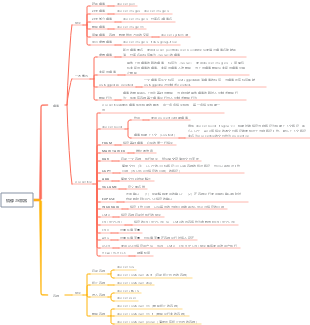
docker command - images and containers, such as hanging images: the old and new images have the same name. After using the docker pull or docker build command, the old image name will be cancelled, and the warehouse name and label will be <none>.
Edited at 2023-10-10 14:39:33This is a mind map about bacteria, and its main contents include: overview, morphology, types, structure, reproduction, distribution, application, and expansion. The summary is comprehensive and meticulous, suitable as review materials.

This is a mind map about plant asexual reproduction, and its main contents include: concept, spore reproduction, vegetative reproduction, tissue culture, and buds. The summary is comprehensive and meticulous, suitable as review materials.
This is a mind map about the reproductive development of animals, and its main contents include: insects, frogs, birds, sexual reproduction, and asexual reproduction. The summary is comprehensive and meticulous, suitable as review materials.
This is a mind map about bacteria, and its main contents include: overview, morphology, types, structure, reproduction, distribution, application, and expansion. The summary is comprehensive and meticulous, suitable as review materials.
This is a mind map about plant asexual reproduction, and its main contents include: concept, spore reproduction, vegetative reproduction, tissue culture, and buds. The summary is comprehensive and meticulous, suitable as review materials.
This is a mind map about the reproductive development of animals, and its main contents include: insects, frogs, birds, sexual reproduction, and asexual reproduction. The summary is comprehensive and meticulous, suitable as review materials.
Mirrors and Containers
mirror
Order
Get image
docker pull
List images
docker images, docker image ls
List some images
docker image ls warehouse name/image name
Delete image
docker image rm
View the space occupied by images, containers, and data volumes
docker system df
Display virtual image
docker image ls -f dangling=true
some concepts
virtual hanging mirror
The old and new images have the same name. After using the docker pull or docker build command, the old image name is cancelled, and the warehouse name and label are both <none>.
Middle layer image
Images that other upper-layer images depend on are labeled <none>. Use docker image ls -a to view images including middle-layer images. The middle layer image should not be deleted. When the upper layer image is deleted, the middle layer image will be deleted.
Untagged and Deleted
An image has multiple tags. Untagged is the tag used to cancel the image. Deleted is triggered when all tags in the image are Untagged.
Delete behavior
The deletion of the image is from the upper layer to the base layer. When the current layer is dependent on other images, the deletion behavior will not be triggered; if there is a container running based on the image, the deletion behavior will not be triggered.
Dockerfile
Dockerfile is a script that describes how to build an image. It consists of instructions. Each instruction builds a layer.
docker build
effect
Create an image using Dockerfile
Image build context (Context)
For example, docker build -t nginx:v3 . When building, specify the current path as the build context path, then the source file paths of instructions such as COPY and ADD must work relative to the current path. File named Dockerfile in default context path as Dockerfile
FROM
Specify the base image, the required first line of instructions
MAINTAINER
Maintainer information
RUN
Start a container, execute the command, and commit the storage layer file changes
COPY
Copy files (Note: The <target path> of COPY can be the absolute path of the container or the path relative to the working directory (the directory specified by WORKDIR))
ADD
Copy files and automatically unzip them
VOLUME
Define anonymous volumes
EXPOSE
Declared port: (1) Helps explain the port used; (2) When the container is running using random port mapping, it is automatically mapped to the port specified by EXPOSE
WORKDIR
Specify the working directory. The current directory of each layer will be the directory specified by WORKDIR.
CMD
Specify the command to be executed when the container starts
ENTRYPOINT
After specifying ENTRYPOINT, the content of CMD will be passed to ENTRYPOINT as a parameter.
ENV
Set environment variables
ARG
Environment variables are set, but the environment variables will not exist when the container is running
USER
After specifying a user using USER, the RUN, CMD, and ENTRYPOINT commands will be executed using this user.
HEALTHCHECK
health examination
container
Order
Start container
docker run
docker container start (start the container in the terminated state)
Terminate container
docker container stop
Enter the container
docker attach
docker exec
Delete container
docker container rm (remove terminated container)
docker container rm -f (delete running container)
docker container prune (clean up all terminated containers)