MindMap Gallery JS Basics Day1
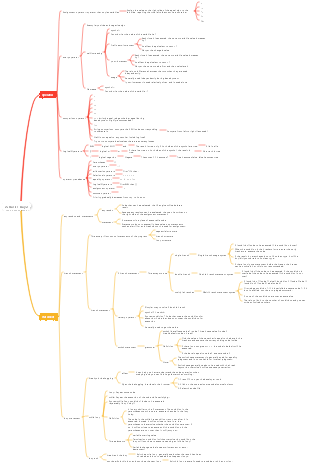
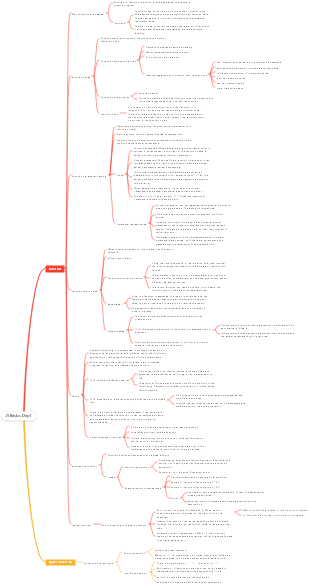
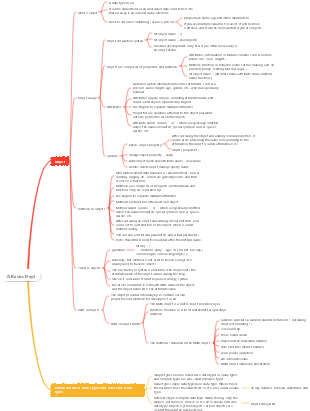
This is a mind map about the basics of JS Day 1. JS is a programming language that runs on the client to achieve human-computer interaction effects.
Edited at 2024-01-18 10:20:27This is a mind map about bacteria, and its main contents include: overview, morphology, types, structure, reproduction, distribution, application, and expansion. The summary is comprehensive and meticulous, suitable as review materials.

This is a mind map about plant asexual reproduction, and its main contents include: concept, spore reproduction, vegetative reproduction, tissue culture, and buds. The summary is comprehensive and meticulous, suitable as review materials.
This is a mind map about the reproductive development of animals, and its main contents include: insects, frogs, birds, sexual reproduction, and asexual reproduction. The summary is comprehensive and meticulous, suitable as review materials.
This is a mind map about bacteria, and its main contents include: overview, morphology, types, structure, reproduction, distribution, application, and expansion. The summary is comprehensive and meticulous, suitable as review materials.
This is a mind map about plant asexual reproduction, and its main contents include: concept, spore reproduction, vegetative reproduction, tissue culture, and buds. The summary is comprehensive and meticulous, suitable as review materials.
This is a mind map about the reproductive development of animals, and its main contents include: insects, frogs, birds, sexual reproduction, and asexual reproduction. The summary is comprehensive and meticulous, suitable as review materials.
JS Basics Day1
Introduction to JS
What is JS?
It is a programming language that runs on the client to achieve human-computer interaction effects.
The composition of JS
ECMAScript
Specifies the basic syntax and core knowledge of js
For example: variables, branch statements, loop statements, objects, etc.
Web APIs
DOM: Manipulate documents, such as moving, resizing, adding, deleting, etc. page elements
BOM: operate the browser, such as page pop-ups, detect window width, store data to the browser, etc.
effect
Web page special effects (monitoring some of the user’s behaviors to allow the web page to provide corresponding feedback)
Form validation (judging the legality of form data)
Data interaction (obtaining background data and rendering to the front end)
Server-side programming (node.js)
JS writing position
Inline JS
Internal JS
Write directly in the html file and wrap it with script tags
Specification: The script tag is written above </body>
Extension: alert("Hello, js") page pops up a warning dialog box
External JS
The code is written in a file ending with .js
Syntax: introduced into the HTML page through script tags
How to write JS
Comment
Single line comments
symbol://
Function: //The line of code on the right will be ignored
Shortcut key: ctrl /
block comments
symbol:/**/
Effect: Everything between /* and */ will be ignored
Shortcut key: shift alt a
terminator
Function: Use English; represents the end of the sentence
Actual situation: In actual development, it can be written or not, and the browser can automatically infer the end position of the statement (without adding it)
JS input and output syntax
Output syntax
document.write('content to be output')
Function: Output content into the body
Note: If the output content is written in tags, it will also be parsed into web page elements.
alert("output content")
Function: The page pops up a warning dialog box
console.log("Console printing")
Console output syntax, used by programmers for debugging
input syntax
prompt("Please enter your name:")
Function: Display a dialog box that contains a text message to prompt the user to enter text.
literal
JS query authoritative website MDN
variable
What are variables?
The 'container' used to store data in a computer is simply a box.
The role of variables
used to store data
Basic use of variables
variable declaration
To use a variable, you first need to create it (also known as declaring a variable or defining a variable)
Syntax: let variable name
Declaring a variable consists of two parts: declaration keyword and variable name (identification)
variable assignment
After defining a variable, you can initialize it. Follow the variable name with ‘=’ and then the value (Note: Get the data in the variable through the variable name)
You can also complete the assignment operation directly when declaring the variable. This operation is also called variable initialization.
update variable
After a variable is assigned a value, you can also update it by simply giving it a different value (note: let does not allow multiple declarations of a variable)
Variable case: exchanging the value of a variable
Core idea: use a temporary variable for intermediate storage
Declare multiple variables
After a variable is assigned a value, you can also update it by simply giving it a different value.
Syntax: Multiple variables separated by commas
Note: It may appear that the code length is shorter, but this is not recommended. For better readability, please declare only one variable per line
The nature of variables
Memory: The place where data is stored in a computer, equivalent to a space
The essence of a variable: it is a small space in memory applied by the program to store data.
Naming rules and specifications for variables
Rules: must be followed, errors will be reported if not followed (legal level
Keywords cannot be used
Characters with special meanings, some English vocabulary built into JS
It can only be composed of underscores, letters, numbers, and $, and numbers cannot begin with it.
Letters are strictly case-sensitive. For example, Age and age are different variables.
specification
The name should be meaningful
Comply with CamelCase nomenclature: the first letter of the first word is lowercase, and the first letter of each subsequent word is capitalized, such as: userName
Variable expansion-the difference between let and var
var declaration
You can use it first and then declare it (unreasonable)
Variables declared with var can be declared repeatedly (unreasonable)
For example, variable promotion, global variables, no block-level scope, etc.
Variable expansion - array
Declaration syntax
let array name = [data 1, data 2...data n]
Arrays are saved in order, so each data has its own number
Arrays can store any type of data
Value syntax
array name[subscript]
the term
Element: Each data stored in the array is called an array element.
Subscript: the number of the data in the array
Length: The number of data in the array, obtained through the length attribute of the array
constant
Basic usage of constants
Concept: Variables declared using const are called "constants"
Usage scenario: When a variable will never change, you can use const to declare it instead of let
Naming convention: consistent with variables
Constant usage: const G = 9.8
Note: Constants are not allowed to be reassigned and must be assigned (initialized) when declared.
Tip: Use const for data that does not need to be reassigned
type of data
JS data types are generally divided into two categories
Basic data types
number numeric type
The numbers learned in mathematics, integers, decimals, positive numbers, and negative numbers are collectively called number types.
Note: JS is a weak data type. Which type a variable belongs to can only be confirmed after copying. For example, int a = 3 must be an integer.
mathematical operators
include content
Sum
- Find the difference
* Find the product
/ Seek business
% Find the remainder
execution priority
Multiplication, division, and remainder have the same priority.
Addition and subtraction priorities are the same
Multiplication, division, and remainder have higher priority than addition and subtraction.
Use () to increase the priority
NaN
NaN represents a calculation error. It is the result of an incorrect or undefined mathematical operation
NaN is sticky. Any operation on NaN will return NaN
string string type
definition
Data wrapped in single quotes, double quotes, and backticks are called strings. There is essentially no difference between single and double quotes. It is recommended to use single quotes.
Precautions
Both single and double quotation marks must be used in pairs
Single and double quotation marks can be nested within each other, but they cannot nest themselves.
If necessary, you can use the escape character \ to output single and double quotes.
String concatenation
Scenario: Operator can realize string concatenation
template string
scenes to be used
Concatenate strings and variables
Before it was available, it was troublesome to splice variables.
grammar
`` (backtick)
When splicing content into variables, wrap the variables with ${}
document.write(`Hello everyone, my name is ${name}, I am ${age} this year`)
boolean Boolean type
When expressing affirmation or negation, the computer corresponds to Boolean type data, which has two fixed values, true and false.
undefined undefined type
Undefined is a special type with only one value undefined
If you only declare a variable without assigning a value, the default value of the variable is undefined. Generally, it is rare to directly assign undefined to a variable.
During development, we often declare a variable and wait for data to be passed in. If you don’t know whether the data has been passed, you can check whether this variable is undefined and determine whether the user has passed data.
null empty type
Null in JS is just a special value that means 'none', 'empty' or 'value unknown'
The difference between undefined
undefined means no assignment
null means a value is assigned, but the content is empty
Development usage scenarios
Official explanation: treat null as an object that has not yet been created
Common vernacular: In the future, there will be an object stored in a variable, but the object has not been created yet. You can give it null first.
Detect data type
typeof
As an operator: typeof x (common writing method)
Function form: typeof(x)
Note: The result is the same with or without parentheses, so use the operator directly.
Reference data type
object object
type conversion
Why type conversion is needed
JS is a data type: JS does not know which data type it belongs to. It will only be clear after assignment.
Pitfall: The data obtained using forms and prompts is of string type by default, and addition operations cannot be performed directly at this time.
At this time, you need to change the data type of the variable
implicit conversion
When certain operators are executed, the system automatically converts the data type internally. This conversion is called implicit conversion.
rule
As long as one of the two sides of the number is a string, the other will be converted to a string.
Arithmetic operators other than -*/ will convert data into numeric types.
shortcoming
The conversion type is not clear and can only be summarized based on experience.
Tips
The sign can be converted into a numeric type when parsed as a positive sign.
The result of adding any data to a string is a string
Show conversion
It is not rigorous to rely too much on the implicit conversion within the system when writing a program, because the rules of implicit conversion are not clear and are mostly based on rules summarized from experience. In order to avoid problems caused by implicit conversion, data is usually converted explicitly according to logical needs.
Concept: Write your own code to tell the system what type to convert to
Convert to numeric type
Number(data)
Convert to numeric type
If there are non-digits in the string, the result will be NaN when the conversion fails, which means it is not a number.
NaN is also number type data, representing non-number
parselnt(data)
Keep only integers
parseFloat(data)
Decimals can be retained