MindMap Gallery Basic computer configuration
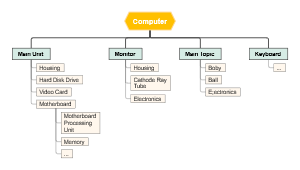
This is a mind map about the basic configuration of a computer. The main contents include: memory, hard disk, CPU, and motherboard. The introduction is detailed and the description is comprehensive. I hope it will be helpful to those who are interested!
Edited at 2024-11-16 21:14:08Basic computer configuration
motherboard
It is called the motherboard, the system bottom board, and almost all components and equipment of the computer run on it.
Common motherboard specifications
Standard-ATX, Mini-ATX, Micro-ATX, ITX, etc.
Bus: A standardized way of exchanging data between computer components
Data bus:
Transfer data that needs to be processed or stored back and forth between the CPU and RAM
Address bus: used to specify the address of data stored in RAM (Random Access Memory).
Control bus: transmits signals from the microprocessor control unit (ControlUnit) to peripheral devices
Expansion bus: can connect expansion slots and computers.
Local bus: an expansion bus that replaces higher-speed data transfers
Chipset: The chipset is a group of integrated circuits that work together and are responsible for connecting the computer's microprocessor to other parts of the machine. The chipset determines the scalability of the motherboard and is an important component that determines the level of the motherboard.
① North and South Bridge Structure
② MCH ICH architecture
③ PCH architecture
④Single chip architecture
Mainstream chipset manufacturers
Intel, AMD, NVIDIA, VIA
CPU
It is one of the most important components in the computer. It controls the main arithmetic and logical unit of the computer so that computer programs and operating systems can run on it.
Working principle: Extract, decode, execute, write back
CPU basic parameters
Main frequency
FSB
Front side bus frequency
cache
bus width
Package form
Hyper-threading: Special hardware instructions simulate a single physical core into two cores (logical cores), allowing each core to perform program-level parallel calculations, making it compatible with multi-threaded operating systems and software, reducing CPU idle time. Improve CPU line efficiency.
harddisk
It consists of one or more aluminum or glass discs covered with ferromagnetic material. Information passes through a magnetic head that is very close to the magnetic surface, and is written onto the disk by the electromagnetic current that changes its polarity. Because of its small size, large capacity, fast speed and ease of use, it has become a standard configuration of PC.
Hard drive structure
① The external structure of the hard disk - a high-precision hardware that integrates mechanics, electricity, and magnetism. It consists of a power interface, a data interface, a control circuit board, and other parts. The outer shell and bottom plate of the hard drive are combined into a sealed whole, called the disk body.
②The physical structure of the hard disk - the data stored in the hard disk is based on the principle of electrical and magnetic conversion.
③ Logical structure of the hard disk - There are many concentric circles on each disk of the hard disk, which are called tracks. The tracks are divided into many segments, called sectors. Each sector usually stores 512 bytes. Tracks with the same position on each side together form a cylinder. There is usually one head on each disk surface. All heads are mounted on a common bracket or load-bearing device and move radially in or out uniformly, rather than moving individually.
Hard drive boot principle
① Master boot sector
② Operating system boot sector
③ File allocation table
④ Directory area
⑤ Data area
Main performance parameters of hard disk
① Classification
② Capacity
③ Speed
④ Cache
⑤ Average seek time
⑥Data transfer rate
Solid State Drive - Compared with traditional hard drives, Solid State Drives have the characteristics of low power consumption, no noise, anti-vibration, and low heat. These features not only allow data to be stored more securely, but also extend the continuous operation time of battery-powered equipment. However, the cost of solid-state drives is relatively high and cannot be saved when damaged.

Memory
Memory is used to store data and programs that are currently being used (executing). Computer memory refers to dynamic memory (DRAM). The so-called "dynamic" in dynamic memory means that after data is written to DRAM, after a period of time, the data will be lost, so an additional circuit is required for the memory refresh operation. Usually the memory stick used on the motherboard is called dynamic DRAM, and the data in it is stored based on capacitive characteristics. Because the capacitor discharges, it needs to be continuously charged to maintain data. The mechanism for periodically charging dynamic DRAM is called the data refresh clock circuit, or memory refresh circuit
The function and classification of memory sticks
The memory stick is a channel that connects the CPU and other devices and plays the role of buffering and data exchange. Memory is a semiconductor storage unit that uses data and instructions, including RAM (random access memory), ROM (read only memory) and cache).
SDRAM (Synchronous DRAM): Synchronous dynamic random access memory, once the most widely used memory type on PCs
DDR (Double Data Rate) SDRAM is a double data transmission mode
DDR2 SDRAM DDR2 memory can read and write data at 4 times the speed of the external bus per clock, and has 2 times the memory pre-reading capability of DDR
DDR3 SDRAM
DDR3L low voltage memory
Main performance indicators of memory modules
① Storage capacity
②Access speed
③ Working frequency
④ Interface type
⑤ CL settings
dual channel technology
The key factor in dual-channel implementation is that there are two memory controllers built into the motherboard northbridge or CPU. Both memory controllers can operate in parallel.
Only memory with the same capacity, the same structure (such as single-sided, double-sided or the number of memory chips, the bit width of each chip and other parameters must be the same) and the same brand (the SPD information of different brands of memory may be different) DIMM1 DIMM3" 'DIMM2 DIMM4' and 'DIMM1 DIMM2 DIMM3 DIMM4' can establish dual-channel mode.