 Wondershare EdrawMind
MindMap Gallery Django development process
- 86
- 1
Django development process
The Django development process includes three parts: common usage of requests, several ways to manipulate data, and instances of metaclass rewriting (metaclass type).
Edited at 2022-02-09 11:50:48
- Avatar Character Relationship Chart
Avatar 3 centers on the Sully family, showcasing the internal rift caused by the sacrifice of their eldest son, and their alliance with other tribes on Pandora against the external conflict of the Ashbringers, who adhere to the philosophy of fire and are allied with humans. It explores the grand themes of family, faith, and survival.
- Zootopia 2 Easter Egg
This article discusses the Easter eggs and homages in Zootopia 2 that you may have discovered. The main content includes: character and archetype Easter eggs, cinematic universe crossover Easter eggs, animal ecology and behavior references, symbol and metaphor Easter eggs, social satire and brand allusions, and emotional storylines and sequel foreshadowing.
- Zootopia 2 Character Relationship Chart
[Zootopia Character Relationship Chart] The idealistic rabbit police officer Judy and the cynical fox conman Nick form a charmingly contrasting duo, rising from street hustlers to become Zootopia police officers!
Django development process
- Avatar Character Relationship Chart
Avatar 3 centers on the Sully family, showcasing the internal rift caused by the sacrifice of their eldest son, and their alliance with other tribes on Pandora against the external conflict of the Ashbringers, who adhere to the philosophy of fire and are allied with humans. It explores the grand themes of family, faith, and survival.
- Zootopia 2 Easter Egg
This article discusses the Easter eggs and homages in Zootopia 2 that you may have discovered. The main content includes: character and archetype Easter eggs, cinematic universe crossover Easter eggs, animal ecology and behavior references, symbol and metaphor Easter eggs, social satire and brand allusions, and emotional storylines and sequel foreshadowing.
- Zootopia 2 Character Relationship Chart
[Zootopia Character Relationship Chart] The idealistic rabbit police officer Judy and the cynical fox conman Nick form a charmingly contrasting duo, rising from street hustlers to become Zootopia police officers!
- Recommended to you
- Outline
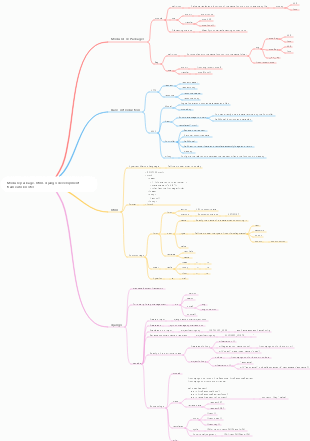
Django development
Common usage of request
request.user gets the current user
request.method gets the request method
request.COOKIESGet COOKIE
request.META gets the request header
Obtaining get and post request parameters, request.GET, request.POST, use the get(key,value) form to obtain
request.body gets json parameters
Get the file request.FILES, set the file FILES.get(key) (binary plus .read() function)
Several ways to manipulate data
data migration
makemigrations
A 000x_initial.py file will be generated each time it is run.
migrate will not be executed repeatedly on the same .py file because Django will save the execution record of the file in the data table django_migrations when executed; if changes have been made in the database, it will not be executed.
If you need to repeatedly execute the .py file, you need to delete the corresponding file execution record in the data table (but this is not recommended, as an exception will occur. For example, the data table already exists, and the error "table 'xxx' will be reported during the next execution. already exists" exception)
Note: When adding a new model field, set the attributes null and blank to true or set the default value (default) for the model field. Otherwise, executing the makemigrations command will prompt field repair information.
sqlmigrate command (but the sql command will not be executed)
python manage.py sqlmigrate application name script file name
Function: Output the corresponding SQL statement according to the content of the migration file
Application scenario: It is useful when writing scripts to batch process databases
Data import and export
loaddata to implement data import operation
dumpdata to implement data export operation
subtopic
When creating a many-to-many relationship in a Django data table, you only need to create two tables, and the third many-to-many table will be automatically generated.
One-to-one: OneToOneField
One-to-many: ForeignKey
Many-to-many: ManyToManyField
Data table operations
New addition: The model instantiation object calls the built-in method to add new data, such as calling create for adding a single data, calling get_or_create for querying and adding new data (insert if the data exists, not inserting if it does not exist), and calling update_or_create( for modification and new addition). If the data exists, update it, otherwise add it), and call bulk_create for batch addition.
Set property values directly at instantiation time
In [15]: v = Vocation(job='Python Backend Development Engineer',title='Backend Development Engineer',payment=0,name_id=4) In [16]: v.save() [2022-01-23 22:16:21,152] (0.056) INSERT INTO "index_vocation" ("job", "title", "payment", "name_id") VALUES ('Python backend development engineer', ' Back-end development engineer', 0, 4); args=['Python back-end development engineer', 'Back-end development engineer', 0, 4]
mdele_name.objects.create(field name 1='xx', field name 2='xx')
Use dictionary format to insert, d=dict((field name='xx',)); and then mdele_name.objects.create(**d)
objects.get_or_create() deduplicate insertion (the inserted data is inserted if it is not in the data table, as long as one piece of data is different, it can be inserted)
What is inserted in bulk_update() is a data object whose type is a list or tuple.
Modification: Before modification, you must perform a data query operation, and then delete the query results. Common methods include: model instantiation, update method and bulk update bulk_update
Use the update_or_create(**d, defaults={}) method to either add or modify (there are two situations: if the primary key is the same, then other fields are modified; the second type of primary key must be unique, so inserting data with the same primary key will Error) The modified content can be passed to the parameter defaults in dictionary format (can only be used when **d is used to pass in the dictionary format). It is very short. It depends on the id (primary key). Only if the id is different can it be updated or modified. , even if the ID is the same
Query first and then modify; v = name.objects.get(id=xxx) v.xxx= xxx v.save() # That’s it
To update one or more pieces of data in batches, the query method uses filter
Add an .update (field value=xx) after filter
You can also use a dictionary to modify data, upadte(**d); without using the query method, the data in the entire table will be updated by default.
It may not be available in Mysql. Use the F method to realize the self-increment or self-decrement of data (if the primary key is set, it cannot self-increment or self-decrement to ensure that the primary key is unique)
v = Vocation.objects.filter(job='uu_aa') # Add 1 to the entire payment field v.update(payment=F('payment') 1) # Out[50]: 2
In [28]: v = Vocation.objects.filter(payment=10000).update(payment=F('payment') 1) [2022-01-23 22:31:50,986] (0.056) UPDATE "index_vocation" SET "payment" = ("index_vocation"."payment" 1) WHERE "index_vocation"."payment" = 10000; args=(1, 10000)
Delete: A data query operation must be performed before deletion. After deleting the query results, if the deleted data has a foreign key field, the deletion result is determined by the deletion mode of the foreign key.
Delete all data in the table Vocation.objects.all().delete()
Delete a piece of data with id 1 (the object returned by the get request can only be one) Vocation.objects.get(id=1).delete() # (1, {'index.Vocation': 1})
Delete multiple pieces of data Vocation.objects.filter(job='uu_aa').delete() # (2, {'index.Vocation': 2})
If the deleted data has a foreign key field, the deletion result is determined by the deletion mode of the foreign key (you should only understand CASCADE cascade)
CASCADE cascade delete. Django simulates the behavior of SQL constraint ON DELETE CASCADE and deletes objects containing ForeignKey (deleting one of many to one (generally the primary key), the corresponding multi-associated data is also deleted, and the data of many is deleted,)
PROTECT prevents deletion of referenced objects by raising the subclass of ProtectedError (deletion of data containing foreign keys and other associated data will fail)
SET_NULL is set to ForeignKey; this is only possible when null is True (the null attribute must be True before it can be deleted, otherwise an exception will be prompted)
SET_DEFAULT deletes the data and sets the ForeignKey to the default value
The set mode performs data deletion and associates foreign key fields of other data tables to other data.
DO_NOTHING does not take any action. The deletion result is determined by the deletion mode of the database.
Single table query
When querying, you can use the query.__str__() attribute to print out the SQL statement of the querysel instantiated object (this must return a query set, that is, with QuerySet, the get method cannot, it returns a single object, Not a query set) (the previous method does not work, it is better to set the log in Django)
<QuerySet [<Person: Lucy>]>
and query and or query
## The and query of SQL mainly adds multiple query conditions in the filter. In Django, it can be separated by commas (,). ## The or query of SQL needs to introduce Q, and the writing format is: Q(filter=value)|Q(filter=value) ### Use '|' to separate multiple Q's ##SQL:select * from index_vocation where job='website design' or id=9 from django.db.models import Q v = Vocation.objects.filter(Q(job='Website Design' )|Q(id=9)) v # ` <QuerySet [<Vocation: 3>]>`
To intercept the first few pieces of data, or to intercept the first few pieces of data in any order, you can use the list slicing operation: [:3] to intercept the first 3 pieces of data.
Vocation.objects.all()[:3]
Query a certain field using the values method. The data is returned as a list and the list elements are represented by a dictionary.
Vocation.objects.values('job')
Use get query to return a separate object (if there are multiple query results, an error will be returned and more than one object is returned), filter returns a query set (QuerySet), and all() is also a QuerySet, but it is generally a full table query.
Aggregation function query; use values or filters to extract certain data, and then use aggregate functions to aggregate certain keywords (Sum and Avg must be used with annotate, but the grouping object is still the field of values())
Summing requires importing Sum (uppercase S) from the django.db.models module
v = Vocation.objects.values('job').annotate(Sum('id'))
To find the average, you need to import Avg (uppercase A) from the django.db.models module
Count the amount of query data using the count method (no need to pass parameters later), or use Count (uppercase C) imported from the django.db.models module
v = Vocation.objects.filter(job='Website Design').count()
v = Vocation.objects.aggregate(id_count=Count('id'))
Aggregate calculates the value of a certain field and returns only the calculation result. It is often used together with aggregate functions.
Can't use aggregate with annotate
It is not equal to query using exclude or ~Q
v = Vocation.objects.filter(~Q(job='Website Design'))
v = Vocation.objects.exclude(job='Website Design')
The deduplication query in SQL is distinct, but there is no need to set parameters in Django. The returned results will be executed according to the fields set by values (add distinct at the end)
v = Vocation.objects.values('job').filter(job='website design').distinct()
Grouping and sorting
annotate grouping (what is the grouping object in the brackets), in Django, if values are not set, the primary key is grouped by default
subtopic
Union intersection difference
Use the union() method similar to SQL's UNION
intersection finds the intersection of two queries, similar to SQL's INTERSECT
Difference set takes the former as the target data and returns the data after removing the common data from the former. EXCEPT in SQL
Multi-table query
one-to-many situation
Forward query (querying data in one table from multiple tables): that is, querying data in related fields through foreign key fields
In [65]: v = Vocation.objects.filter(id=2).first()# Multiple tables In [66]: v Out[66]: <Vocation: 2> ## Query the data corresponding to the model PersonInfo through the foreign key name In [67]: v.name.hireDate # hireDate is a table field Out[67]: datetime.date(2018, 9, 18)
Use forward query or reverse query in the query conditions (get or filter), and use __ double underline link to query the fields associated with the two.
Forward query: (V starts with 1, p starts with many); v = Vocation.objects.filter(name__name="tim").first() The previous name is the name in V, and the subsequent name is p name in (that is, the two fields are the same) and then query the P table for data that meets the change conditions through foreign key association: v.name.hireDate
There is also a reverse query that is quite complicated (anyway, remember that when calling attribute fields, you need a single object, not a queryset)
Regardless of forward query or reverse query, two SQL queries need to be executed in the database. The forward query passes the foreign key field (if the foreign key is used in the query condition, it directly returns the data queried through the foreign key). Reverse query through the related_name parameter field value set in the foreign key field
Reverse query: Use one query to obtain data with many models associated with it
The ondelete attribute of the foreign key field is set to related_set
In [76]: p = PersonInfo.objects.filter(id=4).first() In [77]: v= p.name.first() # name is an additional parameter related_name in the brackets of ForeignKey() except ondelete. In [78]: v Out[78]: <Vocation: 3>
and is not set:
In [68]: p = PersonInfo.objects.filter(id=2).first() In [69]: p Out[69]: <PersonInfo: Tim> # method one The return value of #vocation_set is the queryset object, which is the query result. #vocation_set is the name of the model Vocation in lowercase # The foreign key field name of model Vocation cannot set the parameter related_name # If the parameter related_name is set, vocation_set cannot be used In [70]: v= p.vocation_set.first()
Just execute a SQL query:
The select_related method uses the SQL join statement for optimization
Reverse query (left join): Anyway, we still need to use the related_name field parameter value
p = PersonInfo.objects.select_related('personinfo').values('name','personinfo__payment') # Query that each name field in one table corresponds to the salary in multiple tables; values() is the queried field data, multiple tables The data in is related using personinfo__
Forward query (inner join): foreign keys are required
v = Vocation.objects.select_related('name').values('name','name__age')
The result of multi-table query must be an object (table name first, such as Person at the end)
The object looks like: In [191]: P = Person.objects.select_related('living__province').get(name='Lucy') In [192]: POut[192]: <Person: Lucy> In [193]: P.living.province Out[193]: <Province: Zhejiang Province>
Non-object: In [188]: P = Person.objects.select_related('living__province').values('name','living__province').filter(name='Tom').first() In [189]: P Out[189]: {'name': 'Tom', 'living__province': 2}
subtopic
prefetch_related
Many to many query data
In [220]: p = Program.objects.prefetch_related('performer').filter(name='Xi Yangyang').first() In [222]: p.performer.all() # Extract the corresponding many-to-many data from the many-to-many table Out[222]: <QuerySet [<Performer: Lily>, <Performer: Lilei>, <Performer: Tom>]>
subtopic
One to one
subtopic
subtopic
subtopic
subtopic
subtopic
Execute SQL statement
extra: 6 optional parameters
where: Set query conditions, %s is similar to a format string
Vocation.objects.extra(where=['job=%s'],params=['clerk'])
params: This parameter provides a numerical value for where
select: Add a new query field, that is, add a field outside the model (I don’t know the role of this, since it does not exist in the model, why do you need to add it)
v = Vocation.objects.extra(select={'seat':'%s'},select_params=['seatInfo'])
select_params: If select sets character formatting %s, then this parameter provides a numerical value for select
tables: connect to other data tables to implement multi-table queries
v = Vocation.objects.extra(tables=['index_personinfo'])
Why does this return 5 data with the same data? Is it because 5 fields are selected? It’s not this. Anyway, I don’t understand what the specific query is.
In [238]: v = Vocation.objects.extra(tables=['index_personinfo'],where=['index_vocation.id=1'])
In [239]: v
Out[239]: [2022-01-24 13:19:23,032] (0.000) SELECT "index_vocation"."id", "index_vocation"."job", "index_vocation"."title", "index_vocation"." payment", "index_vocation"."name_id" FROM "index_vocation" , "index_personinfo" WHERE (index_vocation.id=1) LIMIT 21; args=()
<QuerySet [<Vocation: 1>, <Vocation: 1>, <Vocation: 1>, <Vocation: 1>, <Vocation: 1>, <Vocation: 1>]>
order_by: Set the sorting method of data. By default, it is sorted in ascending order by primary key.
raw: a required parameter sql statement
Required: raw_query; sql statement; but it returns a query set, and you need to use parentheses to extract data
In [259]: v = PersonInfo.objects.raw('select * from index_personinfo where id=1') In [260]: v Out[260]: <RawQuerySet: select * from index_personinfo where id=1>
parames: If raw_quert sets string formatting %s, then this parameter provides a value for raw_quert
translations: Set aliases for the queried fields
using: database object, that is, the database to which Django is connected
execute: Need to use third-party modules to achieve database connection, without going through the ORM framework
subtopic
Implement database transactions
extra: can only implement database query
raw: can only implement database query
execute: no need to go through ORM framework processing, can execute all SQL statements
Django's database transaction is defined in the transaction method
atomic(): Use transactions in view functions and view classes savepoint(): Start transactions savepoint_rollback(): Roll back transactions savepoint_commit(): Commit transactions
Make functions support transactional operations
(Place it on the function) @transaction.atomic # Make the function support transaction operations
(Place it inside the function, before the specific statement) with transaction.atomic(): # The function of the with module is the same as that of the decorator
A transaction object must be instantiated before starting a transaction; sid = transaction.savepoint()
Multiple database connections
Configure multiple databases
Create a new dbRouter.py file to write the class DbAppsRouter, and then add database information to the accessory attribute DATABASES in the settings.py file; configuration is also required.
# Add a new dbRouter.py file to write the class DbAppsRouter DATABASE_ROUTERS = ['MyDjango.dbRouter.DbAppsRouter'] # Point to the class of the newly written file DATABASE_APPS_MAPPING = { }# Set the mapping relationship between the database and the project application
Set the app name in the model (not important)
# Set the App to which the model belongs to generate a data table in the corresponding database # If app_label is not set, it will default to the App where the current file is located. app_label = "index" # Attribute the model to an application
Execute migration
python manage.py migrate s --database==database name (the database name here is the key of the key-value pair in the DATABASE_APPS_MAPPING parameter, such as the default, which is usually default)
subtopic
Instances overridden by metaclasses (metaclass type)
If the inherited class needs to specify a metaclass, it needs to add metaclass=the rewritten metaclass name.
To rewrite a metaclass is to inherit the metaclass type, and then rewrite its __cls__ method (generally four parameters, self rewrites the class name, name, bases, attrs store attributes and methods)
An example is: ORM framework
The ORM framework is implemented by inheriting and modifying the metaclass type
subtopic
theme
theme
rustful
Separation of front and back ends
Forms and models