MindMap Gallery Weekly User Interview Schedule and Question Outline
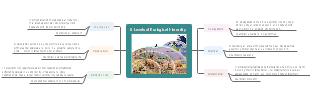
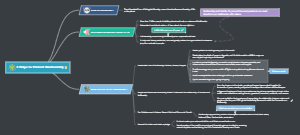
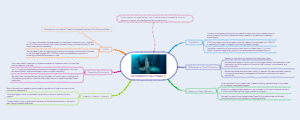
This is a mind map about weekly user interview schedule and question outline . The map is vertically organized around interview stages: weekly plan arrangement (interview time, location, participant information), interview script preparation (opening introduction, main questions, closing remarks), and requirement exploration (expected directions for user needs, pain point collection, anticipated improvement suggestions).The information is logically structured with complete coverage of key steps.
Edited at 2026-04-07 08:05:32This EdrawMind shortcut usage guide is a comprehensive and practical resource designed to help users master the core keyboard shortcuts, streamline workflow, and significantly boost efficiency when creating mind maps. It is structured into multiple sections that cover every aspect of the software, from basic operations to advanced customization and special tips. The guide begins with an Operation Tutorial that details two primary ways to access the shortcut settings: entering from the "Settings" menu at the bottom left corner of the interface, or using the "Help Center" to find and view shortcuts directly. It also explains how to use and modify shortcuts, as well as the step-by-step process for customizing shortcut keys, including scenarios like hot key conflicts and how to set custom keys for commonly used functions without built-in system shortcuts. The core of the guide is organized into Core Shortcut Categories, each listing the key combinations and their corresponding functions. The Common Operation section covers everyday tasks like creating, opening, saving, and closing documents, as well as editing actions such as undo, redo, copy, cut, paste, find, delete, and special functions like screen recording. The Add Topic and Related Elements section details shortcuts for adding and managing topics, including adding sibling topics, subtopics, floating topics, callouts, relationships, boundaries, images, hyperlinks, attachments, comments, and notes. It also includes shortcuts for adjusting topic levels, moving topics, and inserting elements like tables and formulas. The Text Editing and Font Settings section lists shortcuts for common text formatting tasks: bold, italic, underline, strikethrough, increasing/decreasing font size, superscript, subscript, and adjusting topic width. The Outline section covers switching between mind map and outline mode, increasing/decreasing indent levels, and moving topics up and down. The Topic Selecting and Topic Operations section i
This detailed EdrawMind mind map is your ultimate visual companion for planning a comprehensive 21-day journey through Japan, organized by day and region to maximize every moment. It covers iconic destinations including Tokyo, Mount Fuji, Kamakura, Nagano, Shirakawa-go, Kyoto, Nara, Osaka, Himeji, Hiroshima, Sapporo, and Aomori, ensuring you experience both the country’s most famous sights and hidden gems. The map provides a clear daily breakdown, from Day 1-3 exploring Tokyo’s city life and culture, to Day 4-5 taking in Mount Fuji and the Hakone Peninsula, Day 6 visiting Kamakura’s historic sites, Day 7-8 enjoying nature in Nagano, Day 9 discovering the fairy-tale village of Shirakawa-go, Days 10-12 diving deep into Kyoto’s cultural heritage, Day 13 meeting the sacred deer in Nara, Days 14-15 savoring Osaka’s food scene, Day 16 exploring Himeji, Day 17 reflecting on peace in Hiroshima, Days 18-19 experiencing the northern charm of Sapporo and Hakodate, Day 20 visiting Aomori’s stunning natural beauty, and finally Day 21 returning to Tokyo. Beyond the itinerary, the map includes essential travel tips: recommended transport passes like the JR Pass, must-try local foods for each region, accommodation suggestions, and practical advice for foreign visitors, covering visas, internet, cash payments, and useful apps. EdrawMind allows you to customize this guide with your own notes, preferences, and booking details, turning it into a fully personalized travel plan tailored to your interests and pace.
This professional EdrawMind mind map delivers a comprehensive tactical analysis of Japan’s national football team ahead of the 2026 FIFA World Cup, structured into three core sections: Basic Information, Supervision and Command System, and Detailed Position-by-Position Analysis. The “Basic Information” section covers key team data, including the latest market value estimates, average player age, and the high number of players competing in top European leagues, which forms the backbone of Japan’s strength. The “Supervision and Command System” analyzes the coaching staff and technical leadership, highlighting their previous experience and tactical philosophy. The centerpiece is the “Detailed Analysis by Position,” which breaks down the squad into goalkeepers, midfielders, forwards, and defenders, evaluating each player’s strengths, weaknesses, market value, and playing style. It identifies key players like Suzuki Ayą in goal, and details the tactical depth of each position. The map also explores “Factors Affecting Rhythm,” such as injuries to key players, tactical adjustments, and the pressure of high-stakes matches. EdrawMind lets you easily update this analysis with the latest player transfers, form changes, and tactical developments, making it a living document to track the team’s progress towards the tournament. It’s an invaluable tool for fans, analysts, and anyone looking to gain a deep understanding of Japan’s squad.
This EdrawMind shortcut usage guide is a comprehensive and practical resource designed to help users master the core keyboard shortcuts, streamline workflow, and significantly boost efficiency when creating mind maps. It is structured into multiple sections that cover every aspect of the software, from basic operations to advanced customization and special tips. The guide begins with an Operation Tutorial that details two primary ways to access the shortcut settings: entering from the "Settings" menu at the bottom left corner of the interface, or using the "Help Center" to find and view shortcuts directly. It also explains how to use and modify shortcuts, as well as the step-by-step process for customizing shortcut keys, including scenarios like hot key conflicts and how to set custom keys for commonly used functions without built-in system shortcuts. The core of the guide is organized into Core Shortcut Categories, each listing the key combinations and their corresponding functions. The Common Operation section covers everyday tasks like creating, opening, saving, and closing documents, as well as editing actions such as undo, redo, copy, cut, paste, find, delete, and special functions like screen recording. The Add Topic and Related Elements section details shortcuts for adding and managing topics, including adding sibling topics, subtopics, floating topics, callouts, relationships, boundaries, images, hyperlinks, attachments, comments, and notes. It also includes shortcuts for adjusting topic levels, moving topics, and inserting elements like tables and formulas. The Text Editing and Font Settings section lists shortcuts for common text formatting tasks: bold, italic, underline, strikethrough, increasing/decreasing font size, superscript, subscript, and adjusting topic width. The Outline section covers switching between mind map and outline mode, increasing/decreasing indent levels, and moving topics up and down. The Topic Selecting and Topic Operations section i
This detailed EdrawMind mind map is your ultimate visual companion for planning a comprehensive 21-day journey through Japan, organized by day and region to maximize every moment. It covers iconic destinations including Tokyo, Mount Fuji, Kamakura, Nagano, Shirakawa-go, Kyoto, Nara, Osaka, Himeji, Hiroshima, Sapporo, and Aomori, ensuring you experience both the country’s most famous sights and hidden gems. The map provides a clear daily breakdown, from Day 1-3 exploring Tokyo’s city life and culture, to Day 4-5 taking in Mount Fuji and the Hakone Peninsula, Day 6 visiting Kamakura’s historic sites, Day 7-8 enjoying nature in Nagano, Day 9 discovering the fairy-tale village of Shirakawa-go, Days 10-12 diving deep into Kyoto’s cultural heritage, Day 13 meeting the sacred deer in Nara, Days 14-15 savoring Osaka’s food scene, Day 16 exploring Himeji, Day 17 reflecting on peace in Hiroshima, Days 18-19 experiencing the northern charm of Sapporo and Hakodate, Day 20 visiting Aomori’s stunning natural beauty, and finally Day 21 returning to Tokyo. Beyond the itinerary, the map includes essential travel tips: recommended transport passes like the JR Pass, must-try local foods for each region, accommodation suggestions, and practical advice for foreign visitors, covering visas, internet, cash payments, and useful apps. EdrawMind allows you to customize this guide with your own notes, preferences, and booking details, turning it into a fully personalized travel plan tailored to your interests and pace.
This professional EdrawMind mind map delivers a comprehensive tactical analysis of Japan’s national football team ahead of the 2026 FIFA World Cup, structured into three core sections: Basic Information, Supervision and Command System, and Detailed Position-by-Position Analysis. The “Basic Information” section covers key team data, including the latest market value estimates, average player age, and the high number of players competing in top European leagues, which forms the backbone of Japan’s strength. The “Supervision and Command System” analyzes the coaching staff and technical leadership, highlighting their previous experience and tactical philosophy. The centerpiece is the “Detailed Analysis by Position,” which breaks down the squad into goalkeepers, midfielders, forwards, and defenders, evaluating each player’s strengths, weaknesses, market value, and playing style. It identifies key players like Suzuki Ayą in goal, and details the tactical depth of each position. The map also explores “Factors Affecting Rhythm,” such as injuries to key players, tactical adjustments, and the pressure of high-stakes matches. EdrawMind lets you easily update this analysis with the latest player transfers, form changes, and tactical developments, making it a living document to track the team’s progress towards the tournament. It’s an invaluable tool for fans, analysts, and anyone looking to gain a deep understanding of Japan’s squad.
Weekly Plan Arrangement
1
Interview Time
[Fill in: Specific interview dates and time slots]
Interview Location
[Fill in: Online or offline interview location]
Interview Participants
[Fill in: Information of users participating in the interview]
Interview Script Preparation
2
Opening Introduction
[Fill in: Design opening remarks to introduce the interview purpose, etc.]
Main Questions
[Fill in: Design main questions according to the interview purpose]
Closing Remarks
[Fill in: Design remarks to end the interview]
Interview Goal Setting
3
Requirement Exploration
[Fill in: Define the expected directions of user requirements to be explored]
Pain Point Collection
[Fill in: Determine the user pain points to be understood]
Improvement Suggestions
[Fill in: Expected directions of product improvement suggestions]
Weekly User Interview Schedule and Question Outline