 Wondershare EdrawMind
MindMap Gallery DOM Manipulations in Angular
- 96
DOM Manipulations in Angular
In Angular, DOM manipulations are typically handled through the framework's templating and data binding features, as well as through direct access to the DOM using ElementRef and Renderer2. When it comes to directly manipulating the DOM in a web application, there are several important considerations and best practices to keep in mind. Here's an overview of DOM manipulationsin Angular.
Edited at 2022-09-16 08:47:34
- Directives Mindmap
A mind map about Directives Mindmap.
- DOM Manipulations in Angular
In Angular, DOM manipulations are typically handled through the framework's templating and data binding features, as well as through direct access to the DOM using ElementRef and Renderer2. When it comes to directly manipulating the DOM in a web application, there are several important considerations and best practices to keep in mind. Here's an overview of DOM manipulationsin Angular.
- Angular Forms
Angular forms in depth: Template driven, Reactive Forms & difference b/w TDF & RF
DOM Manipulations in Angular
- Directives Mindmap
A mind map about Directives Mindmap.
- DOM Manipulations in Angular
In Angular, DOM manipulations are typically handled through the framework's templating and data binding features, as well as through direct access to the DOM using ElementRef and Renderer2. When it comes to directly manipulating the DOM in a web application, there are several important considerations and best practices to keep in mind. Here's an overview of DOM manipulationsin Angular.
- Angular Forms
Angular forms in depth: Template driven, Reactive Forms & difference b/w TDF & RF
- Recommended to you
- Outline



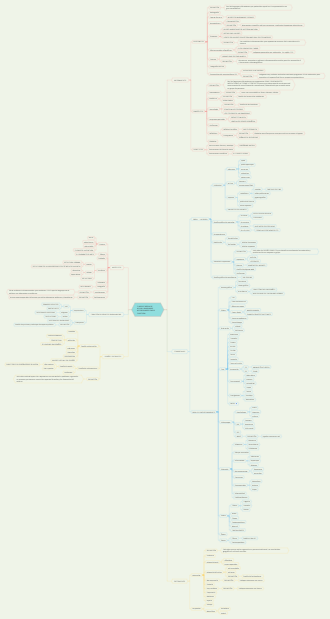
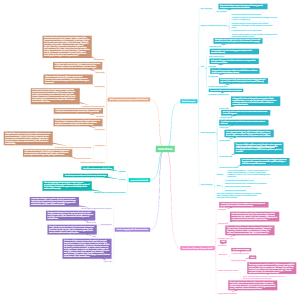

DOM Abstractions in Angular
Abstractions
NOTE
Before updating the Dom Properties Directly we should try to update the bindings in Angular. As Change Detection in Angular works with the View and changes are updated from View to DOM and the not the other way around. So Avoid Updating DOM Directly.
ElementRef
Most basic abstraction in Angular. It only holds the native element that its associated with. It is just a wrapper around the dom element.
How to get this?
1. If we ask for dependency of ElementRef in constructor it will give the reference to the host element for a component or directive.
2. We can use @ViewChild query to get ElementRef
Caution:
Try to avoid manipulating DOM directly via native element property of Element Ref directly.
this.elementRef.nativeElement.innerText=""
the above code assumes the application will always be running in the browser. We should use Renderer to update DOM !
this.renderer.setAttribute(this.elementRef.nativeElement,this.addAttribute.name,this.addAttribute.value);
Angular has been built from ground up to work in different environments like server side or on a native mobile device.
More on this in Renderer API
TemplateRef
TemplateRef instance refers to <ng-template> elements, Basically whats inside it.
<ng-template #template let-heading="heading"> <h1 appHighlight>{{heading}}</h1></ng-template>
TemplateRef is for ng-template
and it has elementRef property which has native element
So angular just adds TemplateRef for ng-template
It holds a reference to host element in elementRef property, & has one very useful method, createEmbeddedView
createEmbeddedView method is very useful, since it allows us to create embedded view and return a reference to it as ViewRef.
Implementation
<ng-template #template let-heading="heading"> <h1 appHighlight>{{heading}}</h1></ng-template>
@ViewChild('template') template:TemplateRef<any>|undefined; @ViewChild('container',{read:ViewContainerRef}) container:ViewContainerRef|undefined;
Call below method in ngAfterViewInit as viewChild queries are just updated before invoking this hook
approach1() { if(this.container && this.template) { const view = this.template.createEmbeddedView({heading:"Comments"}); this.container.insert(view); } }
ViewRef
This type of abstraction represents an Angular View
Angular supports 2 types of view:
Embedded Views
<ng-template>
Host Views
Created from components
Embedded Views
First a template needs to be accessed from view with in a component as TemplateRef using ViewChild and Template Reference Variable.
And we also need one ViewContainerRef where we will insert the view
Implementation 1
<ng-template #template let-heading="heading"> <h1 appHighlight>{{heading}}</h1></ng-template><div #container ></div>
@ViewChild('template') template:TemplateRef<any>|undefined; @ViewChild('container',{read:ViewContainerRef}) container:ViewContainerRef|undefined;
approach2() { if(this.container && this.template) { const view:ViewRef = this.container.createEmbeddedView(this.template,{heading:"comments"}); } }
ngAfterViewInit(): void { this.approach1(); this.approach2(); this.changeDetector.detectChanges(); }
We can achieve the same functionality without having to do all this stuff in component
Implementation 2
<ng-template #template let-heading="heading"> <h1 appHighlight>{{heading}}</h1></ng-template>
<div *ngTemplateOutlet="template;context:{heading:'Comments'}">
Basically it is a directive which asks for ViewContainerRef in its constructor via dependency injection, which is a host element, & we pass the template reference as input, so it does the same thing.
Host Views
Host Views are created when we insert the component dynamically, using create component we will see this later.
ComponentRef
Represents Component created by a component factory, provides access to the component factory.
ViewContainerRef
Represents a container where one or more views can be attached.
Any DOM element can be used as a container, but <ng-container> is preffered.
Angular doesn't insert view inside the element, but appends them after element bound to view container. Similar to how router outlet works.
Manipulating DOM
Short Story
Renderer
Use when we need to change/read Dom Element properties
ViewContainerRef
When we need to modify DOM Hierarchy
Directives
Rendering Logic
Components
Presentation Logic
Best Practices
Angular is designed to run on multiple platforms, web workers, server side rendering, browser, mobile environment, desktop environment. Therefore an extra layer of abstraction was introduced on top of pure DOM. Abstractions like ElementRef, ViewContainerRef, ViewRef
Presentation Logic vs Rendering Logic
Presentation Logic
How buisness data should be presented to user.
Example you have a set of tasks, say done or pending tasks , you want to show pending task on left column & done tasks on right column like in jira
This goes in Components
Rendering
Rendering Logic uses this information to actually render data on the screen. So it works with the DOM. Arranges Dom nodes in certain order apply styles to them.
We have an extra layer between Component & DOM which is directives, this is the place where we should put our rendering logic.
Correct Mindset
Split Presentation & Rendering Logic
Put presentation logic in components
Put rendering logic in Directives
Use data binding for communication between component & directives
Benefits:
Presentation Logic reuse accross the platforms
Rendering Logic Reuse accross the APP
Lets see this using example:
Angular doesn't provide directive to add an attribute.
Server Side under the hood uses library called Domino & that library implements Dom on the server side. But in other we might not have Dom Environment like Web Workers
Types of DOM Operations
Modifying DOM Elements
Like
classList.add()
setAttribute()
style.setProperty
Best Tools to Perform
Renderer2
BuiltIn Attribute Directives which uses Renderer2
NgStyle
NgClass
Modifying DOM Hierarchy
Like
createElement()
appendChild()
removeChild()
remove()
Best tool to perform
ViewContainerRef
Builtin Structural Directives which uses ViewContainerRef
*ngIf
*ngFor
*ngSwitch
Renderer
Makes direct DOM access safe.(platform independent) as every platform has its own implementation
this.elementRef.nativeElement.setAttribute(this.addAttribute.name,this.addAttribute.value)
this.renderer.setAttribute(this.elementRef.nativeElement,this.addAttribute.name,this.addAttribute.value);
How does renderer makes code portable to another platforms?
Implementation of Renderer is always platform specific.
Its not like a wrapper.
Component & Renderer
Each Component defines how it wants its view to be rendered. using shadow dom, emulated or none. & Depending upon type of View Encapsulation Mode defines, Angular will create a specific dedicated renderer for each component.
There is one to one relationship between Renderer & Component.
That is why Services can't be injected with Renderer!
Why not use Renderer for Dom Modification
It has methods like createElement,removeElement, But we should not use Renderer for DOM hierarchy changes. BUT WHY?
Angular doesn't work with components,or the dom directly, instead it uses an underlying representation of a component known as the view. View stores references to DOM nodes. Every component has a view.
Change detection work with the view, any changes in the view are reflected in the DOM. Its a one-way process, there's no backward synchronization like from DOM to View. Therefore if you change DOM directly, the view is not updated(affected). All Angular specific things like ChangeDetection,ViewChild queries work on view & not on DOM. If we direclty remove elements from DOM, they still remain in View, which can cause memory leaks! & what's worse is Change detection will still run through all components in component tree.
That's why we should not use Renderer to Change DOM hierarchy, as it only updates DOM & not View. & we should update view, because changes goes from View to DOM & not the other way around. Thats why we should ViewContainerRef.
ViewContainerRef
We should use Templating Technique & ViewContainerRef for Dom modification. as they work with the view not the DOM directly. Thus both View & DOM are in SYNC.
createComponent with components
createEmbeddedViews using TemplateRefs
Manipulate Views
Insert
move
detach
Conclusions
1. Put presentation logic into components!
2. Use Custom Directives to implement DOM manipulation logic
3. Use Renderer When Direct Access to native DOM API is necessary
4. Use templating technique & View Containers to modify DOM Hierarchy
CreateEmbeddedView vs CreateComponent
Basics
These both methods are used to dynamically add content to the component view (DOM).
This content can be either a template or a component based. In Angular we usually manipulate the DOM using ViewContainerRef. And both these methods are available on it:
class ViewContainerRef { ... abstract createEmbeddedView<C>(templateRef: TemplateRef<C>, context?: C, options?: { index?: number; injector?: Injector; }): EmbeddedViewRef<C>. ...... abstract createComponent<C>(componentType: Type<C>, options?: { index?: number; injector?: Injector; ngModuleRef?: NgModuleRef<unknown>; environmentInjector?: EnvironmentInjector | NgModuleRef<unknown>; projectableNodes?: Node[][]; }): ComponentRef<C>}
createEmbeddedView
it's used to create a view using TemplateRef. TemplateRef is created by Angular compiler when it encounters ng-template tag in your component html. The view created using this method is called an embedded view.
This approach is used by all structural directives like *ngIf and *ngFor because they are all wrap a ng-template.
createComponent
The view created using this method is called a hostview.
Instantiates a single component and inserts its host view into this container.
this function doesn't need factories now, with ivy, we can just pass component name.
this.container.createComponent(CommentsComponent);
https://stackoverflow.com/questions/46338790/what-is-the-difference-between-createembeddedview-and-createcomponent
Accessing Abstractions in
Component
@ViewChild,@ViewChildren,@ContentChildren,@ContentChild are the ways for us to access these abstractions in components.
If its a simple Html Element Angular returns ElementRef (which is wrapper around the native Dom Element)
For Child Components, Angular returns Component Instance
And these decorators can take template reference variables, component or directive class type for template querying
Above discussed is the default behavior, sometimes we want to reference some other abstractions like ViewContainerRef or TemplateRef which cannot be inferred, so we should ask for it specifically by declaring read parameters with type.
@ViewChild(selector,{read:any,static:boolean})
Directive
In directives we can use Dependency Injection and directly ask for Abstractions like ElementRef,TemplateRef,ViewContainerRef.
Dynamic Components
https://github.com/sgarg5858/view-content-queries-in-angular/tree/10-dynamic-components
https://angular.io/guide/dynamic-component-loader
Constructing Dynamic Components now dont need ComponentFactoryResolver with IVY.
Renderer
1. Allows us to manipulate DOM without accessing the DOM directly. Provides a layer of abstraction between the DOM & Component.
2. We can directly modify the DOM, but there are many problems with that:
1) Angular can run on multiple platforms if we access DOM directly, then it cannot run on other platforms like web workers where DOM is not there.
3) Dom APIS do not sanitize data. Hence makes App Vulnerable to XSS Injection Attacks.
2) Anglar keeps the Model & Template in Sync using Change Detection. Angular work with view (internal representation of components) not with DOM , any changes in View are reflected to DOM, but direct changes to DOM are not reflected in View.Therefore we shouldn't directly access the DOM.
Renderer makes DOM manipulation platform Independent. Angular provides multiple implementations of Renderer , basically platform specific implementation.
Each Component defines View Encapsulation Mode like None,Emulated,Shadow DOM. Depending upon Encapsulation Mode, Angular creates a dedicated Renderer for component. There is one to one mapping between component & Renderer.
Thats why we can't inject renderer, in services.
Renderer is suitable for modifying styles,classes,attributes & ngStyle , ngClass attribute directives also use them internally.
But for modifying DOM Hierarchy like adding & removing elements, we should not use Renderer as it doesn't updates the view, it updates DOM. We should use ViewContainerRef & TemplateRef or HostViews as Angular CD works With Views . So at all times our view is updated, which in turn makes sure DOM is updated. We know Changes go from view to DOM & not vice vers
Manipulating DOM
Short Story
Renderer
Use when we need to change/read Dom Element properties
ViewContainerRef
When we need to modify DOM Hierarchy
Directives
Rendering Logic
Components
Presentation Logic
Best Practices
Angular is designed to run on multiple platforms, web workers, server side rendering, browser, mobile environment, desktop environment. Therefore an extra layer of abstraction was introduced on top of pure DOM. Abstractions like ElementRef, ViewContainerRef, ViewRef
Presentation Logic vs Rendering Logic
Presentation Logic
How buisness data should be presented to user.
Example you have a set of tasks, say done or pending tasks , you want to show pending task on left column & done tasks on right column like in jira
This goes in Components
Rendering
Rendering Logic uses this information to actually render data on the screen. So it works with the DOM. Arranges Dom nodes in certain order apply styles to them.
We have an extra layer between Component & DOM which is directives, this is the place where we should put our rendering logic.
Correct Mindset
Split Presentation & Rendering Logic
Put presentation logic in components
Put rendering logic in Directives
Use data binding for communication between component & directives
Benefits:
Presentation Logic reuse accross the platforms
Rendering Logic Reuse accross the APP
Lets see this using example:
Angular doesn't provide directive to add an attribute.
Server Side under the hood uses library called Domino & that library implements Dom on the server side. But in other we might not have Dom Environment like Web Workers
Types of DOM Operations
Modifying DOM Elements
Like
classList.add()
setAttribute()
style.setProperty
Best Tools to Perform
Renderer2
BuiltIn Attribute Directives which uses Renderer2
NgStyle
NgClass
Modifying DOM Hierarchy
Like
createElement()
appendChild()
removeChild()
remove()
Best tool to perform
ViewContainerRef
Builtin Structural Directives which uses ViewContainerRef
*ngIf
*ngFor
*ngSwitch
Renderer
Makes direct DOM access safe.(platform independent) as every platform has its own implementation
this.elementRef.nativeElement.setAttribute(this.addAttribute.name,this.addAttribute.value)
this.renderer.setAttribute(this.elementRef.nativeElement,this.addAttribute.name,this.addAttribute.value);
How does renderer makes code portable to another platforms?
Implementation of Renderer is always platform specific.
Its not like a wrapper.
Component & Renderer
Each Component defines how it wants its view to be rendered. using shadow dom, emulated or none. & Depending upon type of View Encapsulation Mode defines, Angular will create a specific dedicated renderer for each component.
There is one to one relationship between Renderer & Component.
That is why Services can't be injected with Renderer!
Why not use Renderer for Dom Modification
It has methods like createElement,removeElement, But we should not use Renderer for DOM hierarchy changes. BUT WHY?
Angular doesn't work with components,or the dom directly, instead it uses an underlying representation of a component known as the view. View stores references to DOM nodes. Every component has a view.
Change detection work with the view, any changes in the view are reflected in the DOM. Its a one-way process, there's no backward synchronization like from DOM to View. Therefore if you change DOM directly, the view is not updated(affected). All Angular specific things like ChangeDetection,ViewChild queries work on view & not on DOM. If we direclty remove elements from DOM, they still remain in View, which can cause memory leaks! & what's worse is Change detection will still run through all components in component tree.
That's why we should not use Renderer to Change DOM hierarchy, as it only updates DOM & not View. & we should update view, because changes goes from View to DOM & not the other way around. Thats why we should ViewContainerRef.
ViewContainerRef
We should use Templating Technique & ViewContainerRef for Dom modification. as they work with the view not the DOM directly. Thus both View & DOM are in SYNC.
createComponent with components
createEmbeddedViews using TemplateRefs
Manipulate Views
Insert
move
detach
Conclusions
1. Put presentation logic into components!
2. Use Custom Directives to implement DOM manipulation logic
3. Use Renderer When Direct Access to native DOM API is necessary
4. Use templating technique & View Containers to modify DOM Hierarchy