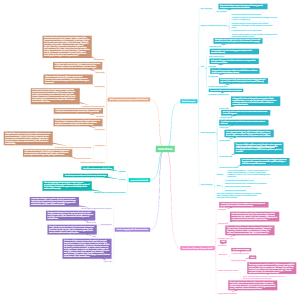
MindMap Gallery Hardware Components
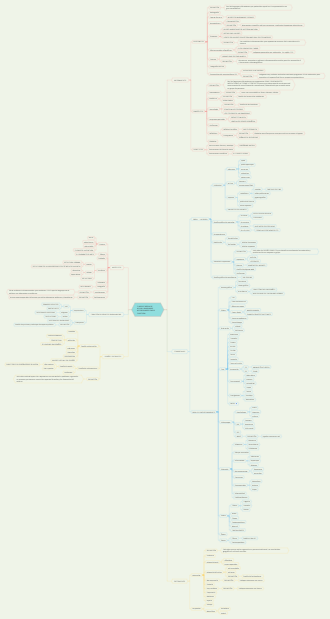
Hardware and software are two fundamental components of modern computer systems, working together to enable the functionality and operation of digital devices. Here's a breakdown of each component and their roles. The synergy between hardware and software is essential for the operation and utility of modern computing systems.
Edited at 2022-10-01 04:34:26Hardware
*Central processing unit (CPU): Athematic/logic unit, the control unit and the register areas
Multiprocessing:
Simultaneous execution of two or more instructions at the same time
Multicore microprocessor:
Combines two or more independent processors into a single computer Quad-core, six-core, and eight-core. Heat build-up is a problem with fast processors
ARM manufactures energy efficient chip used in smart phones and tablet computers
Parallel computing: Simultaneous execution of the same task onmultiple processors to obtain result faster
Grid computing: Use of a collection of computers, to work in coordinated manner to solve a common problem
Arithmetic/logic unit (ALU): performs mathematical calculations and makes logical comparisons
Control unit: Sequentially accesses program instructions, decodes them, and coordinates the flow of data in and out of the ALU, registers, primary storage, and even secondary storage and various output devices
Memory Characteristics and Functions
Random access memory (RAM): Temporary and volatile
Read-only memory (ROM):
Nonvolatile, and Provides permanent storage for data and instructions that
Secondary Storage and Input and Output Devicesrr
Secondary storage: ● Also called permanent storage ● Compared with memory, offers the advantages of nonvolatility, greater capacity, and greater economy ● Considerably slower than memory
Access Methods
Sequential access: Data must be retrieved in the order in which it stored.
Sequential access storage devises (SASDs). Data must be retrieved in the order in which it is stored
Direct access: Records can be retrieved in any order
irect access storage devises (DASDs). Recodes can be retrieved in any order
Input Devices|
Devices used to input general types of data:
Personal computer input devices Digital cameras Magnetic ink character recognition (MICR) devices
Output Devices
Display monitors: ● Used to display the output from the computer
Digital audio player: ● Can store, organize, and play digital music files
Secondary Storage Devices
Magnetic tapes: ● Primarily for storing backups of critical data
Magnetic disks: ● Direct-access storage device
Redundant array of independent/inexpensive disks (RAID): Method of storing data that generates extra bits of data from existing data so that if a hard drive fails, the lost data on that drive can be rebuilt
Virtual tape: ● Storage technology for less frequently needed data
Storage area network: ● Uses computer servers, distributed storage devices, and networks to tie everything together
Optical discs: ● Common form of optical disc on which data cannot be modified once it has been recorded
Digital video disc (DVD): ● Storage medium used to store software, video games, and movies
● Solid state secondary storage devices: Have few moving parts, so they are less fragile than hard disk drives
Storage as a Service: ● Data storage service provider rents space to people and organizations
Computer System Types
Can range from desktop (or smaller) portable computers to massive supercomputers that require housing in large rooms
Portable computers: #handheld computers. #laptop computers. #notebook computers.
Nonportable computers: #desktop computers. #nettop computers. #workstations
Green computing: Concerned with the efficient and environmentally responsible design, manufacture, operation, and disposal of IS-related products.
Software
Systems Operating systems
Cell phone embedded systems and operating systems: ● Embedded systems provide communication and limited personal information management services Embedded operating systems: ● Included with or embedded into small computer devices ● Designed to perform specialized tasks such as controlling fuel injection, digital camera, GPS device Symbian is a popular cell phone operating system ● Cell phone operating systems have transformed into full-fledged personal computer operating systems ● iPhone OS, Google Android, Microsoft Windows Mobile, webOS, Symbian all have APIs and software development kits
Enterprise Operating Systems
z/OS: ● IBM’s first 64-bit enterprise OS HP-UX: ● Robust UNIX-based OS from Hewlett-Packard ● Supports online transaction processing and Web applications
Workgroup Operating Systems
Windows Server: ● Can be used to prevent unauthorized disclosure of information UNIX: ● Can be used on many computer system types and platforms Red Hat Linux: ● Can manage a cluster of up to eight servers Mac OS X Server: ● Includes support for 64-bit processing
Current Operating Systems:
Microsoft PC operating systems: ● Windows XP, Vista, 7, 8 and 10 Apple computer operating systems: ● Can dual boot – run both Windows and Mac ● Mountain Lion Linux: ● Red Hat Linux ● Caldera OpenLinux Google: ● Chrome
Activities performed by the operating system: Manage system memory ● Manage processing tasks ● Provide networking capability
Common hardware functions: ● Get input from keyboard or another input device ● Retrieve data from disks ● Store data on disks
Command-based user interface: ● Requires that text commands be given to the computer to perform basic activities Graphical user interface (GUI): ● Uses icons and menus displayed on screen to send commands to the computer system Natural user interface: ● Touch user interface Hardware independence: Application program interface (API): ● Allows applications to make use of the operating system Memory management: Allows computer to execute program instructions effectively and to speed processing Processing tasks: Multitasking: ● More than one program can run at the same time Time-sharing: ● Allows more than one person to use a computer system at the same time Scalability: ● Ability of the computer to handle an increasing number of concurrent users Networking capability: ● Allows computers in a network to send and receive data and share computing resources ● Access to system resources and security: ● Protection against unauthorized access ● OS establishes a logon procedure ● File management: ● Ensures that files in secondary storage are available when needed and that they are protected from access by unauthorized users
Set of programs that controls computer hardware and acts as an interface with application programs Can control one computer or multiple computers
Utility programs
Application Software for Information, Decision Support, and Specialized Purposes Available in every industry: ● Specialized application software for information, decision support, and other purposes Examples include: ● Blackboard and other learning management software ● Software to visualize and analyze the human genome ● Decision support software to pick the next hit song
Enterprise Application Software: ● Software that benefits an entire organization ● Enterprise resource planning (ERP) software: ● Set of integrated programs that manage a company’s vital business operations for an entire multisite, global organization ● Must be able to support many legal entities, languages, and currencies
Subtopic
Workgroup Application Software: ● Support teamwork, whether people are in the same location or dispersed around the world\ Groupware: ● Software that helps groups of people work together more effectively
Mobile Application Software: ● Number of apps for smartphones and other mobile devices has exploded Developed by third parties and available from the Apple App Store for the iPhone and from the Android Market for Android handsets
Help to perform maintenance or correct problems with a computer system Some can help computer systems run better and longer without problemsCan help to secure and safeguard data
Personal Application Software: ● Word processing ● Spreadsheet analysis ● Database applications ● Graphics program
Overview of Application Software:
Software as a service (SaaS): ● Allows businesses to subscribe to Web-delivered business application software by paying a monthly service charge or a per-use fee Cloud computing: ● Use of computing resources, including software and data storage, on the Internet (the cloud) rather than on local computers
Types and Functions of Application Software:
Proprietary software: ● One-of-a-kind program for a specific application, usually developed and owned by a single company Off-the-shelf software: ● Existing software program that is purchased Application service provider (ASP): ● Company that can provide software, support, and computer hardware on which to run the software from the user’s facilities over a network
Application Software:
Application programs: ● Interact with systems software and the systems software directs computer hardware to perform necessary tasks Help you perform common tasks, such as: ● Creating and formatting text documents ● Performing calculations ● Managing information ● Some applications are more specialized
Middleware:
Software that allows various systems to communicate and exchange data ● Often developed to address situations where a company acquires different information systems through mergers, acquisitions or expansion ● Use of middleware has evolved into the service oriented architecture (SOA) approach to develop systems to allow users to interact with systems and systems to interact with each other
Programming Languages
Sets of keywords, symbols, and a system of rules for constructing statements: ● By which humans can communicate instructions to be executed by a computer
Programming: ● Involves translating what a user wants to accomplish into instructions that the computer can understand and execute
Software Issues and Trends: ● Software bug: ● Defect in a program that keeps it from performing as it should Some tips for reducing impact of software bugs: ● Register all software ● Check read-me files for workarounds
Copyrights and Licenses: ● Most software products are protected by law using copyright or licensing provisions: ● In some cases, you are given unlimited use of software on one or two computers ● In other cases, you pay for your usage: ● If you use the software more, you pay more
Software Upgrades: When software companies stop supporting older software versions or releases: ● Some customers feel forced to upgrade to the newer software Deciding whether to purchase the newest software: ● Can be a problem for corporations and people with a large investment in software
Global Software Support: Supporting local operations: ● One of the biggest challenges IS teams face when putting together standardized, company-wide systems Trend: ● Outsourcing global support to one or more thirdparty distributors