MindMap Gallery AWS Certified Developer Study Notes
The mind map on "AWS Certified Developer" serves as a comprehensive guide for individuals pursuing certification in Amazon Web Services (AWS) as a Developer. AWS certifications validate the skills and expertise required to design, deploy, and maintain applications on the AWS platform. This visualization aims to provide a structured overview of key topics, skills, and considerations essential for those seeking the AWS Certified Developer credential.
Edited at 2023-05-17 11:05:27AWS Certified Developer

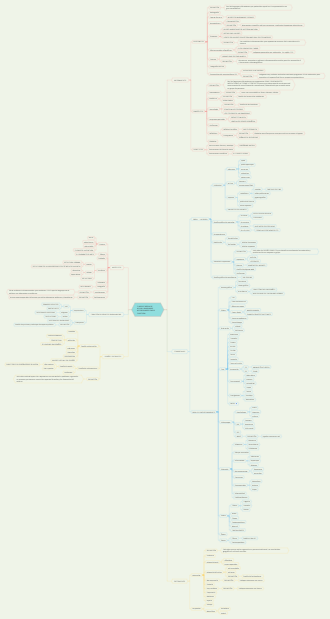
COMPUTE
AMI Amazon Machine Image
Base EC2 --> AMI --> New EC2 Instance
AMI are a customisation of an EC2 instance - You add your own software, configuration, operating system, monitoring etc. - Faster boot / configuration time because all your software is pre-packaged AMI are built for a specific region but can be copied across regions You can launch EC2 instances from: - A Public AMI: AWS provided - Your own AMI: You make and maintain them yourself - An AWS Marketplace AMI: an AMI someone else made (and potentially sells)
EC2 Instance Elastic Compute Cloud
6 Types
General Purpose
Instance type examples: M7g, Mac, M6g, M6i, M6in, M6a, M5, M5n, M5zn, M5a, A1, T3, T3a, T2
Compute Optimisation
Instance type examples: C7g, C7gn, C6i, C6in, C6a, C6g, C6gn, C5, C5n
Memory Optimisation
Instance type examples: R7g, R7iz, R6g, R6i, R6in, R6a, R5, R5n, R5b, X2gd, X2idn, X2iedn, X1, X1e, HighMemory, z1d
Accelerated Computation
Instance type examples: P4, P3, P2, DL1, Trn1, Inf2, Inf1, G5, G5g, F1, VT1
Storage Optimisation
Instance type examples: Im4gn, Is4gen, I4g, I4i, I3, I3en, D2, D3, D3en, H1
HPC Optimisation
Instance type examples: hpc6id, hpc6a.
Setup
Operating System: Linux, Windows or Mac OS How much compute power & cores (CPU) How much random-access memory (RAM) How much storage space: - Network-attached (EBS & EFS) - Hardware (EC2 Instance store Network card: speed of the card, Public IP address Firewall rules: Security group Bootstrap script (configure at first launch): EC2 User Data
Security Groups
Security Groups are acting as a ‘firewall’ on EC2 instances They regulate: - Access to ports - Authorised IP ranges - IPv4 and IPv6 - Control of inbound network (from other to the Instance) - Control of outbound network (from Instance to the other) - Example of Security Group Rules: - 0.0.0.0/0 = everything Can be attached to multiple instances Locked down to a region /VPC combination
Classic Ports
22 = SSH (Secure Shell) - log into a Linux instance 21 = FTP (File Transfer Protocol) - upload files into a file share 22 = SFTP (Secure File Transfer Protocol) - upload files using SSH 80 = HTTP - access unsecured websites 443 = HTTPS - access secured websites 3389 = RDP (Remote Desktop Protocol) - log into a Windows instance
SSH
Purchasing Options (7 types)
On demand
Pay, by the second, for the instances that you launch. short workload, predictable pricing Pay for what you use Linux or Windows - billing per second after the first minute All other operating systems - billing per hour Has the highest cost but no upfront payment No long-term commitment Recommended for short-term and un-interrupted workloads, where you can’t predict how the application will behave
Reserved Instances
1 or 3 year term Reduce your Amazon EC2 costs by making a commitment to a consistent instance configuration, including instance type and Region Reserved Instances - long workloads Convertible Reserved Instances - long workloads with flexible instances Up to a 72% discount compared to On-Demand You reserve a specific instance attributes (Instance Type, Region, Tenancy, OS) Reservation Period - 1 year (+discount) or 3 years (+++discount) Payment Options - No upfront (+), Partial Upfront (++), All upfront (+++) Reserved Instance’s Scope - Regional or Zonal (reserve capacity in an AZ (Availability Zone) Recommended for steady-state usage applications (think database) You can buy and sell in the Reserved Instance Marketplace Convertible Reserved Instance - Can change the EC2 Instance type, Instance family, OS, scope and tenancy - Up to a 66% discount
Saving Plans
1 or 3 year term Commit to a specific spending Reduce your Amazon EC2 costs by making a commitment to a consistent amount of usage, in USD per hour commitment to an amount of usage, long workload Instead of committing to a specific Instance type, you commit to a specific amount of usage in $ Get a discount based on long-term usage (up to 72% - same as RIs) Commit to a certain type of usage (eg. $10/hour for 1 or 3 years) Usage beyond EC2 Savings Plans is billed at the On-Demand price Locked to a specific instance family & AWS region (eg., M5 in us-east-1) Flexible across: - Instance Size (eg., m5.xlarge, m5.2xlarge) - OS (eg., Linux, Windows) - Tenancy (Host, Dedicated, Default)
Spot Instances
short workloads, cheap, can loose instances (less reliable) Request unused EC2 instances, which can reduce your Amazon EC2 costs significantly. Can get a discount of up to 90% compared to on demand Instances that you can “loose” at any point of time if your max price is less than the current spot price The most cost-effective instances in AWS Useful for workloads that are resilient to failure - Batch jobs - Data analysis - Image processing - Any distributed workloads - Workloads with a flexible start and end time Not suitable for critical jobs or databases
Dedicated Hosts
Pay for a physical host that is fully dedicated to running your instances, and bring your existing per-socket, per-core, or per-VM software licenses to reduce costs. book an entire physical server, control instance placement A physical server with EC2 instance capacity fully dedicated to your use Allows you address compliance requirements and use your existing server-bound software licenses (per-socket, per-core, per VM software licenses) Purchasing Options: - On-demand - pay per second for active Dedicated Host - Reserved - 1 or 3 years (No Upfront, Partial Upfront, All Upfront) The most expensive option Useful for software that have complicated licencing model (BYOL - Bring Your Own License) Or for companies that have strong regulatory or compliance needs
Dedicated Instances
Pay, by the hour Instances run on single-tenant hardware. no other customers will share your hardware Instances run on hardware that’s dedicated to you May share hardware with other instances in same account No control over instance placement (can move hardware after a Stop / Start)
Capacity Reservation
Reserve capacity for your EC2 instances in a specific Availability Zone for any duration. Reserve capacity in a specific AZ (Availability Zones) for any duration Reserve On-Demand instances capacity in a specific AZ for any duration You always have access to EC2 capacity when you need it No time commitment (create/cancel anytime), no billing discounts Combine with Regional Reserved Instances and Savings Plans to benefit from billing discounts You’re charged at On-Demand rate whether you run instances or not Suitable for short-term, uninterrupted workloads that need to be in a specific AZ
STORAGE
Instance Store (high performance)
• If you need a high-performance hardware disk, use EC2 Instance Store • Better I/O performance • EC2 Instance Store lose their storage if they’re stopped (ephemeral) • Good for buffer / cache / scratch data / temporary content • Risk of data loss if hardware fails • Backups and Replication are your responsibility
EBS Volume Elastic Block Store
6 types EBS volumes are network drives with good but “limited” performance
General Purpose (SSD) gp2, gp3 Can be used as boot volume
Cost effective storage, low latency System boot volumes, Virtual Desktops, development and test environments 1GB – 16TB gp3 (newer generation): - Baseline of 3,000 IOPS and throughput of 125 MB/s - Can increase IOPS up to 16,000 and throughput up to 1000 MB/s independently (not linked) gp2 (older version): - Small gp2 volumes can burst IOPS to 3,000 - Size of the volume and IOPS are linked, max IOPS is 16,000 - 3 IOPS per GB, means at 5,334 GB we are at the max IOPS
Provisional IOPS (SSD) io1, io2 Can be used as boot volume
Highest-performance SSD volume for mission-critical low-latency or high-throughput workloads Critical business applications with sustained IOPS performance Or applications that need more than 16,000 IOPS Great for database workloads (sensitive to storage performance and consistency) io1 / io2 (SSD) (4GB – 16 TB): - Max PIOPS: 64,000 for Nitro EC2 instances & 32,000 for other - Can increase PIOPS independently from storage size - io2 have more durability and more IOPS per GB (at the same price as io1) io2 Block Express (4GB – 64TB): - Sub-milisecond latency - Max PIOPS: 256,000 with an IOPS:GB ratio or 1,000:1 - 256,000 is the maximum IOPS you can achieve when you're using the EBS io2 Block Express volume type. Supports EBS Multi-attach
EBS Multi-Attach – io1/io2 family
Attach the same EBS volume to multiple EC2 instances in the same AZ Each instance has full read & write permissions to the high-performance volume Use case: - Achieve higher application availability in clustered Linux applications (eg. Teradata) - Applications must manage concurrent write operations - Can connect up to 16 EC2 Instances at a time - Must use a file system that is cluster-aware (not XFS, EXT4, etc….)
st1 (HDD)
Low cost HDD volume designed for frequently accessed throughput-intensive workloads • Big Data, Data Warehouses, Log Processing • Max throughput 500 MiB/s – max IOPS 500
sc1 (HDD)
Lowest cost HDD volume designed for less frequently accessed workloads • For data that is infrequently accessed • Scenarios where lowest cost is important • Max throughput 250 MiB/s – max IOPS 250
Snapshots
Make a backup (snapshot) of your EBS column at a point in time Not necessary to detach volume to do a snapshot, but it is recommended Can copy snapshots across AZ or Region EBS Snapshot Archive - Move a Snapshot to an “Archive Tier” that is 75% cheaper - Takes within 24 to 72 hours for restoring the archive
Recycle Bin
Snapshots → Recycle bin Setup rules to retain deleted snapshots so you can recover them after an accidental deletion Specify retention from 1 day to 1 year
Delete on Termination attribute
Controls the EBS behaviour when EC2 instance terminates - By default, the Root EBS volume is deleted (attribute enabled) - By default, any other attached EBS volume is not deleted (attribute disabled) This can be controlled by the AWS console /AWS CLI Use case: preserve root volume when instance is terminated, you can disable ‘Disable on termination’
EFS Elastic File System
Amazon Elastic File System (Amazon EFS) provides a simple, scalable, elastic file system for general purpose workloads for use with AWS Cloud services and on-premises resources. Managed NFS (network file system) that can be mounted on many EC2 Mounts to 100's Instances over different AZs Highly available, scalable, expensive (3x gp2 price), pay per use Protected by a Security Group --- Use cases: content management, web serving, data sharing, Wordpress Uses NFSv4.1 protocol Uses security group to control access to EFS Compatible with Linux based AMI (not Windows) Encryption at rest using KMS POSIX file system (Linux) that has a standard file API File system scales automatically, pay-per-use (per GB), no capacity planning!
Performance
EFS Scale - 1000s of concurrent NFS clients, 10 GB+ of throughput - Grow to Petabyte-scale NFS, automatically Performance Mode (set at EFS creation time) General Purpose (default) – latency-sensitive use cases (web server, CMS, etc…) Max I/O – higher latency throughput, highly parallel (big data, media processing) Throughput Mode Bursting – 1TB = 50MB/s + burst or up to 100MB/s Provisioned – set your throughput regardless of storage size, eg. 1 GB for 1 TB storage Elastic – automatically scales throughput up or down based on your workloads Up to 3GB/s for reads and 1GB/s for writes Used for unpredictable workloads
Storage Classes
Storage Tiers (lifecycle management feature – move file after N days) Standard: for frequently accessed files Infrequent access (EFS-IA): cost to retrieve files, lower price to store. Enable EFS-IA with a Lifecycle Policy Availability and durability Standard: Multi-AZ, great for production One Zone: One AZ, great for dev, backup enabled by default, compatible with IA (Infrequent Access) storage tier (EFS One Zone-IA) Over 90% in cost savings
DATABASE
NETWORKING
IAMS Identity and Access Management
Roles
Not used by people, but instead by IAM services
AWS CLI
Policies
Password Policy
Multi Factor Authentication (MFA)
AWS Access Keys, CLI, SDK
AWS SDK
AWS CloudShell
IAM Security Tools
IAM Credentials Report (account (Root) level)
IAM Access Adviser (user-level)
IAM Guidelines & Best Practices
AWS Budget Setup