MindMap Gallery Internet infrastructure
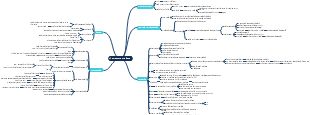
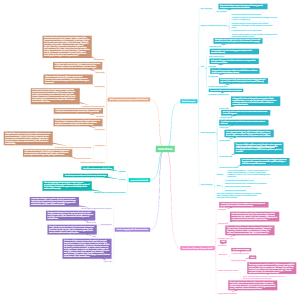
This mind map details the key areas of internet infrastructure, including main parts such as system development and website development, each further divided into sub-parts like chronological evolution, data processing, and system research. This visual tool, radiating from the central theme and comprising themes, branches, and keywords, imitates the neural network of the human brain, aiding in memory, information organization, and creativity stimulation.
Edited at 2023-07-29 09:37:35Katalog Layanan TIK
EdrawMind is a cross-platform and multi-functional mind mapping software newly released by Edrawsoft. It provides effective mind mapping solutions for problem-solving, brainstorming, knowledge management, business planning, note-taking, and project management. Users can enjoy from a wide range of impressive features including user-friendly interface, abundant layout options, exquisite icons and cliparts, high quality preset themes, import and export, and a large variety of templates. The program also focuses on collaboration capabilities such as task assignment, Gantt view, comment and cloud teamwork. What’s more, its presentation function is fantastic. You can choose to turn the map branches into slideshows automatically, or present the whole map in a big picture and traverse topics one by one. MindMaster offers a free version which is already good enough for most people’s needs, and the Pro version allows uses to access more advanced functions like high DPI support, cloud collaboration, etc.EdrawMind has been well received by worldwide fans since release, and it aims to be a superior and competent mind mapping tool with cutting edge functions and high user experience.
1. Start drawing mindmaps with ease
Topic
Press "Enter" to add a topic
Subtopic
Press "Ctrl + Enter" or "Insert" to add a subtopic
Floating Topic
Add an independent topic
Multiple Topics
Add multiple topics at one click
2. Make a professional mindmap
Relationship Line
Show the relationship between two topics
Callout
Show deteiled information of a topic
Boundary
Emphasize the topic and its subtopics as a whole
Summary
Sum up the content for better understanding
Customize Format
Topic shape
Color
Layout
Line
Mark
Priority
Progress
Face
Arrow
Flag
Star
Symbol
Customize Mark
Add and manage customized marks
Tag
Resuorce
Used in HR allocation for task management
Customize
Add and manage customized tags
Using Occasions
Daily planning
Project management
Task management
...
Hyperlink
Attachments such as pictures and documents
Folder
Internet Address
Current Document
Numbering
Number irems in a mindmap
Number topics at different levels
3. Colorful Format Design
Built-in Theme
Use built-in themes for free
9 themes for Free version, 30 themes for Pro version
Custom Theme
Create custom theme and save as your unique theme
Theme Color
Customize theme colors
Rainbow, single, symmetrical and alternate colors for Pro version
Background
49 built-in background pictures are available besides monochrome color background
Insert local images as background
Hand-drawn Style
Free for Pro version
Make a mindmap natural of hand-drawn style on computer
4. Abundant examples and templates
Cip Arts
Covering business, education, people, nature and technology etc.
Some are available for Free version and all for Pro version
Examples and Templates
Free editable built-in templates
Beginners and users at introductory level can use for reference
5. Slideshow
Auto-create Slides
Auto-create slides according to the logic distribution of a mindmap
Fullscreen Mode
Play slides in fullscreen mode
Traverse
Free for Pro version
Topic
Branch
Traverse topics and branches in fullscreen mode
Export and Print Slides
Free for Pro version
Export to PPT,PDF format
6. Gantt Chart
Generate Gantt Chart from Mindmap
Free for Pro version
Generate Gantt Chart from Mindmap at one click
Edit mindmap and Gantt chart simultaneously
Export Gantt Chart to PDF format
Task Management
Widely used in mindmaps for daily planning and task management
Task information added to a mindmap is in sync with corresponding Gantt chart
7. Brain Storm
Useful in collaboration
Suitable for online collaboration
Online version required
Quickly organize your ideas
8. Formula
Powerful built-in formula editor
9. Table
Display rich information easily
10. Import and Export
Import
MindManager File
XMind File
Edraw File
Export
Graphics
JPEG、PNG、GIF、BMP
Tiff
PDF、PS、EPS
Export editable PDF files in Pro version
MS Office Files
Word
PPT
Excel
Export editable Word、PPT、Excel files
Html Page
File
Free for Pro version
MindManager file
11. Share and Collaboration
Share
Share mindmaps to SNS
Cloud
Personal
Access personal documents at any time
Team
Share information and collaborate on mindmaps
1G Cloud Storage
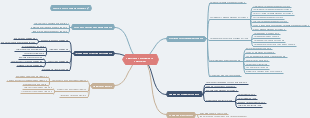
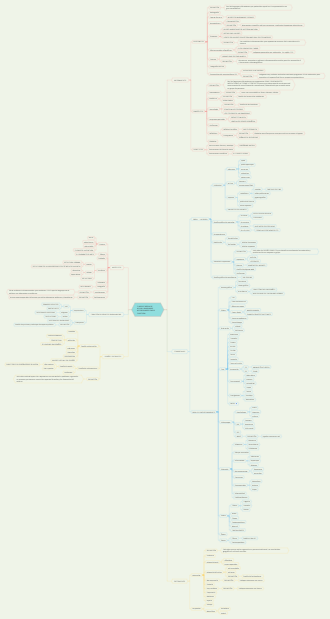
Katalog Layanan TIK UIN Syarif Hidayatullah Jakarta 2023 v1.0
TIK.4 Hosting dan Subdomain
TIK.4.1 Pembuatan Hosting dan Subdomain
SOP Pembuatan Hosting dan Subdomain
TIK.4.2 Perubahan/Penutupan Hosting dan Subdomain
SOP Perubahan/Penutupan Hosting dan Subdomain
TIK.4.3 Masalah Penggunaan Hosting dan Subdomain
SOP Masalah Hosting dan Subdomain
PIC Divisi: - Infrastrtuktur
TIK.5 Website
TIK.5.1 Pembuatan Akun Website CMS UINJKT
SOP Pembuatan Akun Website CMS UINJKT
TIK.5.2 Perubahan/Penutupan Akun Website CMS UINJKT
SOP Perubahan/Penutupan Akun Website CMS UINJKT
TIK.5.2 Masalah Penggunaan Website CMS UINJKT
SOP Masalah Website CMS UINJKT
PIC Divisi: - Data dan Informasi
TIK.6 Pengembangan Sistem
TIK.6.1 Pengembangan Modul Sistem Informasi
SOP Pengembangan Modul Sistem Informasi
TIK.6.2 Pengembangan Form Sistem Informasi
SOP Pengembangan Form Sistem Informasi
TIK.6.3 Pengembangan Laporan Sistem Informasi
SOP Pengembangan Laporan Sistem Informasi
TIK.6.4 Perbaikan Error/Bugs Sistem Informasi
SOP Perbaikan Error/Bugs Sistem Informasi
PIC Divisi: - Pengembangan Sistem Informasi
TIK.7 Data
TIK.7.1 Permohonan Data TIK
SOP Permohonan Data TIK
PIC Divisi: - Data dan Informasi
TIK.8 Pelatihan
TIK.8.1 Permohonan Pelatihan TIK
SOP Permohonan Pelatihan TIK
PIC Divisi: - Riset dan Bisnis - Data dan Informasi
TIK.3 Internet dan Infrastruktur
TIK.3.1 Informasi Akses Internet UINJKT
SOP Informasi Koneksi Internet UINJKT
TIK.3.2 Masalah Akses Internet UINJKT
SOP Masalah Akses Internet UINJKT
SOP Penilaian Kondisi Infrastruktur Jaringan
TIK.3.3 Pengadaaan Infrastruktur Jaringan
SOP Penilaian Kondisi Infrastruktur Jaringan
SOP Pengadaan Infrastruktur Jaringan
TIK.3.4 Pemeliharaan Infrastruktur Jaringan
SOP Pemeliharaan Infrastruktur Jaringan
SOP Penilaian Kondisi Infrastruktur Jaringan
TIK.3.5 Internet untuk Video Conference
SOP Internet Video Conference
TIK.3.6 Permohonan IP Publik
SOP Permohonan IP Publik
TIK.3.7 Penitipan Server (Colocation Server)
SOP Penitipan Server (Colocation Server)
PIC Divisi - Data dan Informasi - Infrastruktur
TIK.2 Email UINJKT
TIK.2.1 Pembuatan Akun Email UINJKT
SOP Pembuatan Akun Email UINJKT
TIK.2.2 Reset Password Akun Email UINJKT
SOP Reset Password Akun Email UINJKT
TIK.2.3 Perubahan/Penutupan Akun Email UINJKT
SOP Perubahan/Penutupan Akun Email UINJKT
TIK 2.4 Masalah Penggunaan Akun Email UINJKT
SOP Masalah Penggunaan Akun Email UINJKT
PIC Divisi - Data dan Informasi
TIK.1 eCampus
TIK.1.1 Pembuatan Akun eCampus
SOP Pembuatan Akun eCampus
TIK.1.2 Reset Password Akun eCampus
SOP Reset Password eCampus
TIK.1.3 Perubahan/Penutupan Akun eCampus
SOP Perubahan/Penutupan Akun eCampus
TIK.1.4 Masalah Penggunaan eCampus
SOP Masalah Penggunaan eCampus
PIC Divisi - Data dan Informasi