MindMap Gallery Requirements analysis software testing software engineering software design self-study mind map
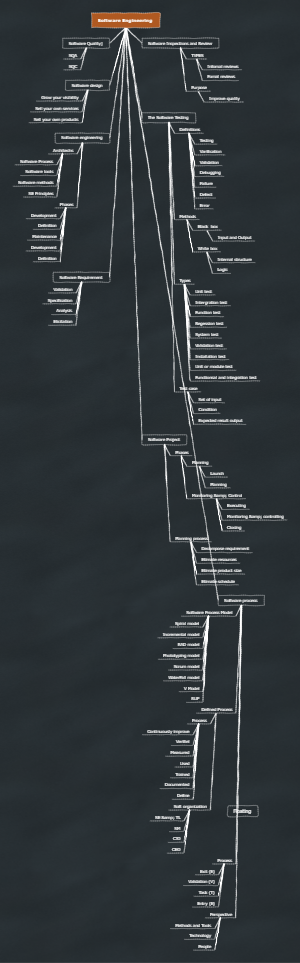
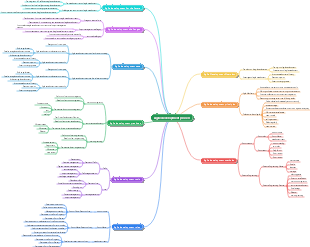
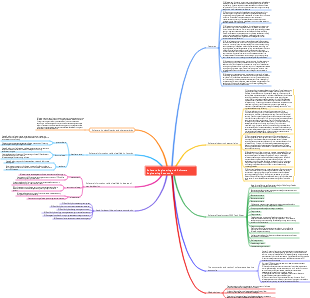
Requirements analysis, software testing, software engineering, software design self-study mind map, which organizes the content of requirements analysis, software design, software testing, software maintenance, software reuse, and software development environment. I hope this mind map will be helpful to you.
Edited at 2023-02-23 22:55:01This article discusses the Easter eggs and homages in Zootopia 2 that you may have discovered. The main content includes: character and archetype Easter eggs, cinematic universe crossover Easter eggs, animal ecology and behavior references, symbol and metaphor Easter eggs, social satire and brand allusions, and emotional storylines and sequel foreshadowing.

[Zootopia Character Relationship Chart] The idealistic rabbit police officer Judy and the cynical fox conman Nick form a charmingly contrasting duo, rising from street hustlers to become Zootopia police officers!
This is a mind map about Deep Analysis of Character Relationships in Zootopia 2, Main content: 1、 Multi-layer network of relationships: interweaving of main lines, branch lines, and hidden interactions, 2、 Motivation for Character Behavior: Active Promoter and Hidden Intendant, 3、 Key points of interaction: logic of conflict, collaboration, and covert support, 4、 Fun Easter eggs: metaphorical details hidden in interactions.
This article discusses the Easter eggs and homages in Zootopia 2 that you may have discovered. The main content includes: character and archetype Easter eggs, cinematic universe crossover Easter eggs, animal ecology and behavior references, symbol and metaphor Easter eggs, social satire and brand allusions, and emotional storylines and sequel foreshadowing.
[Zootopia Character Relationship Chart] The idealistic rabbit police officer Judy and the cynical fox conman Nick form a charmingly contrasting duo, rising from street hustlers to become Zootopia police officers!
This is a mind map about Deep Analysis of Character Relationships in Zootopia 2, Main content: 1、 Multi-layer network of relationships: interweaving of main lines, branch lines, and hidden interactions, 2、 Motivation for Character Behavior: Active Promoter and Hidden Intendant, 3、 Key points of interaction: logic of conflict, collaboration, and covert support, 4、 Fun Easter eggs: metaphorical details hidden in interactions.
Requirements analysis software testing software engineering software design self-study mind map
demand analysis
Requirements classification
Functional requirements (what the software does, what the system must accomplish and the qualities it has), performance requirements (reliability, fault tolerance, performance, response time), design constraints (constraints specify restrictions, such as specifying databases, operating systems, development tools )
Business needs (the general manager said I want to develop a... system to realize... business), user needs (the management manager said... functions and performance are needed), system needs (development and use of)
Basic needs (requirements clearly stated by users), expected needs (things that users have not stated explicitly but think should go without saying), exciting needs (exceeding user expectations, added functions that users did not expect and do not need to be done)
requirements engineering
Requirements development (determining functions, performance, data and interfaces, including four stages of requirement capture, analysis, writing specifications, and requirements verification)
Demand management
Develop a requirements management plan, define requirements baselines, obtain understanding and commitment to requirements, manage requirements changes, maintain two-way tracking of requirements, and identify inconsistencies between project work and requirements
Two-way tracking of requirements: In forward tracking, in which use case the original requirement is realized, whether all the original requirements are realized. In reverse tracing, if a use case does not realize any original requirement, it is an exciting need.
Requirements acquisition
information to capture (what)
Information related to the problem domain, information related to the problem to be solved, user expectations and constraints
Source of information (where)
Stakeholders, legacy systems, competitors, domain experts
Requirements capturing techniques (how)
Joint discussion requirements meeting (multi-party discussion), user interviews (key users prepare questions), written surveys (when there are many people), on-site observations, reading historical documents, and participating in business practices
Graphical tools: hierarchical block diagram, use case diagram, IPO diagram, Warnier diagram
Requirements capturing strategies
Requirements development is a non-waterfall, iterative evolutionary process that decomposes the problem from top to bottom, layer by layer, and provides a logical view and a physical view of the system.
demand analysis
Task
Draw a scope diagram of the relationship between the system and external entities, create a user interface prototype, analyze the feasibility of requirements, determine the priority of requirements, establish an analysis model for requirements (use case model, ER diagram, data flow diagram), create a data dictionary, and use quality functions allocate
method
structured analysis methods
A modeling method that relies on the top-down step-by-step decomposition of data flow diagrams to graphically express the transformation and transfer process of information in the system.
business process analysis
Investigate and grasp the basic situation, describe, confirm and analyze existing business processes, discover problems, propose solutions, and propose optimized business processes
Draw data flow diagram DFD
The top-level diagram clarifies which external entities the system has a relationship with and what data needs to be transmitted. The top-level diagram is decomposed layer by layer from top to bottom and details the components.
Including data flow (data with name and flow direction), processing (transformation of data flow), data storage (accessible stored information), external entities (data source and data destination)
Data Dictionary
Give logical definitions to all data elements appearing in the data flow diagram
Including structured language, decision tree, decision table
Object-oriented analysis method
Area problem domain analysis method
Write software requirements specification
Methods (use good structure and natural language to write text documents, build graphical models, and write formal specifications)
Requirements (completeness, consistency, modifiability, traceability)
Requirements verification
Demand review: Customer participation in signature confirmation is one of the acceptance criteria. Review whether the demand is done according to the process and whether the demand result is objective, fair and reasonable.
Requirements testing
software design
The basic principle
Information concealment (data and methods between modules are not allowed to be used by unrelated modules), abstraction, top-down, layer-by-layer refinement, module independence (high cohesion and low coupling)
step
Architecture design
Logical view (meeting functional requirements), process view (concurrency issues), component view (implementation issues), deployment view (distribution issues)
Outline design
Convert software requirements into data structures and software system structures, mainly completing the overall design, including dividing functions into modules, determining module functions and the calling and composition relationships between modules
detailed design
Top-down, gradual refinement, information hiding (operation interface), independent modules (high cohesion, low coupling)
Design data structure and algorithm for each module, performance, turnaround time, response time, throughput, accuracy, etc.
Write design documents
design review
design method
Modules in the system structure diagram
Incoming module, outgoing module, transformation module, coordination module
Common system structure diagram
Transformation, Transaction, Mixed
user interface
Usability, flexibility, complexity, reliability
design review
Design leader, senior management personnel, chief reviewers, review team
software test
Testing principles
Test as early as possible and continuously. Programmers should avoid testing the programs they designed. They should choose valid and reasonable data as well as invalid and unreasonable data. After modification, perform regression testing. The number of errors that have not yet been discovered is the same as the number of errors that have been discovered by the program. error proportional to
Design test cases including input, execution conditions, and expected output
Test Methods
black box testing
Design test cases according to the functional specifications and check whether the functions meet the requirements, regardless of the structure and processing of the program.
Equivalence class division
Divide equivalence classes. Testing the representative values of the equivalence class is equivalent to testing other values of this type. Each equivalence class is tested in two cases: valid and invalid.
boundary value analysis
Design test cases on the input and output boundaries. The boundary values are the most error-prone (take a value that is exactly equal to, just greater than, or just smaller than the boundary)
error guessing
Possible errors in speculation from experience and intuition
cause and effect diagram
Analyze the requirements specifications to find out various inputs and outputs (causes and results), find out the correspondence between various combinations of input conditions and outputs, and draw a cause-and-effect diagram. The cause-and-effect diagram is converted into a decision table. Each column of the decision table is a test case.
white box testing
Test content
Design test cases for the internal logic of the program to check whether the logic paths work according to predetermined requirements, which is more comprehensive and detailed than black box testing
Test all paths of the program module at least once, test all logical judgments, true and false, at least once, test loop boundaries and running limits, and test the validity of internal data structures
Test Methods
Statement coverage, decision coverage, condition coverage, decision condition coverage, condition combination coverage, path coverage
Gray box testing
Combine black box and white box testing
testing phase
unit test
Conducted during the coding phase, general white-box testing, such as module interface function testing, local data structure testing, path testing, error handling testing, and boundary condition testing
Integration Testing
Errors in the design stage are discovered. After the modules are assembled, the interface and communication between the modules are tested, usually black box testing.
Confirmation test
Check whether the functions and performance of the software are consistent with the user's needs, based on the demand specifications, validity testing, software configuration review, and acceptance testing (analysis report, user manual, development summary report) in a simulated environment
System test
Production environment testing, black box testing based on requirements specifications, covering all joint components, and evaluating the quality of software products
Including software, hardware, peripherals, data, support software, etc., specifically recovery testing, security testing, strength testing, performance testing, reliability testing, and installation testing
test
For product-type software, the @ developer is present and the customer implements the test, and the b developer is not present.
Test type
function test
Performance Testing
Purpose (evaluate system capabilities, identify weaknesses, system tuning, verify stability and reliability), type (load testing, strength testing, capacity testing)
Acceptance Test
Software requirements analysis, preparation of acceptance test plan and project acceptance criteria, test design and test case design, test environment construction, test implementation, result analysis, test report
third party testing
Intermediary--Beijing Software Evaluation Center
Regression testing (verify that defects that have occurred before but have been repaired will not reappear), recovery testing, reliability testing, startup/stop testing, configuration testing, security testing, usability testing, installation testing, process testing, compatibility sex test
Object-oriented testing
Object-oriented analysis testing, object-oriented design testing, object-oriented programming testing (object-oriented unit testing, object-oriented integration testing, object-oriented system testing)
test tools
Does not require periodic validation, calibration, verification or configuration management to maintain suitability.
test management
It is difficult to manage the testing team because the performance indicators of testers are not easy to count. There is a big gap in the number of bugs in programs written by experts and novices. How to determine the testers' ability to find bugs?
Error (defect) tracking management
Software maintenance
Software maintenance is an integral part of the life cycle. It provides all activities that require software support. The software is understandable, testable, modifiable, and maintainable.
Software maintainability
Software engineering improves maintainability
Requirements analysis--Possible improvements and modifications are explained
Design phase - easy to expand, portable, reusable solution, object-oriented
Coding phase - annotation, quality, object-oriented
Testing phase--if the test is good, then the maintenance is good; all test-related documents are available
Maintenance phase - good configuration management and synchronized documents
System documentation (maintenance requirements, source code, design documents, test documents)
User documentation (User Manual, Installation Documentation, Reference Manual, Administrator's Guide)
maintainability metrics
Number of loops (source code complexity), software size, other factors
Software maintenance classification
Correction (the process of diagnosing and correcting errors)
Adaptive type (the process of adapting to changes in the external environment's new software and hardware, data environment database, data format, and storage media to modify the software, such as upgrading the operating system and modifying the software)
Preventive type (the process of modifying the software to improve the maintainability and reliability of the software and lay the foundation for future improvements to the software. It is not a mistake now but will become a mistake over time, such as the Millennium Bug problem solved in 1999)
Perfection type (the process of modifying software or redeveloping software to meet new functions and performance)
Software maintenance implementation
Establish maintenance organization, propose maintenance requirements, implement maintenance operations, record maintenance elements, and evaluate maintenance activities
Pre-delivery maintenance includes post-delivery operation plans and maintenance plans, and post-delivery maintenance includes software modifications, training, help materials, etc.
Software reuse
Utilizing various relevant knowledge of existing software to construct new software to reduce software development and maintenance costs is an important technology to improve software productivity and quality.
Code reuse, design reuse, analysis reuse, test case reuse
A component is a program body with certain functions that can work independently or be assembled and coordinated with other components. In order to be practical and reuse more effectively, components should have variability and flexibility to improve versatility.
software development environment
A collection of related software tools, integrated development environment (data integration, control integration, interface integration)