MindMap Gallery HTML knowledge points
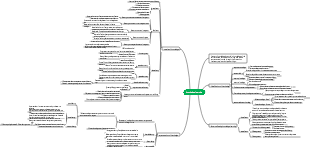
HTML concepts tags with certain functions, CSS concepts, selectors, standard document flow, pseudo-elements, standard box model, weird box model, floating, positioning
Edited at 2021-04-11 10:27:56This is a mind map about bacteria, and its main contents include: overview, morphology, types, structure, reproduction, distribution, application, and expansion. The summary is comprehensive and meticulous, suitable as review materials.

This is a mind map about plant asexual reproduction, and its main contents include: concept, spore reproduction, vegetative reproduction, tissue culture, and buds. The summary is comprehensive and meticulous, suitable as review materials.
This is a mind map about the reproductive development of animals, and its main contents include: insects, frogs, birds, sexual reproduction, and asexual reproduction. The summary is comprehensive and meticulous, suitable as review materials.
This is a mind map about bacteria, and its main contents include: overview, morphology, types, structure, reproduction, distribution, application, and expansion. The summary is comprehensive and meticulous, suitable as review materials.
This is a mind map about plant asexual reproduction, and its main contents include: concept, spore reproduction, vegetative reproduction, tissue culture, and buds. The summary is comprehensive and meticulous, suitable as review materials.
This is a mind map about the reproductive development of animals, and its main contents include: insects, frogs, birds, sexual reproduction, and asexual reproduction. The summary is comprehensive and meticulous, suitable as review materials.
Knowledge points
HTML
concept
Definition: Hypertext Markup Language, which can store music, videos, links, pictures, etc.
Normal text: Only text can be placed
Label
Divided into single label and double label
Tags with strong semantics
p paragraph
span contains a sentence
h1-h6 heading level
There can only be one h1 or h2 level title
Use h3 to represent the title of a part of the web page
del delete
em emphasize
strong Special emphasis, emphasizing notes is higher than em
list
unordered list
ulli
ordered list
ol li
custom list
dl dt dd
Only li can be placed in the ul tag and ol tag; any tag can be placed in li; only dt and dd can be placed in the dl tag.
Tags with certain functions
img tag
br line feed (cannot be used)
hr dividing line (cannot be used)
<!----> Comments
b bold text
i italic text
pre output as is
iframe places other web pages in the specified web page
audio audio
video video
autoplay automatically plays, the mute attribute must be set
loop loop playback
muted mute attribute
controls controls
a label
Hyperlink
href attribute sets the jump address
anchor point
Add #id name after the href address
form
Form controls form tags to match
input
type
button is just an ordinary button and does not have the function of submitting data.
The core function of submit is to submit data
The text input box becomes a text box
password password box
file upload file
reset reset button
radio single choice
checkboxMultiple selection
image Use image as submit button
email mailbox
value attribute the default value of the input box
placeholder attribute tip
checked default option
autofocus automatically obtains focus
autocomplete automatically complete
The name attribute must be written
The autocomplete attribute value must be on
off
required required
Tags must have a name attribute
There must be a submit button
Must be in the form tag
disabled disabled
readonly read only
textarea multi-line text input
name
placeholder prompt information
disabled disabled
autofocus automatically obtains focus
cols width, unit is number
rows height, unit is number
button button has the same effect as input type="button" and will not submit data.
select drop-down list
The option tag can set the options of the drop-down list
optgroup groups options
The label attribute can be used to name the groups divided into optgroups.
label label
Function: When the user clicks on the text in the label label, the input box bound to the label label can gain focus.
Usage: Place the text and controls directly in the label label
sheet
table tag tr, td, th
div tag
cutting
CSS
concept
Cascading Style Sheets
Selector
Three major selectors
id global and unique
class is global and not unique
html tag selector
Combination selector
descendant selector
Child element selector
sibling selector
adjacent
Normal ~
Pseudo class selector
Hyperlink pseudo-class
:link Not viewed yet
:visited Browsed
:hover mouse hover state
:active selected state
Pseudo class for selecting child elements
first-child selects the first child element
last-child selects the last child element
nth-child() selects any child element
nth-child (odd) cardinal child element
nth-child (even) even number of child elements
nth-child(n) all child elements
2n even number
2n 1 base
Union selector
div, box
Intersection selector
div.box
Select the div tag and the class name of this div is called box
standard document flow
The parsing order of web pages
From top to bottom left to right
Label hierarchies
inline elements
Features:
Multiple inline elements are squeezed into one line
Inline elements cannot set width and height. Inline elements are the width of all content added together, and the height is the content line height.
block-level elements
Features:
Each block-level element will occupy its own line (it will occupy 100% of the width of the parent element by default)
Block-level elements can set width and height
space folding
All whitespace in the code will be merged together to form one space
Advantages and Disadvantages
Benefits: Make the web page structure more stable
harm:
Pseudo element
::before
::atfer
Standard box model
All labels are actually a box
The box includes five key points:
width width of content
height the height of the content
padding: the distance from the content to the border. You can set the padding values in four directions at once.
separate settings
padding-top top margin
padding-bottom bottom margin
padding-left left margin
padding-right right margin
Set together<br>
When the padding value is a value, it represents four directions.
When there are two values, the first represents up and down, and the second represents left and right.
When there are three values, the first means up, the second means left and right, and the third means down.
When there are four values, the order is top, right, bottom, left.
border border
The margin outer border refers to the distance between the two boxes
The setting of margin value is the same as padding. You can set four directions at once, or you can set one direction separately.
Collapse: Take the larger of the two margin values
The actual width occupied by the standard box model in the web page: content width left padding right padding left border right border=actual width<br>
Small problems caused by padding: it will cause the box to become larger.
weird box model
Actual width = width attribute value
Content width =width-left and right padding-left and right borders
How to enable the weird box model:
box-sizing: border-box;
float
concept
It is a very important and frequently used layout scheme in CSS.
By floating, you can take elements out of the standard document flow.
The impact of floating out of the standard document flow
Tag level restrictions will disappear
Margin collapse will disappear
Font size effect
Elements separated from the document flow will lead to unstable web page structure (disadvantage)
use
float: left|right
Clear the impact of floating<br>
.clearfix::after
position
relative positioning
absolute positioning
Fixed positioning