MindMap Gallery [- Computer Networks
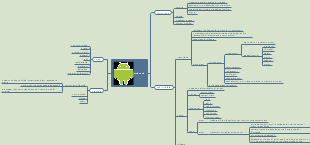
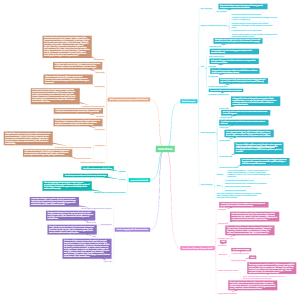
The knowledge system of computer networks is rich. Basic knowledge of networks is the cornerstone, and there are various types of networks, such as local area networks, wide area networks, etc. Network devices include routers, switches, etc. The network layer is responsible for data transmission and routing selection. Network management ensures efficient and stable operation of the network, ensuring network security and reliability.
Edited at 2025-04-02 03:08:57[- Computer Networks

Basic Knowledge of Networks
Definition of a Computer Network
A collection of interconnected devices.
Enables communication and resource sharing.
Types of Network Topologies
Bus, Star, Ring, Mesh, and Hybrid topologies.
Advantages and disadvantages of each topology.
Importance of Networking
Facilitates data sharing and communication.
Supports access to shared resources.
Types of Networks
Local Area Network (LAN)
Covers a small geographic area, like a home or office.
High data transfer speeds and low latency.
Wide Area Network (WAN)
Spans large geographic areas, connecting multiple LANs.
Examples include the internet, phone lines, and satellites.
Metropolitan Area Network (MAN)
Connects networks within a city.
Could link several LANs across different locations.
Personal Area Network (PAN)
Covers a very small area, typically within a range of a few meters.
Often used for connecting personal devices like smartphones and tablets.
Networking Devices
Routers
Connect multiple networks and route data packets.
Operate both at Layer 3 (Network layer) of the OSI model.
Switches
Connect devices within a LAN and manage data traffic.
Operate at Layer 2 (Data Link layer) of the OSI model.
Hubs
Basic networking device that connects multiple Ethernet devices.
Operates at the Physical layer of the OSI model.
Modems
Modulate and demodulate signals for data transmission over phone lines.
Connects a computer or router to the internet.
Network Protocols
Definition of Network Protocols
A set of rules governing data transmission.
Crucial for communication between devices.
Common Protocols
Transmission Control Protocol (TCP)
Ensures reliable data transmission.
Establishes connections and manages data flow.
Internet Protocol (IP)
Responsible for addressing and routing packets of data.
Works in two versions: IPv4 and IPv6.
Hypertext Transfer Protocol (HTTP)
Governs the transmission of web pages.
Often used in conjunction with HTTPS for secure communication.
File Transfer Protocol (FTP)
Used for transferring files between computers.
Provides a standard way for file uploads and downloads.
OSI Model
Overview of the OSI Model
A conceptual framework that standardizes network communication.
Divided into seven layers from Physical to Application.
Layers of the OSI Model
Layer 1: Physical Layer
Deals with the physical connections and transmission of raw data.
Involves cables, switches, and other hardware.
Layer 2: Data Link Layer
Manages protocols for local data transfer.
Responsible for error detection and correction.
Layer 3: Network Layer
Handles packet forwarding including routing through intermediate routers.
Responsible for IP addressing.
Layer 4: Transport Layer
Ensures complete data transfer and manages flow control.
Includes TCP and UDP.
Layer 5: Session Layer
Manages sessions or connections between applications.
Responsible for establishing, managing, and terminating connections.
Layer 6: Presentation Layer
Translates data formats, encrypts data, and ensures correct presentation.
Involves character encoding and data compression.
Layer 7: Application Layer
Interfaces directly with user applications.
Provides network services such as email and file transfer.
TCP/IP Model
Overview of the TCP/IP Model
A more simplified model than OSI with four layers.
Basis for the internet and network communication.
Layers of the TCP/IP Model
Layer 1: Network Interface Layer
Combines the physical and data link layers of OSI.
Responsible for delivering data to the network.
Layer 2: Internet Layer
Matches with the OSI's Network layer.
Handles addressing, routing, and packet forwarding.
Layer 3: Transport Layer
Corresponds to OSI's Transport layer.
Ensures reliable or unreliable services using TCP or UDP.
Layer 4: Application Layer
Combines OSI's session, presentation, and application layers.
Provides end user services such as web browsing and email.
IP Addressing
What is an IP Address?
A unique identifier for devices on a network.
Used for communication between devices.
Types of IP Addresses
IPv4
32-bit address formatted as four decimal numbers.
Limited number of unique addresses available.
IPv6
128-bit address allowing for a vastly larger number of unique addresses.
Addresses are formatted in hexadecimal.
Static vs Dynamic IP Addresses
Static IP Addresses
Permanently assigned and do not change.
Useful for servers and devices needing constant address.
Dynamic IP Addresses
Temporarily assigned by the DHCP server.
Changes each time the device reconnects.
Network Layers
Understanding Network Layers
Different layers perform distinct functions in network communication.
Each layer interacts with the layers above and below it.
Key Functions of Each Layer
Application Layer
Interfaces with end-user applications.
Transport Layer
Ensures reliable data transfer.
Network Layer
Routes data through multiple networks.
Data Link Layer
Manages local transfer of data packets.
Physical Layer
Deals with the hardware transmission of data.
Network Security
Importance of Network Security
Protects data and resources from unauthorized access and breaches.
Ensures data integrity, confidentiality, and availability.
Common Security Practices
Firewalls
Monitor and control incoming and outgoing network traffic.
Can be hardware or software-based.
Encryption
Secures data by converting it into a coded format.
Ensures data can only be read by authorized users.
Authentication Protocols
Verifies user identities before granting access.
Includes methods such as passwords, tokens, and biometrics.
Types of Attacks
Malware, phishing, DDoS attacks, and more.
Defense strategies for these attacks.
Network Deployment
Steps for Deploying a Network
Planning network layout based on requirements.
Selecting appropriate hardware and software components.
Configuring devices and establishing connections.
Testing the Network
Conducting diagnostics to ensure proper functionality.
Troubleshooting any configuration issues.
Network Management
Overview of Network Management
The process of maintaining and administering network resources.
Ensures optimal performance and system reliability.
Tools for Network Management
Monitoring software to track network usage and performance.
Configuration tools for managing network settings and devices.
Network Troubleshooting
Common Network Issues
Connectivity problems, slow speeds, hardware failures.
Identifying root causes effectively.
Troubleshooting Steps
Isolating the issue and checking hardware connections.
Reviewing configuration settings and logs for errors.
Trends in Networking Technology
Emerging Technologies
Software-Defined Networking (SDN)
Abstracts network control from hardware.
Allows centralized management of network resources.
Internet of Things (IoT)
Connects everyday devices to the internet for data exchange.
Expanding the scope of network applications.
Applications of Networking in Daily Life
Personal Communication
Email, social media, and messaging apps.
Business Operations
Remote work, collaboration tools, and cloud computing.
Smart Homes
Home automation devices connected to the internet.
Education
Online learning platforms and virtual classrooms.]