MindMap Gallery Operating System
The operating system is the core software of a computer. It provides a human-computer interface (HCI) that facilitates user interaction with computers. Capable of multitasking and running multiple application software simultaneously. Ensure system security and personalized settings through user account management. Also responsible for managing files, implementing file storage, retrieval, and other operations. These functions work together to provide users with an efficient and convenient computer experience.
Edited at 2025-05-11 19:40:36The operating system is the core software of a computer. It provides a human-computer interface (HCI) that facilitates user interaction with computers. Capable of multitasking and running multiple application software simultaneously. Ensure system security and personalized settings through user account management. Also responsible for managing files, implementing file storage, retrieval, and other operations. These functions work together to provide users with an efficient and convenient computer experience.
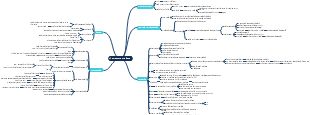
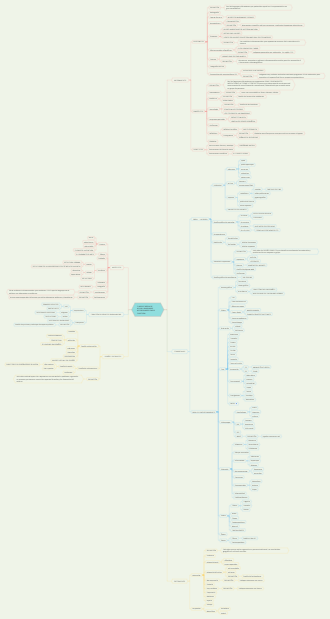
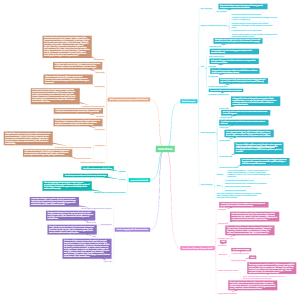
This mind map provides a detailed breakdown of an operating system's components and functions. It starts with the Human Computer Interface (HCI), covering both CLI and GUI. The map then explores multitasking, highlighting resource allocation and process priorities. It details the platform for running application software, user account management, and file management, including naming conventions and access control. Additionally, it covers hardware peripheral management, memory management techniques, interrupt handling routines, and security measures like login and password management.
The operating system is the core software of a computer. It provides a human-computer interface (HCI) that facilitates user interaction with computers. Capable of multitasking and running multiple application software simultaneously. Ensure system security and personalized settings through user account management. Also responsible for managing files, implementing file storage, retrieval, and other operations. These functions work together to provide users with an efficient and convenient computer experience.
This mind map provides a detailed breakdown of an operating system's components and functions. It starts with the Human Computer Interface (HCI), covering both CLI and GUI. The map then explores multitasking, highlighting resource allocation and process priorities. It details the platform for running application software, user account management, and file management, including naming conventions and access control. Additionally, it covers hardware peripheral management, memory management techniques, interrupt handling routines, and security measures like login and password management.
Operating System
Human Computer Interface (HCI)
CLI
A CLI requires a user to type in instructions in order to choose options from menus, open software, etc. There are often a number of commands that need to be typed in, for example, to save or load a file. The user has to therefore learn a number of commands just to carry out basic operations. It is also slow having to key in these commands every time an operation has to be carried out. However, the advantage of CLI is that the user is in direct communication with the computer and is not restricted to a number of pre-determined options.
CLI: a programmer, analyst or technician; basically somebody who needs to have a direct communication with a computer to develop new software, locate errors and remove them, initiate memory dumps (contents of the computer memory at some moment in time), and so on
GUI
A GUI allows the user to interact with a computer (or MP3 player, gaming device, mobile phone, etc.) using pictures or symbols (icons) rather than having to type in a number of commands.
GUI: the end-user who doesn’t have or doesn’t need to have any great knowledge of how the computer works; a person who uses the computer to run software or play games or stores/manipulates photographs, for example.
Multitasking
resources are allocated to a process for a specific time limit
the process can be interrupted while it is running
the process is given a priority so it can have resources according to its priority (the risk here is that a low priority process could be starved of resources).
Platform for running application software
OS provides a platform for running applications. Applications loaded into RAM and hosted on OS. Different parts of OS loaded into and out of RAM as Program Runs.
Management of user accounts
customise their screen layout and other settings
use separate folders and files and to manage these themselves.
Managing files
file naming conventions which can be used
performing specific tasks (for example, create, open, close, delete, rename, copy, and move)
maintaining the directory structures
ensuring access control mechanisms are maintained
ensuring memory allocation for a file by reading it from the HDD/SSD and loading it into memory.
Hardware Peripheral management (including drivers)
communicates with all input and output devices using device drivers
uses a device driver to take data from a file (defined by the operating system) and translates it into a format that the input/output device can understand
ensures each hardware resource has a priority so that they can be used and released as required
manages input/output devices by controlling queues and buffers
Memory Management
manages the primary storage (RAM) and allows data to be moved between RAM and HDD/SSD during the execution of programs
keeps track of all the memory locations
carries out memory protection to ensure that two competing applications cannot use the same memory locations at the same time
Interrupt handling routines
a timing signal
an input/output process (for example, a disk drive or printer requiring more data)
a hardware fault (for example, a paper jam in the printer)
user interaction (for example, the user presses a key (or keys) on a keyboard, such as <CTRL><ALT><BREAK>, which causes the system to be interrupted)
software errors that cause a problem (for example, an .exe file that cannot be found to initiate the execution of a program, two processes trying to access the same memory location, or an attempt to divide by zero).
Security (Manages log on, passwords)
by carrying out operating system updates as and when they become available
ensuring that anti virus software (and other security software) is always up to date, preserving the integrity, security and privacy of data
by communicating with, for example, a firewall to check all traffic to and from the computer
by making use of privileges to prevent users entering ‘private areas’ on a computer that permits multi-user activity (this is done by setting up user accounts and making use of passwords and user IDs); this helps to ensure the privacy of data
by maintaining access rights for all users
by offering the ability for the recovery of data (and system restore) when it has been lost or corrupted
by helping to prevent illegal intrusion into the computer system (also ensuring the privacy of data).