MindMap Gallery AL Masterlabs Program_S01: AI Fundamentals and Applications
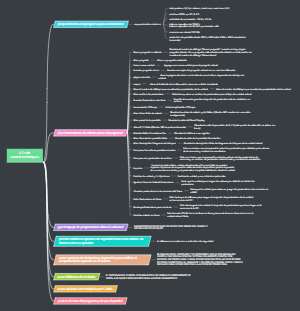
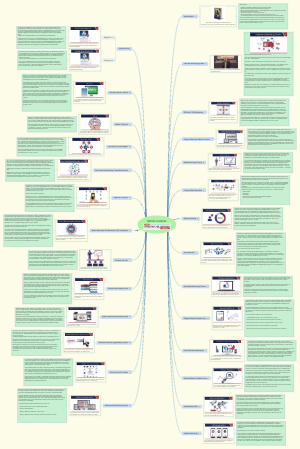
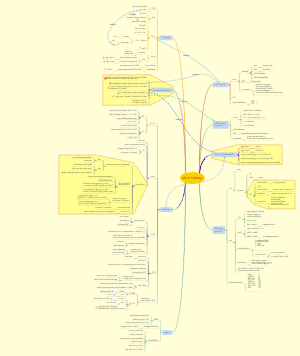
This mind map provides an overview of the AL Masterlabs Program_S01, focusing on the fundamentals and applications of artificial intelligence (AI). It covers key topics including the definition of AI, differences between AI and automation, various AI types (ML, DL, GenAI), and distinctions between narrow and general AI. The map also explores how Generative AI works, the concept of LLMs, and the importance of understanding hallucinations in AI. Additionally, it discusses prompt engineering techniques, API vs. Hook, exploring custom GPTs, private GPT projects, and tools like OpenAI Playground and prompt designers.
Edited at 2026-01-20 13:04:09AL Masterlabs Program_S01
What is AI?
System designed to Mimic Human Intelligence
Artificial Intelligence (AI) is a field of computer science that enables machines to simulate human intelligence, such as learning from data, reasoning, understanding language, recognizing patterns, and making decisions
Netflix
Amazon Alexa
What AI does here: - Understands natural language (NLP) - Interprets intent and context - Responds intelligently in real time
Amazon Shopping
What AI does here: - Analyzes your viewing, search, and purchase behavior - Learns preferences over time - Predicts what you’re most likely to buy next
How AI Works?
AI systems typically: 1) Collect data (text, images, transactions, voice, sensor data) 2) Learn patterns using algorithms (Machine Learning / Deep Learning) 3) Make predictions or decisions 4) Improve over time through feedback
AI vs Automation
AI
Systems capable of performing tasks that typically require human intelligence.
Automation
Systems or machines that operate independently with minimal or no human intervention.
AI vs ML vs DL vs GenAI
AI (Artificial Intelligence)
-Decision-making -Rule-based logic -Problem solving -Pattern recognition -Language understanding
Example -A rule-based chatbot -Chess-playing software
ML (Machine Learning)
learn patterns from data
How it works -Feed historical data -Train a model -Model predicts outcomes on new data
Example -Spam email detection -Credit risk scoring -Demand forecasting
DL (Deep Learning)
-Handles images, voice, video, text -No need for manual feature engineering -Learns representations automatically
Example -Face recognition -Speech-to-text -Self-driving car vision systems
GenAI (Generative AI)
-Text (emails, code, reports) -Images (art, designs) -Audio (music, voice) -Video
Example -Writing content or code -Creating marketing images -Generating Videos
Narrow vs General AI
How GenAI Works
1) Training on Massive Data (Learning Phase)
Generative AI models are trained on huge datasets, such as: -Books, articles, websites (for text) -Images and captions (for vision models) -Code repositories (for coding models)
1||| Example: It learns that “The capital of France is ___” → Paris
2) Neural Networks & Transformers (The Brain)
core of Generative AI is a neural network, most commonly a Transformer architecture. Key ideas: - Neurons → small math units that detect patterns - Layers → progressively understand deeper meaning - Attention mechanism → focuses on what matters most in a sentence
Example: In the sentence “He put the glass on the table because it was fragile” The model understands “fragile” refers to glass, not table.
3) Tokenization (Breaking Data Into Pieces)
Before processing, everything is broken into tokens: - Words - Parts of words - Symbols or characters
Example: “Generative AI is powerful” → ["Generate", "ive", " AI", " is", " powerful"]
4) Prediction, Not Thinking (Key Insight)
Generative AI does not think or reason like humans. It works by: - Looking at your input - Predicting the next most probable token - Repeating this step extremely fast
Example: Input: “Once upon a time” Model predicts: “there” → “was” → “a” → “king” …
5) Fine-Tuning & Alignment (Making It Useful)
After base training, models are: - Fine-tuned on specific tasks - Trained with human feedback - Aligned for safety, usefulness, and tone
6) Generation Phase (When You Ask a Question)
When you type a prompt: - Your text is tokenized - Model analyzes context - Predicts next tokens - Produces coherent output - Applies safety & quality filters
What is LLM?
Type of AI model that is trained on massive amounts of text to understand, generate, and interact with human language
Understanding Hallucination
Good Prompt vs Bad Prompt
Bad Prompt
Too Vague
“Tell me about AI.”
Why it’s bad: - No goal - No depth - No audience - No output format
Missing Context
“Write an email with below information"
Why it’s bad: - No recipient - No purpose - No tone - No length
Overloaded & Confusing
“Create a business plan, marketing strategy, financial projection, competitor analysis, pitch deck, and launch roadmap for my idea.”
Why it’s bad: -Too many tasks in one prompt -No prioritization -Leads to shallow answers
Why writing good Prompt is Important?
Writing good Prompts are important: - LLMs are not mind readers - Prompt quality directly impacts output quality - Clarity > verbosity - Structure beats intelligence
Good Prompting Techniques
Markdown Prompting Technique
## Task Explain Machine Learning to beginners ### Audience Non-technical professionals ### Requirements - Use simple language - Max 150 words - Include 2 real-life examples ### Output Format - Short definition - Bullet list of examples
In simple terms: you format your prompt like a document so the LLM understands what to do, in what order, and in what format.
When to use Markdown Prompting Technique
Custom GPTs
Writing System and User Prompts while drafting agents
CoStar Prompting Technique
CoStar Prompting is a structured prompting framework that improves LLM output quality by clearly defining five elements: C – Context O – Objective S – Style T – Tone A – Audience R – Response format
Context: We are creating an internal learning module on AI. Objective: Explain what an LLM is. Style: Use simple language with analogies. Tone: Friendly and confident. Audience: Non-technical professionals. Response Format: - 5 bullet points - 1-line summary at the end
Context: [Explain the situation and background clearly] Objective: [What exactly do you want the email to achieve?] Style: [How should the email be written? e.g., structured, concise, bullet-based] Tone: [How should it sound? e.g., calm, confident, empathetic] Audience: [Who is reading this email?] Response Format: - Subject line - Email body - Clear call to action
When to use CoStar Prompt Technique -
Best for: - Training & workshops - Leadership communication - Business writing - Marketing & content creation
Using CoStar framework, build a SOP for an Small to Mid segment ecommerce company for their customer success teams. Create a copy and paste ready costar prompt based on the image. Make suitable assumptions and proceed.
Chain of Thoughts Prompting Technique
you tell the model to “show its thinking in steps” so complex problems are solved more accurately.
A project is delayed by 2 weeks. The delay will increase cost by ₹1,00,000 per week. If fixing the issue now costs ₹1,50,000, should the leader fix it now or delay further?
Prompt: Step 1: Identify the cost of delay Step 2: Calculate total delay cost Step 3: Compare it with the fix cost Step 4: Conclude with a clear recommendation
When to use Chain of Thoughts?
Chain-of-Thought is especially useful for: - Logical reasoning - Math & word problems - Decision making - Root-cause analysis - Planning & strategy - “Why / How” explanations
Prompt Chaning Framework
API vs Hook
API (Aplication Programing Interface)
Web Hook
Explore Custom GPTs
Explore the world!!
Private GPT Projects
OpenAI Playground
Whats Open AI Playground
Pricing of Open AI api gpt 5
Write your Own Prompt Designer
Yupp
OpenAI Playground
Google AI Studio
Main Idea
Main Topic
Main Topic
Main Topic
Main Idea
Main Topic
Main Topic
Main Topic