Wondershare EdrawMind
MindMap Gallery Complete EdrawMind Keyboard Shortcuts Guide: Operations, Categories and Advanced Usage
Complete EdrawMind Keyboard Shortcuts Guide: Operations, Categories and Advanced Usage
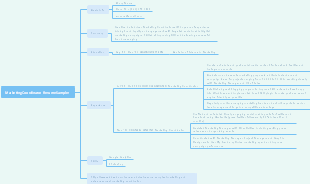
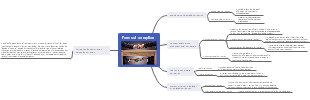
This EdrawMind shortcut usage guide is a comprehensive and practical resource designed to help users master the core keyboard shortcuts, streamline workflow, and significantly boost efficiency when creating mind maps. It is structured into multiple sections that cover every aspect of the software, from basic operations to advanced customization and special tips. The guide begins with an Operation Tutorial that details two primary ways to access the shortcut settings: entering from the "Settings" menu at the bottom left corner of the interface, or using the "Help Center" to find and view shortcuts directly. It also explains how to use and modify shortcuts, as well as the step-by-step process for customizing shortcut keys, including scenarios like hot key conflicts and how to set custom keys for commonly used functions without built-in system shortcuts. The core of the guide is organized into Core Shortcut Categories, each listing the key combinations and their corresponding functions. The Common Operation section covers everyday tasks like creating, opening, saving, and closing documents, as well as editing actions such as undo, redo, copy, cut, paste, find, delete, and special functions like screen recording. The Add Topic and Related Elements section details shortcuts for adding and managing topics, including adding sibling topics, subtopics, floating topics, callouts, relationships, boundaries, images, hyperlinks, attachments, comments, and notes. It also includes shortcuts for adjusting topic levels, moving topics, and inserting elements like tables and formulas. The Text Editing and Font Settings section lists shortcuts for common text formatting tasks: bold, italic, underline, strikethrough, increasing/decreasing font size, superscript, subscript, and adjusting topic width. The Outline section covers switching between mind map and outline mode, increasing/decreasing indent levels, and moving topics up and down. The Topic Selecting and Topic Operations section i
Edited at 2026-05-08 07:33:48
- Análise do Esquadrão da França
A seleção da França é, sem dúvida, uma das mais temidas no cenário do futebol mundial, especialmente com a aproximação da Copa do Mundo FIFA 2026. Este perfil analisa as forças e fraquezas do esquadrão francês, destacando seu núcleo excepcional e as táticas empregadas. Entre(Este conteúdo é gerado por IA. É apenas para referência.)
- Avaliação detalhada do esquadrão alemão, estilo de jogo e perspectivas para 2026
Este mapa mental, elaborado com o EdrawMind, apresenta uma análise preditiva e detalhada da Seleção Alemã de Futebol para a Copa do Mundo FIFA 2026, cobrindo desde a visão geral da equipe até suas vantagens e riscos. É um guia completo para entender o potencial da equipe, baseado na forma atual dos jogadores e na opinião pública. Começa com uma visão geral básica: a "Mannschaft", tetracampeã do mundo, chega à competição com o status de candidato ao título, combinando a tradição do futebol europeu com um estilo de jogo moderno, ofensivo e versátil. O coração do mapa é o esquadrão previsto de 26 jogadores, organizado por posição: Goleiros: Manuel Neuer (experiente e líder), Marc-André ter Stegen e Oliver Baumann. Defensores: Benjamin Henrichs, Matthias Ginter, Nico Schlotterbeck, David Raum, Joshua Kimmich, İlkay Gündoğan, Thilo Kehrer, Waldemar Anton e Malick Thiaw, que oferecem solidez, versatilidade e energia. Meias-campistas: Joshua Kimmich, İlkay Gündoğan, Florian Wirtz, Serge Gnabry, Pascal Groß, Robert Andrich, Mario Götze e Kai Havertz, formando um meio de campo criativo e dinâmico. Atacantes: Thomas Müller, Kai Havertz, Jamal Musiala, Niclas Füllkrug, Leroy Sané e Serge Gnabry, que trazem experiência, versatilidade e poder de finalização. O mapa detalha a filosofia do técnico Julian Nagelsmann, com uma ênfase no futebol ofensivo, de ataque e alta intensidade, baseado em jovens talentos e jogadores do Bayern de Munique e Borussia Dortmund. A formação inicial prevista (4-2-3-1) e a estrutura tática são analisadas, destacando a importância de Kimmich e Gündoğan como líderes. Além disso, avalia talentos jovens em ascensão como Jamal Musiala e Florian Wirtz, aponta as vantagens (abundância de talentos, coesão e experiência) e as fraquezas e riscos ocultos (falta de ponta de lança, eficiência em jogos difíceis e mentalidade dos jovens). Finaliza com as perspectivas da Copa: a fase de grupos, o objetivo de chegar às quartas de final e a ambição de competir pelo títu
- 2026 世界盃法國國家隊:陣容、戰術與晉級前景全面剖析
本分析針對 2026 年美加墨世界盃的法國國家隊,進行全方位的戰力與戰術剖析,幫助讀者深入了解這支衛冕冠軍的實力與潛力。首先,「團隊概述」部分介紹法國隊的歷史榮耀,包括兩次世界盃冠軍、兩次歐洲盃冠軍,以及長期位居 FIFA 排名前列的實力,強調其做為連屆大賽強隊的地位。 接著是「預測 26 人名單」,按守門員、後衛、中場、前鋒分類,逐一解析預選球員的特點與角色,重點解析基利安・姆巴佩、奧雷利安・楚阿梅尼、金斯利・科曼等核心球員的作用,以及他們如何在球隊中發揮關鍵影響力。「戰術體系」部分深入解析法國隊預計採用的陣型與風格,探討如何透過攻守平衡、快速反擊、邊路突破與中場壓迫,最大化球員的個人優勢。 「主要戰術要點」則進一步說明進攻組織、防守架構與攻防轉換速度,展現法國隊的整體戰鬥力與應變能力。此外,本分析也涵蓋「優勢與劣勢」部分,全面評估法國隊的優點與潛在風險,並指出其奪冠路上的關鍵挑戰,幫助讀者客觀看待這支球隊的潛力。整體而言,本分析完整呈現了法國隊在 2026 世界盃的陣容、戰術與前景,幫助讀者深入了解這支擁有超強陣容的衛冕熱門。
Complete EdrawMind Keyboard Shortcuts Guide: Operations, Categories and Advanced Usage
- Análise do Esquadrão da França
A seleção da França é, sem dúvida, uma das mais temidas no cenário do futebol mundial, especialmente com a aproximação da Copa do Mundo FIFA 2026. Este perfil analisa as forças e fraquezas do esquadrão francês, destacando seu núcleo excepcional e as táticas empregadas. Entre(Este conteúdo é gerado por IA. É apenas para referência.)
- Avaliação detalhada do esquadrão alemão, estilo de jogo e perspectivas para 2026
Este mapa mental, elaborado com o EdrawMind, apresenta uma análise preditiva e detalhada da Seleção Alemã de Futebol para a Copa do Mundo FIFA 2026, cobrindo desde a visão geral da equipe até suas vantagens e riscos. É um guia completo para entender o potencial da equipe, baseado na forma atual dos jogadores e na opinião pública. Começa com uma visão geral básica: a "Mannschaft", tetracampeã do mundo, chega à competição com o status de candidato ao título, combinando a tradição do futebol europeu com um estilo de jogo moderno, ofensivo e versátil. O coração do mapa é o esquadrão previsto de 26 jogadores, organizado por posição: Goleiros: Manuel Neuer (experiente e líder), Marc-André ter Stegen e Oliver Baumann. Defensores: Benjamin Henrichs, Matthias Ginter, Nico Schlotterbeck, David Raum, Joshua Kimmich, İlkay Gündoğan, Thilo Kehrer, Waldemar Anton e Malick Thiaw, que oferecem solidez, versatilidade e energia. Meias-campistas: Joshua Kimmich, İlkay Gündoğan, Florian Wirtz, Serge Gnabry, Pascal Groß, Robert Andrich, Mario Götze e Kai Havertz, formando um meio de campo criativo e dinâmico. Atacantes: Thomas Müller, Kai Havertz, Jamal Musiala, Niclas Füllkrug, Leroy Sané e Serge Gnabry, que trazem experiência, versatilidade e poder de finalização. O mapa detalha a filosofia do técnico Julian Nagelsmann, com uma ênfase no futebol ofensivo, de ataque e alta intensidade, baseado em jovens talentos e jogadores do Bayern de Munique e Borussia Dortmund. A formação inicial prevista (4-2-3-1) e a estrutura tática são analisadas, destacando a importância de Kimmich e Gündoğan como líderes. Além disso, avalia talentos jovens em ascensão como Jamal Musiala e Florian Wirtz, aponta as vantagens (abundância de talentos, coesão e experiência) e as fraquezas e riscos ocultos (falta de ponta de lança, eficiência em jogos difíceis e mentalidade dos jovens). Finaliza com as perspectivas da Copa: a fase de grupos, o objetivo de chegar às quartas de final e a ambição de competir pelo títu
- 2026 世界盃法國國家隊:陣容、戰術與晉級前景全面剖析
本分析針對 2026 年美加墨世界盃的法國國家隊,進行全方位的戰力與戰術剖析,幫助讀者深入了解這支衛冕冠軍的實力與潛力。首先,「團隊概述」部分介紹法國隊的歷史榮耀,包括兩次世界盃冠軍、兩次歐洲盃冠軍,以及長期位居 FIFA 排名前列的實力,強調其做為連屆大賽強隊的地位。 接著是「預測 26 人名單」,按守門員、後衛、中場、前鋒分類,逐一解析預選球員的特點與角色,重點解析基利安・姆巴佩、奧雷利安・楚阿梅尼、金斯利・科曼等核心球員的作用,以及他們如何在球隊中發揮關鍵影響力。「戰術體系」部分深入解析法國隊預計採用的陣型與風格,探討如何透過攻守平衡、快速反擊、邊路突破與中場壓迫,最大化球員的個人優勢。 「主要戰術要點」則進一步說明進攻組織、防守架構與攻防轉換速度,展現法國隊的整體戰鬥力與應變能力。此外,本分析也涵蓋「優勢與劣勢」部分,全面評估法國隊的優點與潛在風險,並指出其奪冠路上的關鍵挑戰,幫助讀者客觀看待這支球隊的潛力。整體而言,本分析完整呈現了法國隊在 2026 世界盃的陣容、戰術與前景,幫助讀者深入了解這支擁有超強陣容的衛冕熱門。
- Recommended to you
- Outline