 Wondershare EdrawMind
MindMap Gallery docker virtual environment container mind map
- 35
docker virtual environment container mind map
This is a mind map about docker. Docker is a virtual environment container that can package the development environment, code, configuration files, etc. into the container, and publish and apply it to any platform. Hope this helps!
Edited at 2023-11-05 20:10:22
- bacteria
This is a mind map about bacteria, and its main contents include: overview, morphology, types, structure, reproduction, distribution, application, and expansion. The summary is comprehensive and meticulous, suitable as review materials.
- Plant asexual reproduction
This is a mind map about plant asexual reproduction, and its main contents include: concept, spore reproduction, vegetative reproduction, tissue culture, and buds. The summary is comprehensive and meticulous, suitable as review materials.
- Reproductive development of animals
This is a mind map about the reproductive development of animals, and its main contents include: insects, frogs, birds, sexual reproduction, and asexual reproduction. The summary is comprehensive and meticulous, suitable as review materials.
docker virtual environment container mind map
- bacteria
This is a mind map about bacteria, and its main contents include: overview, morphology, types, structure, reproduction, distribution, application, and expansion. The summary is comprehensive and meticulous, suitable as review materials.
- Plant asexual reproduction
This is a mind map about plant asexual reproduction, and its main contents include: concept, spore reproduction, vegetative reproduction, tissue culture, and buds. The summary is comprehensive and meticulous, suitable as review materials.
- Reproductive development of animals
This is a mind map about the reproductive development of animals, and its main contents include: insects, frogs, birds, sexual reproduction, and asexual reproduction. The summary is comprehensive and meticulous, suitable as review materials.
- Recommended to you
- Outline

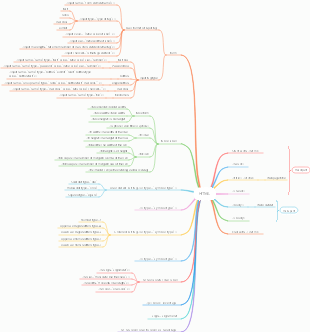
docker
basic concept
Docker is a virtual environment container that can package the development environment, code, configuration files, etc. into the container, and publish and apply it to any platform An open source project implemented in go language, complying with the Apache2.0 protocol, and the project code is maintained on GitHub
advantage
Fast: The runtime performance is fast, and management operations (start, stop, start, restart, etc.) are all in seconds or milliseconds.
Lightweight: The container does not have its own kernel, and there is no hardware virtualization. Applications and systems are "containerized" without adding additional operating systems.
Docker sets the image standard and the running standard of the container.
Open source, free, low cost
Disadvantages: All containers share Linux kernel resources, and whether resources can be utilized to the maximum extent, there will be loopholes in security.
docker-ce: community edition docker-ee: commercial version
docker installation
Basic package
yum-utils wget net-tools nfs-utils lrzsz gcc gcc-c make cmake libxml2-devel openssl-devel curl curl-devel unzip sudo ntp libaio-devel wget vim ncurses-devel autoconf automake zlib-devel python-devel epel-release openssh -server socat ipvsadm conntrack
Dependency package
yum-utils: yum-config-manager --add-repo http://mirrors.aliyun.com/docker-ce/linux/centos/docker-ce.repo
device-mapper-persistent-data: Device Mapper is a universal device mapping mechanism in the Linux 2.6 kernel that supports logical volume management. It provides a highly modular kernel architecture for implementing block device drivers for storage resource management.
lvm2: Logical volume management
Enable packet forwarding and modify kernel parameters
The br_netfilter module is used to forward bridge traffic to the iptables chain. The br_netfilter kernel parameter needs to enable forwarding.
modprobe br_netfilter #Load modules into the kernel
Configurable - Restart the machine and automatically load the module
Create a new rc.sysinit file in /etc/ cat /etc/rc.sysinit #!/bin/bash for file in /etc/sysconfig/modules/*.modules ; do [ -x $file ] && $file done Create a new file in the /etc/sysconfig/modules/ directory as follows cat /etc/sysconfig/modules/br_netfilter.modules modprobe br_netfilter Add permissions chmod 755 /etc/sysconfig/modules/br_netfilter.modules The module will also be automatically loaded when the machine is restarted. [root@localhost ~]# lsmod |grep br_netfilter br_netfilter 22209 0 bridge 136173 1 br_netfilter
#Non-interactive writing cat > /etc/sysctl.d/docker.conf <<EOF net.bridge.bridge-nf-call-ip6tables = 1 net.bridge.bridge-nf-call-iptables = 1 net.ipv4.ip_forward = 1 EOF
#Make parameters effective sysctl -p /etc/sysctl.d/docker.conf
Image accelerator configuration
/etc/docker/daemon.json
{ "registry-mirrors":["https://y8y6vosv.mirror.aliyuncs.com","https://registry.docker-cn.com","https://docker.mirrors.ustc.edu.cn" ,"https://dockerhub.azk8s.cn","http://hub-mirror.c.163.com"] }
Configuration takes effect
sudo systemctl daemon-reload sudo systemctl restart docker
docker three elements
mirror
docker run --help #View all options parameters
Similar to the ISO image in a virtual machine, it is a read-only template for the Docker engine that contains a file system.
Unique identifier: Image ID
Mirroring commands
docker images View local image list
docker search image name search image
docker pull image name: Pull the latest image docker pull image name: Tag pulls the specified version image
docker run image name: run the image docker run image name: Tag
-a, --attach=[] Attach to stdin, stdout or stderr. -c, --cpu-shares=0 # Set cpu usage weight –cidfile="" # Write the container id to the specified file –cpuset="" # cpu binding -d, --detach=false # Run the container in the background –dns=[] # Set dns –dns-search=[] # Set dns domain search -e, --env=[] # Define environment variables –entrypoint="" Overwrite the default entrypoint of the image #Overwrite the default entrypoint of the image –env-file=[] # Read variable values from the specified file –expose=[] # Specify the external service port -h, --hostname="" # Set the container host name -i, --interactive=false # Keep standard output open even if not attached –link=[] # Add a link to another container –lxc-conf=[] # Add custom lxc options --lxc-conf="lxc.cgroup.cpuset.cpus = 0,1" -m, --memory="" # Memory limit –name="" # Set container name –net="bridge" #Set container network mode ***** ‘bridge’: creates a new network stack for the container on the docker bridge ***** ‘none’: no networking for this container ***** ‘container:<name|id>’: reuses another container network stack ***** ‘host’: use the host network stack inside the container. ***** Note: the host mode gives the container full access to local system services such as D-bus and is therefore considered insecure. -P, --publish-all=false # Automatically map the port for external services provided by the container -p, --publish=[] # Specify port mapping ***** format: ip:hostPort:containerPort | ip::containerPort | hostPort:containerPort ***** (use ‘docker port’ to see the actual mapping) –privileged=false # Provide more permissions to the container –rm=false # Automatic removal if the container exits conflicts with the -d option –sig-proxy=true Proxify received signals to the process (even in non-tty mode). SIGCHLD is not proxied. # Proxy received signals to the process (even in non-tty mode). SIGCHLD not proxied -t, --tty=false # Allocate pseudo terminal -u, --user="" #Specify the user uid or username to run the container -v, --volume=[] Bind mount a volume (e.g., from the host: -v /host:/container, from docker: -v /container) # Mount volume –volumes-from=[] # Mount volumes from the specified container- -w, --workdir="" #Specify the container working directory
All parameters of docker run
docker save image name/image ID -o path/name Save the image as a tar file to facilitate transfer and storage docker load -i loads the file back into an image
docker tag image1:v1 image1:v2 Tag the image for version iteration and image differentiation.
docker rmi -f image name/image ID delete an image docker rmi -f image name/image ID image name/image ID image name/image ID #Delete multiple images. The image IDs or images can be separated by spaces. docker rmi -f $(docker images -aq) #Delete all images -a means display all, -q means only display ID docker image rm image name/image ID forcefully delete the image
container
Containers are application instances created by images. The Docker engine uses containers to run and isolate each application. Each container is isolated from each other and does not affect each other.
docker ps view the list of running containers
docker ps -a View all containers - including running and stopped ones
docker run -it -d --name Alias to be taken Image name: Tag /bin/bash # -it means interactive startup with the container -d means the container can be run in the background (daemon running) --name is the name given to the container to be run /bin/bash interactive path
docker stop image name/image ID to stop the container
docker start image name/image ID starts the stopped container
docker exec -it image name/image ID /bin/bash enter the container
docker rm -f image name/image ID delete container
storehouse
Introduction to Harbor
The development and operation of Docker container applications are inseparable from reliable image management. Although Docker officially provides public image warehouses, it is also necessary to deploy the Registry in our private environment from the perspective of security and efficiency. Harbor is an enterprise-level Docker Registry management project open sourced by VMware. It includes functions such as permission management (RBAC), LDAP, log audit, management interface, self-registration, image replication, and Chinese support. Official website address: https://github.com/goharbor/harbor
docker private image warehouse harbor
Self-sign certificate for Harbor
Install Harbor
docker hub official website https://hub.docker.com/
dockerfile
Concept: Dockerfile is a text file used to build an image. The text content contains the instructions and instructions required to build the image.
dockerfile
Build process
Run a container from a base image Execute an instruction to make changes to the container Perform an operation similar to docker commit to submit a new image layer Then run a new container based on the image just submitted Execute the next instruction in the dockerfile until all instructions are executed
Writing standards
FROM base image must be downloadable
MAINTAINER specifies the author information of the image
RUN specifies the command to be run during the current image building process (Shell, exec mode)
EXPOSE reminds the user what port the container exposes
CMD: Specify the program to be run by default for the started container. When the program is finished running, the container will also end. Similar to the RUN instruction, it is used to run the program, but the two run at different points in time: 1. CMD runs when docker run. 2. RUN is run when docker build builds the image.
ENTERYPOINT Similar to the CMD instruction, but it will not be overridden by instructions specified by the command line parameters of docker run, and these command line parameters will be used as parameters to the program specified by the ENTRYPOINT instruction. If you need to re-specify ENTERYPOINT, please use the --entrypoint option, which will overwrite the program specified by the entrypoint directive.
COPY # Copy command, copy files or directories from the context directory to the specified path in the container.
The ADD # instruction has the same format as COPY ADD includes a tar-like decompression function. If you simply copy files, dockerfile recommends COPY.
VOLUME #Define anonymous data volume. If you forget to mount the data volume when starting the container, it will be automatically mounted to the anonymous volume. 1. Avoid important data being lost due to container restart, which is very fatal. 2. Prevent the container from growing larger.
WORKDIR #Specify the working directory. The working directory specified with WORKDIR will exist in each layer of the built image. (The working directory specified by WORKDIR must be created in advance)
ENV #Set environment variables
USER # is used to specify the user and user group for executing subsequent commands. This is just to switch the user for executing subsequent commands (the user and user group must already exist in advance)
ONBUILD #Used to delay the execution of build commands
LABEL #Used to add some metadata to the image in the form of key-value pairs
HEALTHCHECK # is used to specify a program or instruction to monitor the running status of the docker container service.
ARG Build parameters, same as ENV. But the scope is different. The environment variables set by ARG are only valid within the Dockerfile, which means they are only valid during the docker build process. This environment variable does not exist in the built image.
Docker container
Docker container data management
data volume
concept
A data volume is a specially designed directory that can bypass the Union File System (UFS) and provide access to one or more containers. The purpose of the data volume design is to permanently store data. It is completely independent of the life cycle of the container, so , Docker will not delete its mounted data volume when the container is deleted, nor will there be a similar garbage collection mechanism to process the data volume referenced by the container. The same data volume can only support access by multiple containers.
Features
1. The data volume is initialized when the container starts. If the image used by the container contains data at the mount point, the data will be copied to the newly initialized data volume. 2. Data volumes can be shared and reused between containers 3. The contents in the data volume can be modified directly 4. Changes to the data volume will not update the image mirror 5. The volume will always exist, even if the container mounting the data volume has been deleted
use
Add a data volume to the container
Add a data volume to the container docker run -v /datavolume:/data -it centos /bin/bash
Add access permissions to data volumes docker run --name volume1 -v ~/datavolume1:/data:ro -itd centos /bin/bash
Use dockerfile to build an image containing data volumes
FROM centos VOLUME ["/datavolume3","/datavolume6"] CMD /bin/bash Use the following to build the image docker build -t="volume" . Start container docker run --name volume-dubble -it volume You will see that there are two directories under this container, /datavolume3 and /datavolume6
Docker data volume container
concept
The named container mounts the data volume, and other containers realize data sharing by mounting this container. The container that mounts the data volume is called a data volume container. How to mount a data volume container docker run --volumes-from [container name]
Backup and restore of docker data volumes
Backup and restore of docker data volumes
Data backup method: docker run --volumes-from [container name] -v $(pwd):/backup centos tar czvf /backup/backup.tar [container data volume]
Data restoration method: docker run --volumes-from [container name] -v $(pwd):/backup centos tar xzvf /backup/backup.tar.gz [container data volume]
docker container interconnection
Network basics of docker containers
docker0: When installing docker, a virtual bridge for docker0 will be generated. Every time a docker container is run, a veth device pair is generated. This veth interface has one interface in the container and one interface on the physical machine.
Install bridge management tools: yum install bridge-utils -y
Docker container interconnection
docker run --name test2 -itd --link=test1:webtest inter-image /bin/bash Log in to the test2 container and ping the ip alias webtest of the test1 container. It can be pinged even if the ip of the test1 container has changed.
Docker container network mode
Docker has the following 4 network modes
none mode It means that the created container has no network address, only the local lo address.
container mode #Share the network with the existing none container
bridge mode When bridge is selected by default, an address will be obtained through DHCP after the container is started.
host mode Docker network host mode refers to a network that shares the host machine
docker resource quota
docker controls CPU
-c --cpu-share
Specifying the CPU share value used by the container when creating the container is just a flexible weighted value.
--cpuset-cpus #core core control
--cpuset-mems #
Valid for servers with multiple memory nodes
Stress testing software: Stress
docker control memory
-m , --mem=""
docker control IO
--device-write-bps value #Limit the write speed of this device
--device-read-bps value # Limit the read speed of this device
Docker automatically releases resources
--rm value #After the container is finished running, the container will be automatically deleted after the specified time.
How to set the title of Evernote?