MindMap Gallery PPT look and feel
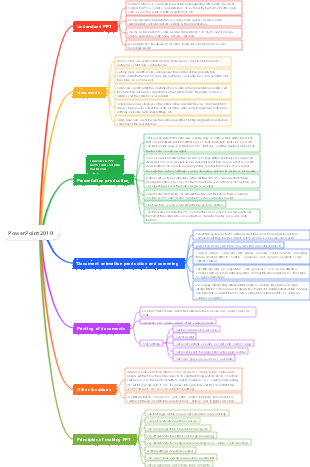
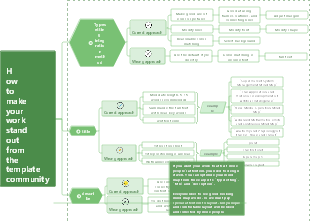
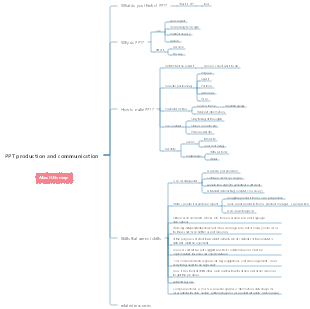
PPT look and feel mind map. An excellent PPT should have a good look and feel, which can attract the audience's attention and improve the presentation effect.
Edited at 2024-04-10 14:13:38This is a mind map about bacteria, and its main contents include: overview, morphology, types, structure, reproduction, distribution, application, and expansion. The summary is comprehensive and meticulous, suitable as review materials.

This is a mind map about plant asexual reproduction, and its main contents include: concept, spore reproduction, vegetative reproduction, tissue culture, and buds. The summary is comprehensive and meticulous, suitable as review materials.
This is a mind map about the reproductive development of animals, and its main contents include: insects, frogs, birds, sexual reproduction, and asexual reproduction. The summary is comprehensive and meticulous, suitable as review materials.
This is a mind map about bacteria, and its main contents include: overview, morphology, types, structure, reproduction, distribution, application, and expansion. The summary is comprehensive and meticulous, suitable as review materials.
This is a mind map about plant asexual reproduction, and its main contents include: concept, spore reproduction, vegetative reproduction, tissue culture, and buds. The summary is comprehensive and meticulous, suitable as review materials.
This is a mind map about the reproductive development of animals, and its main contents include: insects, frogs, birds, sexual reproduction, and asexual reproduction. The summary is comprehensive and meticulous, suitable as review materials.
Perception
scope
We are talking about shared reading or knowledge transfer. Materials that must rely on in-depth reading do not count.
No presentation skills involved
compatible:
16:9 and 4:3 compatible, be careful not to deform, don’t stack text and pictures together
grateful
Some students’ PPTs made my eyes light up.
Some are simple and elegant, some are gorgeous, and they all have something worth learning from.
Misunderstanding
Stack footage
Ignore people with poor vision
Consider the environment: not just because it looks clear on the computer, but also because of the projector and TV. Try to ensure that the content can be seen clearly on a black and white TV.
Dazzling effect
Ignore template usage scenarios
Don’t be a flower picker
experience
About the picture: You need to relax after a long time
Positive energy: use good pictures to guide readers’ emotions
Fool-proof operation of color and font design - Microsoft has done a good job
SmartArt is a good thing
Outline and lead
Five fingers on one hand, more than five items, it is difficult to remember at one time, appropriate classification will help memory
Structured for easy understanding and memory: Topic - Section - Content
Habit
attention
Reading attention is limited. Too much content to pay attention to can easily lead to distraction. Where is the point on this page that is expected to enhance attention?
About the cover and title
Another function of the homepage cover - curtain, solemnity, leaving suspense
Title party is very important
The relationship between primary and secondary titles: odd and correct complement each other, both solemn and humorous
back cover
Sincerity from beginning to end: In addition to Q&A and Thank you, can you have something nutritious? Be creative when thanking you
Text and graphics
The amount of text information per page should not be too large, especially for on-site explanations. Too much text will cause the speaker to become a PPT reader.
A sentence should not be too long
Try not to use related sentence patterns: cause and effect, progression, hypothesis, transition (unless you change Word to PPT)
The text is not as good as the numbers, the numbers are not as good as the tables, and the tables are not as good as the pictures
Too many colors can cause visual fatigue
Fonts: Each font adapts to different scenarios
Reflection is limited to big titles, with less text, to ensure clarity at a glance, only two or three words (characters), and do not require readers to concentrate to see clearly.
Maintain style and use Gif animations judiciously
sense of the times
From button to tile
Highly quasi-objective to minimalist solid color
Don't be lazy
Common lazy behaviors
How come the blurry picture has the face to show it (I hate text screenshots the most)
Office family: Don’t use screenshot software to take Visio diagrams, and don’t take screenshots to take Excel tables.
About this map
general direction
Reason: Why write PPT? Is it to share reading, inform information, or transfer knowledge?
Purpose: What do you hope to achieve?
Audience: Who are the target readers/listeners?
Personal experience in making PPT
Opening: Random PPT
To attract good ideas
Course scope
Design slideshow
Display, quick reading, memorization
Heavy framework, weak association
Not a PowerPoint operation class
PPT function analysis
Competitive product research
Design Notes
knowledge transfer
product planning
Promotion plan
Service guide
Self introduction
Recommended steps
Collect materials
Maintain daily information management habits: EVERNOTE
Be broad-minded and make appointments; be rich in accumulation but thin in hair (Su Shi's "Jia Shuo" sent to Zhang Hu)
The range of materials should be broad
mind Mapping
Original information accumulated from daily life: work practice, classification, experience summary, trend judgment (telling your own story to reflect differentiation)
Target
The more materials, the better, but you must choose the most valuable or most reliable ones.
Assess your ability to grasp information
Combing clues
frame
expression structure
It is roughly like flowing clouds and flowing water. It has no definite quality at first, but it always goes on what it should do, and always stops where it cannot stop. It is literary and natural, and its posture is full of energy.
Determine content
Select appropriate materials
Estimated number of pages
design effect
About the picture
Photos and works of my own team
Make good use of PowerPoint functions
SmartArt-The power of artifacts
Foolish style design
Style is like clothing: keep it consistent
Tips and Lessons
The disease may be in the hair and interstitium, some in the skin, some in the bones and flesh, some in the pulse, some in the bones, and some in the marrow.
autosuggestion
Confidence: It shows between the lines that you can only work hard
Taboo: Do it casually, don’t spend much time, it is only my personal opinion, I will not be responsible if there is any misleading
Subtext: My PPT and I are very unreliable, you insisted on me doing it
picture
About the framework
Outline and lead
Quick learning: The advantage of PPT lies in the framework, and the value is also in the framework
Structured for easy understanding and memory: Topic - Section - Content
one two three four five
Five fingers on one hand, more than five items, it is difficult to remember at one time, appropriate classification will help memory
If there are more than five, it is necessary to group and layer them
If it really exceeds the limit, you must consider ways to help memory, such as rhyming with the same pattern.
argument argument
Too much material can’t kill anyone
Strict logic is king
Don’t try to cover up logical problems with pretty pictures
It’s just the length of time it’s been exposed
front cover and back cover
Home page cover is very important
Curtain, silence, announcing the theme, staying curious
Listen to the string song and know the elegant meaning
writer of sensational headlines
Title combination: Qi Zheng, Yizhuang Yixue
Title 1: Directly pointing to the human heart, seeing one’s nature and becoming a Buddha
The power of commitment
Become a PPT master in 30 minutes
Want to feel good
Don’t let PPT expose your shortcomings
Afraid of pain
Title 2: Move with emotion, learn with reason
knowledge category
Five steps to create PPT
Common misunderstandings when writing PPT
Title 3: The clouds and mountains are shrouded in fog, ask and answer your own questions
Damn, it’s exciting again
Be in style! Don't lose your share! -A brief discussion on PPT skills
Know a woman by smell? -Look at the style from PPT
Title party four: I am cute
There are always some people who always want to act cute
Groove.Pangpangde-Slideshow homework review
...-Uncle Ni is an old man in IT. I can’t give you too cute examples. You girls can go home and be cute yourself.
back cover
A grateful heart: sincerity from beginning to end
Share, distribute, enjoy
PPT is a tool for presentation. If you are willing to present, someone must be willing to read and listen. A grateful heart is very important.
Thoughts and new ideas
Express your feelings with your heart
Continuous experience
Every page needs to be expressed carefully, including the back cover. In addition to Q&A and Thank you, can you give me something nutritious? Be creative when thanking you
Various things on the back cover
Shout slogans and build brands
Repetition is power, let everyone identify with yourself
"Work together and grow together"
Send out flyers, please keep them
Extend knowledge recommendations and extend the life value of PPT
"Recommendations for good books" and "recommendations for excellent website resources in related fields"
Ask questions, spread the word
Finally, ask one or two questions, not too many, so that people can continue thinking outside the door.
""
Leave homework, picture effects
If the training requires practice, it would be more appropriate to leave homework
"Would you like to try modifying your PPT?"
Small publicity, advertising
If it is a series of PPTs, it is best to include post-advertisements to gain popularity.
"If you know what will happen next, please stop decomposing it" - Use PPT to ruin an idea
Big promotion, remember me
meet me again
Organization, individual, team, customized on demand
Picture on the back cover
atmosphere
To the point
topic introduction
Dreams and pain
What you want, why you haven’t done it yet, how you can do it
Let’s get straight to the point, let the data speak for itself
Hey, hey, it's so dangerous! The road to Shu is as difficult as climbing to the sky!
Fresh and hot topics
Helps get the audience into the mood quickly
Wechat masturbation
Application of fragmented time
PK among friends
text chart
Good food, color, aroma, hearing, touch, and three-dimensional combination are all indispensable
text, tables, diagrams
The text is not as good as the numbers, the numbers are not as good as the tables, and the tables are not as good as the pictures
Leave more space, don’t fill it in
text, sentence pattern
The amount of text information per page should not be too large, especially for on-site explanations. Too much text will cause the speaker to become a PPT reader.
A sentence should not be too long
Try not to use related sentence patterns: cause and effect, progression, hypothesis, transition
Don’t use too many text colors
Subtopic 1
When using text effects, pay attention to the usage scenarios
Reflection is limited to big titles, with less text, to ensure clarity at a glance, only two or three words (characters), and do not require readers to concentrate to see clearly.
chart
The Power of Charts: Silence is better than sound at this time
Words are the finishing touch: a little bit of text, a little bit of resonance
Keep the style consistent
Use Gifs with caution
About style
Don’t make PPT to death, the style can be changed at any time
Use background images with caution
sense of the times
Don’t always leave yourself in the Win 9X era
Buttons, tiles
Personalization: Clever use of fonts
Solemn, naughty, mellow
Clever layout
Keep your style consistent: If you act cute, you must keep acting cute to the end.
Details, details, have nothing to do with ability or style, but with character
Pictures of success and pictures of failure, the most revealing of laziness!
A bunch of bad pictures and a bunch of X
persecution! If the resolution is too low, don’t enlarge it.
Sin! Full screen screenshot for PPT
Me and my little friends are shocked! Also screenshot the text? You don’t know how to copy, but you can type.
Aborigines, purebred aborigines will become purebred aborigines: screenshots of Visio and Excel
typo
Not to mention, they are all flies
logical
Done?
Don't worry, check if it's reliable first
Imagine the PPT playback scene. Look at each page to see if all the elements are clear. Students who have the conditions can find a monitor with color distortion.
Simple way, record and rehearse
Find an acquaintance to read for you
Turn on the self-abuse mode and give it a try
My best PPTs are all preserved by having someone audio-visualize them before.
Conclusion
If you are unsure about foreign affairs, ask Google; if you are unsure about domestic affairs, ask Baidu.
A good PPT is only a small part, users know whether the product is good or not
Listen, improve, and constantly polish to extend the life cycle of PPT