 Wondershare EdrawMind
MindMap Gallery HTML tag types
- 194
- 2
- 1
HTML tag types
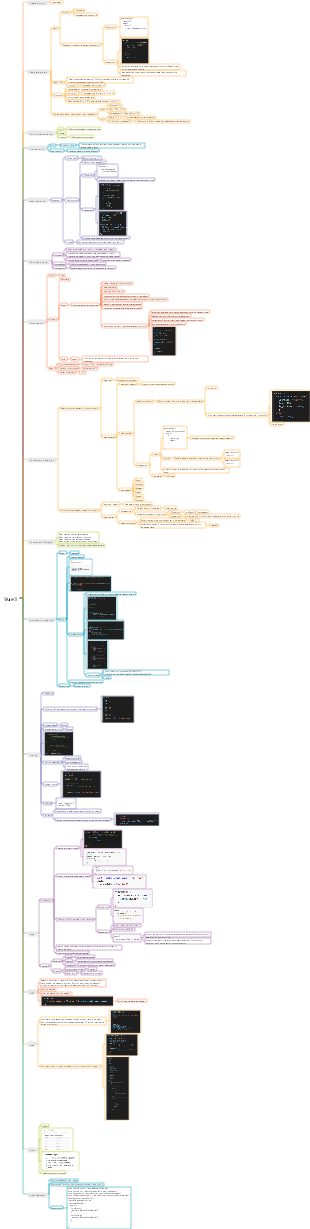
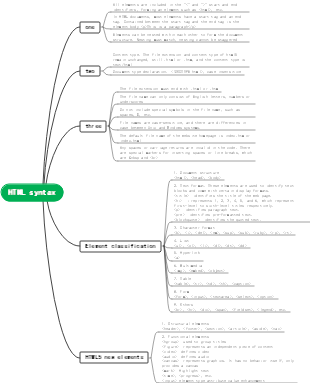
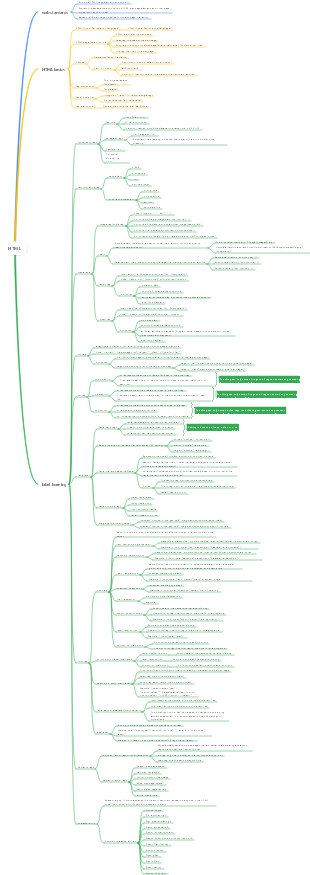
This is a mind map about the types of HTML tags. The main contents include: 3. Commonly used tags within the Body, 2. The basic structure of HTML documents, 1. What is HTML and what is it not? .
Edited at 2024-04-26 15:22:04
- bacteria
This is a mind map about bacteria, and its main contents include: overview, morphology, types, structure, reproduction, distribution, application, and expansion. The summary is comprehensive and meticulous, suitable as review materials.
- Plant asexual reproduction
This is a mind map about plant asexual reproduction, and its main contents include: concept, spore reproduction, vegetative reproduction, tissue culture, and buds. The summary is comprehensive and meticulous, suitable as review materials.
- Reproductive development of animals
This is a mind map about the reproductive development of animals, and its main contents include: insects, frogs, birds, sexual reproduction, and asexual reproduction. The summary is comprehensive and meticulous, suitable as review materials.
HTML tag types
- bacteria
This is a mind map about bacteria, and its main contents include: overview, morphology, types, structure, reproduction, distribution, application, and expansion. The summary is comprehensive and meticulous, suitable as review materials.
- Plant asexual reproduction
This is a mind map about plant asexual reproduction, and its main contents include: concept, spore reproduction, vegetative reproduction, tissue culture, and buds. The summary is comprehensive and meticulous, suitable as review materials.
- Reproductive development of animals
This is a mind map about the reproductive development of animals, and its main contents include: insects, frogs, birds, sexual reproduction, and asexual reproduction. The summary is comprehensive and meticulous, suitable as review materials.
- Recommended to you
- Outline

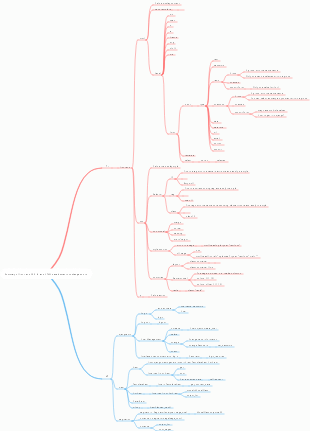
html tag
script tag
1. Place it in the <head> tag
Since HTML documents are loaded by the browser from top to bottom, if you place JavaScript code in the <head> tag, JavaScript cannot obtain the required elements from the <body> tag, and the DOM will not be loaded. The page is rendered and JavaScript cannot be executed. Therefore, JavaScript code is placed in the <head> tag, which is generally used to load in advance in response to user actions. It does not affect the browser display content of the HTML document and ensures that the script is loaded before any call.
2. Place it in the <body> tag
The <script> tag located within the <body> tag can contain functions or statements that can be executed immediately. However, if you need to interact with web page elements (such as getting the value of a certain tag or assigning a value to a certain tag), you need to put < The script> tag is placed after the web page element.
3. Place it after the <body> tag
When preparing to interpret the JavaScript code here, the entire web page has already been loaded, so this is the most suitable place for commands that need to be executed immediately, but custom functions and the like are not suitable.
rel=nofollow
The nofollow tag prevents spiders from crawling and following this link.
The meta robots tag prevents spiders from tracking or indexing the entire page link
https://jingyan.baidu.com/article/75ab0bcba6c61fd6874db279.html
Common tags
https://blog.csdn.net/qq_46137324/article/details/131971697
Standardized HTML5 elements
root element
Element Description <html> Represents the root of an HTML or XHTML document. All other elements must be children of this element.
Document metadata
Element Description <head> Represents a collection of metadata about a document, including links to or content of scripts or stylesheets. <title> Defines the title of the document, which will be displayed in the browser's title bar or tab. This element can only contain text, contained tags will not be interpreted. <base> Defines the base URL for relative URLs on the page. <link> Used to link external JavaScript or CSS to this document. <meta> Defines metadata that cannot be described by other HTML elements. <style> Used for inline CSS.
script
Element Description <script> Define an inline script or link to an external script. The scripting language is JavaScript. <noscript> Defines the alternative text that is displayed when the browser does not support scripting. A container that instantiates content at runtime via JavaScript.
chapter
Element Description <body> Represents the content of an HTML document. There can be only one <body> element in a document. Defines a section in the document. Define sections containing only navigation links. Define a complete independent block of content that can be independent from the rest of the content. Define content that is less relevant to the content of the page - if removed, the remaining content will still make sense. <h1>,<h2>,<h3>,<h4>,<h5>,<h6> The title element implements six levels of document titles, <h1> is the largest title, and <h6> is the smallest title. The title element briefly describes the topic of the chapter. Defines the page or section header. It often includes a logo, page title, and navigational table of contents. Defines the end of a page or section. It often contains copyright information, links to legal information, and addresses for feedback suggestions. <address> Define a section containing contact information. Define the main or important content in the document.
Organize content
Element Description <p> Define a paragraph. <hr> Represents the separator between paragraphs in a chapter, article, or other long content. <pre> It means that the content has been typeset in advance and the format should be retained. <blockquote> Represents quotes from other sources. <ol> Define an ordered list. <ul> Define an unordered list. <li> Defines a list item in a list. <dl> Define a definition list (a list of terms and their definitions). <dt> Represents a term defined by the next <dd>. <dd> Represents the definition of the term that precedes it. Represents a legend associated with the document. Represents the description of a legend. <div> Represents a general container with no special meaning.
text form
Element Description <a> Represents a hyperlink to another resource. <em> Represents emphasis text. <strong> Represents particularly important text. <small> Represents comments, such as disclaimers, copyright statements, etc., that are not important to understanding the document. <s> Represents inaccurate or irrelevant content. <cite> Represents the title of the work. <q> Represents an inline reference. <dfn> Represents the definition of a term as contained in its nearest ancestor. <abbr> Represents an omission or abbreviation, and its complete content is in the title attribute. Associated with the machine-readable equivalent of a piece of content (this element is only in the WHATWG version of the HTML standard, not in the W3C version of the HTML5 standard). Represents a date and time value; the machine-readable equivalent is specified via the datetime attribute. <code> Represents computer code . <var> Represents variables in code. <samp> Represents the output of a program or computer. <kbd> Represents user input, usually output from the keyboard, but can also represent other input, such as voice input. <sub>,<sup> Represents subscript and superscript respectively. <i> Represents a piece of text of different natures, such as technical terms, foreign language phrases, etc. <b> Represents a piece of text that needs attention. <u> Represents a text comment that needs to be underlined, such as marking misspelled text, etc. Represents a quoted text that needs to be highlighted. Represents text marked by ruby comments, such as Chinese characters and their pinyin. Represents ruby comments, such as Chinese Pinyin. Represents extra inserted text around ruby comments, used to provide friendly comment display in browsers that do not support ruby comment display. Represents a piece of text that needs to be separated from the text direction of the parent element. It allows embedding a text in a different or unknown text orientation format. <bdo> Specifies the text direction of child elements, explicitly overriding the default text direction. <span> Represents a piece of text with no special meaning. This element can be used when other semantic elements are not suitable for the text. <br> Represents newline. Represents word break opportunity (Word Break Opportunity), where a line break will be added when the text is too long and needs to be broken.
edit
Element Description <ins> Definition adds content to the document. <del> Defines content to be removed from the document.
Embed content
Element Description <img> represents a picture. <iframe> Represents an inline frame. Represents an embedded external resource, such as an application or interactive content. <object> Represents an external resource, such as an image, HTML subdocument, plug-in, etc. <param> Represents the parameters of the plug-in specified by the <object> element. Represents a video, its video files and subtitles, and provides a user interface for playing the video. Represents a piece of sound, or audio stream. Specify the media source for media elements such as <video> or <audio>. Specifies a text track (subtitle) for media elements such as <video> or <audio>. Represents a bitmap area on which graphics, such as charts, game drawings, etc., can be rendered in real time through scripts. <map> Together with the <area> element, it defines the image mapping area. <area> Together with the <map> element, it defines the image mapping area. Define an embedded vector image . Define a mathematical formula.
sheet
Element Description <table> Define multidimensional data. <caption> Represents the title of the table. <colgroup> Represents a group of single or multiple columns in a table. <col> Represents a column in a table. <tbody> Represents a specific piece of data in the table (the body of the table). <thead> Represents a column label (header) in the table. <tfoot> Represents a column summary (table footer) in the table. <tr> Represents a row in the table. <td> Represents a cell in the table. <th> Represents the header cell in the table.
form
Element Description <form> Represents a form, composed of controls. <fieldset> Represents the control group. <legend> Represents the title of the <fieldset> control group. <label> Represents the title of the form control. <input> Represents a data area (text box, radio button, check box, etc.) that allows the user to edit data. <button> Represents button . <select> Represents the drop-down box. Represents a predefined set of options provided to other controls. <optgroup> Represents an option grouping. <option> Represents an option within a <select> element or a <datalist> element <textarea> Represents a multi-line text box. Represents a key pair generator control. Represents the calculated value . Represents a progress bar. Represents the slider.
interactive elements
Element Description Represents a widget that the user can click to obtain additional information or controls. Represents a summary or title of the <details> element. Represents a menu item that the user can click. Represents the menu.
HTML tag types
1. 1. What is HTML and what is it not?
1.1. What is HTML?
Hypertext Markup Language (HTML) is a markup language used to create web pages.
Web page file extension: .html or .htm
Essentially, they are rules that can be recognized by the browser. We write web pages according to the rules, and the browser renders our web pages according to the rules. The same tag may be interpreted differently by different browsers. (compatibility issue)
1.2. What HTML is not
HTML is a markup language, not a programming language. HTML uses tags to describe web pages.
2. 2. Basic structure of HTML document
Basic structure example
<!DOCTYPE html> <html lang="zh-CN"> <head> <meta charset="UTF-8"> <title>css style priority</title> </head> <body> </body> </html>
Description of the basic format of HTML
Note: For Chinese web pages, you need to use <meta charset="utf-8"> to declare the encoding, otherwise garbled characters will appear. Some browsers will set GBK as the default encoding, so you need to set it to <meta charset="gbk">.
2.1. Commonly used tags inside head
<!--Tag classification<h1></h1>--> <!DOCTYPE html> <!--lang="en" indicates that the main language of the web page is English--> <html lang="zh-CN"> <head> <!--Define the original information of the web page--> <meta charset="UTF-8"> <!--It is convenient for search engines to find. One is keywords. Search keywords can lead to the web page. Description is equivalent to a summary--> <meta name="keywords" content="meta summary,html meta,meta attributes,meta jump"> <meta name="description" content="Old Boy Education Python Academy"> <!--Content displayed on the tab page--> <title>My First HTML</title> <!--Define the style of a tag--> <style> a{ color:darkred; } </style> <!-- Define JS code or introduce external JS files <script>alert("Hello World")</script> --> <!--Introduce the external style sheet file text.css to change the color of the a tag to green--> <link rel="stylesheet" href="text.css"> <!-- Jump to the corresponding URL after 2 seconds, pay attention to the quotation marks <meta http-equiv="refresh" content="2;URL=https://www.cnblogs.com/zaixiazhouzhou/default.html?page=1"> --> <!--Tell IE to render the document in the most advanced mode--> <meta http-equiv="x-ua-compatible" content="IE=edge"> </head>
2.1.1. Supplement to the Meta tag
• The <meta> element provides meta-information about the page, descriptions and keywords for search engines and update frequency. • The <meta> tag is located at the head of the document and contains no content. • <meta> provides information that is not visible to the user. The composition of the meta tag: The meta tag has two attributes, which are the http-equiv attribute and the name attribute. Different attributes have different parameter values. These different parameter values realize different web page functions.
1.http-equiv attribute:
Equivalent to the file header function of http, it can return some useful information to the browser to help correctly display the web page content. The corresponding attribute value is content, and the content in content is actually the variable value of each parameter.
<!--Jump to the corresponding URL after 2 seconds, pay attention to the quotation marks--> <meta http-equiv="refresh" content="2;URL=https://baidu.com"> <!--Specify the encoding type of the document--> <meta http-equiv="content-Type" charset=UTF8"> <!--Tell IE to render the document in the most advanced mode--> <meta http-equiv="x-ua-compatible" content="IE=edge">
2.name attribute:
It is mainly used to describe web pages, and the corresponding attribute value is content. The content in content is mainly used by search engine robots to find information and classify information.
<meta name="keywords" content="meta summary,html meta,meta attributes,meta jump"> <meta name="description" content="Old Boy Education Python Academy">
3. 3. Commonly used tags inside Body
3.1. Basic tags
<b>Bold</b> <i>italic</i> <u>Underline</u> <s>Delete</s> <p>Paragraph tag</p> <h1>Title 1</h1> <h2>Title 2</h2> <h3>Title 3</h3> <h4>Title 4</h4> <h5>Title 5</h5> <h6>Title 6</h6> <!--Line break--> <br> <!--Horizontal line--> <hr>
3.2. img tag
<img src="Path of the image" alt="Prompt when the image is not loaded successfully" title="Prompt message when the mouse is hovering" width="Width" height="Height (only one of the two attributes of width and height will automatically wait) than zoom)">
In addition to the built-in attributes of the img tag, we can also add some custom attributes to it.
<img format="jpg" sx="Customized attributes" src="Picture path" >
3.3. a tag
3.3.1. Introduction to a tag
The a tag is our common hyperlink tag. The so-called hyperlink refers to the connection relationship from a web page to a target. The target can be another web page or a different location on the same web page. It can also be a picture, an email address, a file, or even an application. By default, the link will appear in the browser as:
An unvisited link appears in blue font and underlined.
Visited links appear purple and underlined. When you click a link, it appears red and underlined.
Note: If CSS styles are set for these hyperlinks, the display style will be displayed according to the CSS settings.
3.3.2. Syntax format of a tag
<a href="http://www.oldboyedu.com" target="_blank" id="Customized ID value">Click me</a>
The href attribute specifies the target web address. The address can be of several types: • Absolute URL - points to another site (eg href="http://www.jd.com) • Relative URL - refers to the exact path within the current site (href="index.htm") • Anchor URL - points to an anchor in the page (href="#top")
target attribute: • _blank means opening the target page in a new tab • _self means opening the target web page in the current tab
id attribute: The id attribute can be used to create an HTML document bookmark. Tip: Bookmarks are not displayed in any special way, i.e. they are not displayed in the HTML page, so they are hidden from readers.
Insert ID in HTML document: <a id="ID is 1">Now is the position with ID 1</a>
3.4. Special characters in HTML
Although html is not case-sensitive, entity characters are case-sensitive.
3.5, div and span tags
The difference between span and div is that div is a block-level element, and the elements it contains will automatically wrap. Span is an inline element, and there will be no line breaks before and after it.
span has no structural meaning, it is just a simple application of styles. The span element can be used when other elements are not suitable. span can be used as a child element of div, but div cannot be a child element of span. If a div appears in span, it does not comply with the ws3c page standard.
3.6. Focus: Classification of tags
3.6.1. The first type: block-level tags
Features: The label occupies one line, and the width and height can be specified.
characteristic: • Ability to identify width and height • The upper, lower, left and right margins and padding are all valid for it. • Can automatically wrap lines • Multiple block element tags are written together, and the default arrangement is from top to bottom • You can use margin:0 auto to center the alignment
Commonly used block elements include: <div>, <p>, <h1>...<h6>, <ol>, <ul>, <dl>, <table>, <address>, <blockquote>, <form>
3.6.2. The second type: inline label (inline label)
Features: The label is in one line, and the width and height are determined by the content. It will only wrap when the content exceeds the width of HTML.
characteristic: • Unable to set width and height • The upper and lower margins are invalid, only the left and right have an effect, and padding has an effect, which will expand the space; box-sizing:border-box; is invalid because this attribute is for the box model. • No automatic line wrapping
Commonly used inline elements are: <a>, <span>, <i>, <em>, <strong>, <label>, <q>, <var>, <cite>, <code>
3.7. List tags
The attributes of list tags are roughly as follows:
3.7.1. Related attributes of unordered list ul
type attribute: • disc (solid dot, default) • circle (open circle) • square (solid square) • none (no style)
<ul type="disc"> <li>Solid dot-default</li> </ul> <ul type="circle"> <li>Filled circles</li> </ul> <ul type="square"> <li>Solid Square</li> </ul> <ul type="none"> <li>No style</li> </ul>
Output example:
3.7.2. Related attributes of ordered list ol
ordered list type attribute value It is not that an ordered list can only use 1, 2, 3... to represent a sequence. You can also use the following method:
Other properties of ordered lists
3.7.3. Related attributes of title list
<dl> <dt>Title 1</dt> <dd>Content under the title 1</dd> <dt>Title 2</dt> <dd>Content under title 2 1</dd> <dd>Content 2 under title 2</dd> </dl>
Output example
3.8. Text formatting tags
https://blog.csdn.net/qq_44891434/article/details/113371490
https://blog.csdn.net/qq_46137324/article/details/131971697