MindMap Gallery Operating system introduction mind map
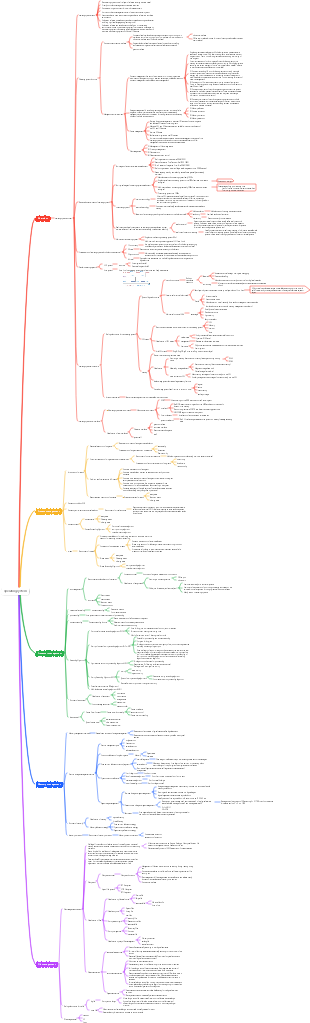
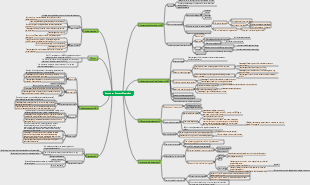
This is a mind map about the introduction of operating systems. OS refers to the rational organization of hardware and software resources that control and manage the entire computer system, schedule the work and resource allocation of the computer, and then provide convenient interfaces and environments for users and other software. collection of programs. It is the most basic system software in the computer system.
Edited at 2023-12-01 15:57:29This is a mind map about bacteria, and its main contents include: overview, morphology, types, structure, reproduction, distribution, application, and expansion. The summary is comprehensive and meticulous, suitable as review materials.

This is a mind map about plant asexual reproduction, and its main contents include: concept, spore reproduction, vegetative reproduction, tissue culture, and buds. The summary is comprehensive and meticulous, suitable as review materials.
This is a mind map about the reproductive development of animals, and its main contents include: insects, frogs, birds, sexual reproduction, and asexual reproduction. The summary is comprehensive and meticulous, suitable as review materials.
This is a mind map about bacteria, and its main contents include: overview, morphology, types, structure, reproduction, distribution, application, and expansion. The summary is comprehensive and meticulous, suitable as review materials.
This is a mind map about plant asexual reproduction, and its main contents include: concept, spore reproduction, vegetative reproduction, tissue culture, and buds. The summary is comprehensive and meticulous, suitable as review materials.
This is a mind map about the reproductive development of animals, and its main contents include: insects, frogs, birds, sexual reproduction, and asexual reproduction. The summary is comprehensive and meticulous, suitable as review materials.
operating system
Introduction
OS concept (definition)
OS refers to the hardware and software resources that control and manage the entire computer system. Reasonably organize and schedule computer work and resource allocation, A collection of programs that provides convenient interfaces and environments for users and other software. It is the most basic system software in the computer system.
operating system characteristics
Concurrency (most important, prerequisite for other features)
Two or more events occur within the same time interval
shared
The resources in the system can be used by multiple concurrently executing processes in memory. Resource sharing is sharing
Mutually exclusive sharing mode (shared use of camera equipment)
Simultaneous access mode (shared use of hard disk resources)
The most basic characteristics, the two are the conditions for the existence of each other
virtual
Transform a physical entity into several logical counterparts
time-sharing resources
asynchronous
The multiprogramming environment allows multiple programs to execute concurrently. Due to limited resources, the execution of the process is not consistent, but stop-and-go. It advances at an unpredictable speed.
Operating system goals
Convenience
effectiveness
Scalability
openness
Goals and functions The role of the operating system service provided
OS as the manager of computer system resources
Processor management
memory management
Device management
File management
OS serves as the interface between the user and the computer hardware system (Providing services to upper levels)
For ordinary users
GUI graphical user interface (which ultimately boils down to a program interface)
command interface
Online control method
Online command interface (interactive command interface) suitable for time-sharing or real-time systems
Offline control mode
Offline command interface (batch command interface) is suitable for batch processing systems
Software/programmer use
Program interface (system call == generalized instruction)
The user requests the OS to provide services by using system call commands in the program. Users can directly use system call commands in the program to make various service requests to the system.
For example, using external devices, performing operations on disk files, Apply to allocate and reclaim memory and various control requirements
OS used as an expansion machine Implement abstraction of computer resources
Extended Machine/Virtual Machine: Machine with software covered
development and classification
manual stage
shortcoming
User exclusive use of the entire machine
The CPU is waiting for manual operation and the CPU is not fully utilized.
Conflict between man and machine, conflict between CPU and I/O speed
Batch processing stage
Single-channel batch processing system (introduction of offline input and output technology)
Advantages: Alleviating the conflict between human and machine speeds
Disadvantages: Resource utilization is still low, high-speed CPU waits for low-speed I/O
Multi-channel batch processing system (multi-programming technology operating system begins to appear) Multi-programming (multi-channel, macro-parallel, micro-serial)
advantage
High resource utilization, multi-programming shares computer resources
System throughput is high, CPU and other resources stay "busy"
shortcoming
Long user response time and drone interaction capabilities
time-sharing OS
advantage
Provide human-computer interaction functions
shortcoming
Unable to prioritize urgent tasks
Real-time OS
Soft real-time system
Ability to accept occasional time violations without causing permanent damage
hard real-time system
An action must absolutely occur at a specified moment (or within a specified time range)
Pros: Ability to prioritize urgent tasks
Microcomputer operating system
Network OS
Distributed OS
PC OS
Operating environment
Operating mechanism
How the program works
High-level language programming——>Machine instructions
The process of program running is the process of CPU executing instructions.
two procedures
kernel program
app
Two types of instructions
Privileged instructions (such as I/O instructions, interrupt instructions, etc.)
unprivileged instructions
Access management instructions (the execution of the program is transferred from user mode to core mode)
Two processor states
Kernel state/core state/tube state
User mode/eye mode
How to pervert?
Kernel mode->User mode
A privileged instruction that modifies PSW
User mode->Kernel mode
Caused by an interrupt, the hardware automatically completes
example
system call
An interrupt occurred
An error condition occurred in the user program
Attempt to execute a privileged instruction in user program
The transition from the core state to the user state is implemented by an instruction. This instruction is also a privileged command, usually an interrupt return instruction.
Kernel (the underlying software configured on your computer) The most important and core part of the operating system
clock management
Implement timing function
Interrupt mechanism
Responsible for implementing the interrupt mechanism
primitive
is a special program
It is at the bottom of the operating system and is the part closest to the hardware.
The operation of this kind of program is atomic - its operation can only be completed in one go and cannot be interrupted.
Short running time and frequent calls
Data structure and processing of system control Functions to manage system resources
Process management
memory management
Device management
interrupt
The role of interrupts
Let the operating system kernel forcibly take back control of the CPU
Change the CPU from user mode to kernel mode
Classification of interrupts
Internal interrupt (exception/exception/trap) Relevant to the currently executed instruction The interrupt signal comes from inside the CPU
trap, fall into
Trapped in instruction raise, application intentionally raises
Fault
Caused by an error condition that may be fixed by a kernel program. After the kernel program is repaired, the CPU usage rights will be returned to the application, allowing it to continue executing. (such as page fault interrupt)
termination
Caused by a fatal error, the kernel program cannot repair the error and generally terminates the application directly. (such as integer division by zero, illegal use of privileged instructions)
External interrupt (narrow sense interrupt) Regardless of the currently executing instruction The interrupt signal comes from outside the CPU
Peripheral request (clock interrupt)
Human intervention (I/O interrupt request)
The basic implementation principle of the interrupt mechanism
Check interrupt signal
Internal interrupt: The CPU checks whether an exception occurs when executing instructions
External interrupt: At the end of each instruction cycle, the CPU checks whether there is an external interrupt signal that needs to be processed.
Find the corresponding interrupt routine
"Interrupt vector table"
System call (interface provided by the OS to applications/programmers) Program interface/generalized instructions
System calls are when users call some sub-functions provided by the OS in a program and can be regarded as special public subroutines. Involves system resource management and process management. Certain privileged instructions must be used, so running in core mode
The difference between system calls and library functions
Some library functions further encapsulate system calls.
Some library functions do not use system calls
What functions need to be implemented using system calls?
Device management
File management
process control
process communication
Memory management
System call process
Passing on parameters
Trapped in command/trap/access management
System call requests are processed by the operating system kernel program
Return to application
Architecture
big core
The main functional modules of the operating system are used as the system kernel and run in the core state.
Advantages: high performance
Disadvantages: The kernel code is huge, confusing structure, and difficult to maintain
microkernel
Keep only the most basic functions in the kernel
Advantages: fewer core functions, more reliable, clear structure, easy to maintain
Disadvantages: Frequent switching between core mode and user mode is required, low performance
Interrupts and Exceptions
The difference between interrupt handling and subroutine calling
Entrance address
interrupt
Obtained from the interrupt implicit instruction according to the interrupt vector
subroutine call
Obtained by the calling program according to the addressing mode
save environment
interrupt
Save PC, PSW, general register
subroutine call
Save PC, General Purpose Register
process status
interrupt
From user mode to kernel mode
subroutine call
No state changes
Parallelism vs. Concurrency
OS concurrency is achieved through time sharing
Concurrency
Two or more events occur within the same time interval
Parallelism
Two or more events are sent at the same time
Requires hardware support
In a multiprogramming environment, over a period of time, macroscopically, multiple programs are executed simultaneously At a certain moment, only one program is actually executed in a single-processor environment. Microscopically, the programs are executed alternately in a time-sharing manner.