MindMap Gallery Computer System Overview
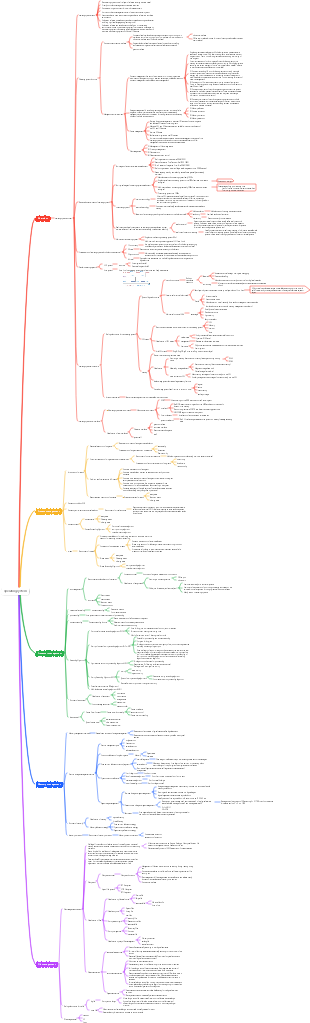
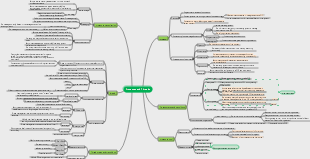
This is a mind map about an overview of computer systems. The main contents include: virtual machines, OS boot, OS concepts and functions, OS basic structure, system calls, interrupts and exceptions, OS operating mechanism, OS development and Classification.
Edited at 2024-10-24 16:49:14This template shows the structure and function of the reproductive system in the form of a mind map. It introduces the various components of the internal and external genitals, and sorts out the knowledge clearly to help you become familiar with the key points of knowledge.
This is a mind map about the interpretation and summary of the relationship field e-book, Main content: Overview of the essence interpretation and overview of the relationship field e-book. "Relationship field" refers to the complex interpersonal network in which an individual influences others through specific behaviors and attitudes.
This is a mind map about accounting books and accounting records. The main contents include: the focus of this chapter, reflecting the business results process of the enterprise, the loan and credit accounting method, and the original book of the person.
This template shows the structure and function of the reproductive system in the form of a mind map. It introduces the various components of the internal and external genitals, and sorts out the knowledge clearly to help you become familiar with the key points of knowledge.
This is a mind map about the interpretation and summary of the relationship field e-book, Main content: Overview of the essence interpretation and overview of the relationship field e-book. "Relationship field" refers to the complex interpersonal network in which an individual influences others through specific behaviors and attitudes.
This is a mind map about accounting books and accounting records. The main contents include: the focus of this chapter, reflecting the business results process of the enterprise, the loan and credit accounting method, and the original book of the person.
Computer System Overview
Concepts and functions of OS
concept
Manage computer resources such as hardware and software
Provide simple and easy-to-use services for upper-level users and applications
a system software
Functions and goals
resource manager
processor
memory
document
equipment
Provide services to upper levels
For general users
GUI graphical user interface
command interface
Online command interface
Offline command interface
For software and programmers
Program interface (system call)
Expansion of hardware machines
operating system characteristics
concurrent
shared
Mutually exclusive sharing mode
Such as camera device calls
Share simultaneously
Such as hard disk sharing use
virtual
space division multiplexing technology
such as virtual storage technology
time division multiplexing technology
such as virtual processor technology
asynchronous
Development and Classification of OS
manual stage
Disadvantages: Conflict between human and machine speeds, low resource utilization
Batch processing stage
Single-channel batch processing system (offline input and output)
Advantages: Alleviating the conflict between human and machine speeds
Disadvantages: Resource utilization is still low
Multi-channel batch processing systems (operating systems begin to appear)
Advantages: concurrent execution of multiple programs, high resource utilization
Disadvantages: Does not provide human-computer interaction function
time-sharing operating system
Advantages: Provide human-computer interaction function
Disadvantages: Unable to prioritize urgent processes
real-time operating system
Hard real-time operating system
Urgent processes must be handled within strict time limits
Soft real-time operating system
Can accept occasional timeouts
Advantages: Urgent processes can be prioritized
network operating system
Distributed operating system
personal computer operating system
OS operating mechanism
Two kinds of instructions
Privileged instructions
unprivileged instructions
Two processor states
Kernel state (tube state)
Can execute privileged instructions
Execute a special privileged instruction - modify the PSW flag to user mode - switch to user mode
User mode (eye mode)
Can only execute user instructions
If a privileged instruction is read in user mode - causing an interrupt instruction, forcing the transition to kernel mode - causing a kernel program that handles the interrupt signal - returning to user mode after processing
Whenever the operating system needs to intervene, an interrupt signal will be triggered.
Rely on the program status word register to determine the status
two procedures
Kernel program (the kernel of the operating system)
Privileged instructions can be used
Applications (running on top of the operating system)
Only unprivileged instructions can be used
Interrupts and Exceptions
The role of interrupts
The operating system kernel forcibly takes back control of the CPU
Let the CPU change to kernel state
Classification of interrupts
Interrupt (external interrupt signal)
I/O interrupt request
clock interrupt
Exception (internal interrupt signal)
fall into
The application actively transfers control to the kernel program
unprivileged instructions
Fault
termination
Caused by an error condition, which may be fixed by the kernel program, after repair Give control back to applications
page fault
Caused by fatal errors that cannot be repaired by the kernel program, generally not Transfer control back to the application and terminate directly
Such as division by zero, illegal use of privileged instructions
The principle of interruption
Check interrupt signal
Exception: The CPU checks whether there is an exception when executing the instruction.
Interrupts: The CPU checks for interrupts at the end of each instruction cycle
Find the corresponding interrupt handler (handled through the interrupt vector table)
system call
The interface provided by the operating system to programmers/applications
The difference between system calls and library functions
Some library functions are further encapsulation of system calls
Some library functions do not use system calls
System call process
Passing on parameters
stuck in instruction
System call requests are processed by the operating system kernel program
Return to application
Basic structure of OS
big core
The main functional modules of the operating system are used as the system kernel and run in the kernel state.
Advantages: high performance, low switching frequency between core mode and user mode
Disadvantages: Large amount of kernel code, difficult to maintain, messy structure
Linux, UNIX, Windows
microkernel
Keep only the most basic functions in the kernel
Advantages: less kernel code, clear structure, easy to maintain
Disadvantages: Need to frequently switch between user mode and kernel mode, low performance
Mac
Hierarchical structure
The kernel is divided into multiple layers, and each layer can call the interface of the next layer in one direction.
Advantages: Easy to debug and verify, bottom-up layer-by-layer debugging and verification
Disadvantages: low efficiency, cannot be called across layers, and difficult to reasonably define the boundaries of each layer
Modular
Divide the kernel into multiple modules, and each module works collaboratively (kernel = main module + loadable kernel)
Advantages: Supports dynamic loading of new kernel modules, modules can directly call each other, high efficiency
Disadvantages: Interdependence between modules, difficult to debug and verify
outer core
The kernel is responsible for process scheduling, process communication and other functions. The outer core is responsible for allocating unabstracted hardware resources to user processes, and the outer core is responsible for ensuring the security of resource use.
Advantages: The outer core can directly allocate hardware resources to user processes, and user processes can use resources more flexibly, reducing the mapping layer of virtual hardware resources and improving efficiency.
Disadvantages: Reduce system consistency and the system becomes more complex
OS boot
The CPU is powered on, the ROM bootstraps, and the disk master boot record is imported into RAM.
Find the C drive location through the master boot record, and import the C drive boot record into RAM
Find the startup program in the root directory of C drive and start the operating system
virtual machine
Virtualize one physical machine into multiple virtual machines
Type 1 VMM
Runs directly on the hardware and can directly control and allocate resources
Can directly allocate physical hardware without abstraction
Runs at the highest privilege level and can execute advanced instructions
Advantages: better performance, more virtual machines that can be supported
Disadvantages: poor mobility
Type II VMM
Runs on HostOS and relies on HostOS to allocate physical resources to it
GuestOS has its own virtual disk - effectively a large file in HostOS that can only allocate virtual memory
Runs in user mode, partially runs in kernel mode
Advantages: good migration
Disadvantages: Poor performance, small number of supported virtual machines