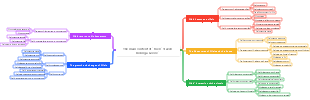
MindMap Gallery 99 time management skills (all 7 modules)
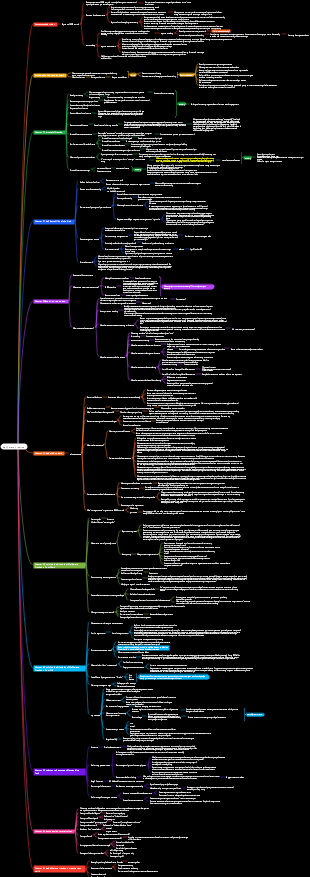
"Super Efficiency Manual" reading notes, 99 more comprehensive time management skills, to help readers improve work efficiency and quality of life. These tips are cleverly divided into seven modules, covering everything from overcoming procrastination to staying active to getting the right work done.
Edited at 2024-11-05 14:52:54이것은 곤충학에 대한 마인드 맵으로, 곤충의 생태와 형태, 생식 및 발달, 곤충과 인간의 관계를 연구하는 과학입니다. 그것의 연구 대상은 곤충으로, 가장 다양하고 가장 많은 수의 동물이며 생물학적 세계에서 가장 널리 분포되어 있습니다.
이것은 어린이의 내부 동기를 육성하는 방법에 대한 마인드 맵입니다. 기업가를위한 실용적인 가이드, 주요 내용 : 요약, 7. 정서적 연결에주의를 기울이고, 과도한 스트레스를 피하십시오.
이것은 자동화 프로젝트 관리 템플릿, 주요 내용에 대한 마인드 맵입니다. 메모, 시나리오 예제, 템플릿 사용 지침, 프로젝트 설정 검토 단계 (What-Why-How), 디자인 검토 단계 (What-Why-How), 수요 분석 단계 (What-Why-How)에 대한 마인드 맵입니다.
이것은 곤충학에 대한 마인드 맵으로, 곤충의 생태와 형태, 생식 및 발달, 곤충과 인간의 관계를 연구하는 과학입니다. 그것의 연구 대상은 곤충으로, 가장 다양하고 가장 많은 수의 동물이며 생물학적 세계에서 가장 널리 분포되어 있습니다.
이것은 어린이의 내부 동기를 육성하는 방법에 대한 마인드 맵입니다. 기업가를위한 실용적인 가이드, 주요 내용 : 요약, 7. 정서적 연결에주의를 기울이고, 과도한 스트레스를 피하십시오.
이것은 자동화 프로젝트 관리 템플릿, 주요 내용에 대한 마인드 맵입니다. 메모, 시나리오 예제, 템플릿 사용 지침, 프로젝트 설정 검토 단계 (What-Why-How), 디자인 검토 단계 (What-Why-How), 수요 분석 단계 (What-Why-How)에 대한 마인드 맵입니다.
gram Clothes drag extend disease
Article 1
Weekly/daily goals
The last day of the week to list the tasks to be completed next week
At the end of each day, list your goals for the next day in reference to your weekly goals.
Once the daily goal is achieved, stop working for the day
Article 2
limited time
When you don’t want to work, set up a “time box” of 30-90 minutes
Clear your desktop, close your inbox, and focus on work for 30-90 minutes
Article 3
Break down tasks
Break down the tasks you don’t like doing
Break down tasks without clear deadlines
Article 4
sprint theory
Find a highly disciplined task
Set a timetable and focus on completing it
Article 5
Calendar proofreading
All to-do items must be completed
After completing the goal for the day, be sure to stop
Article 6
Strengthen self-discipline
When you want to stop working, hold on for another 10 minutes
Set a goal for the next month and focus on one thing
Article 7
use spell
Set a "mantra" that inspires you
Place it in a prominent location, such as setting it as wallpaper or screensaver
Article 8
Eliminate potential stumbling blocks
Confirm whether the goal is still motivating
Does it still make sense to identify the reasons for desiring efficiency?
Check whether you are using "efficiency" as an excuse to avoid your real fears and dreams
Article 9
power catalyst
Make the goals into a table and visualize them
Make a public commitment to the plan
Write down your thoughts to remind yourself
Article 10
Stir
Lower standards and continue output, even if what is produced is "garbage"
Expect to lose most of the results
Article 11
Create a distraction-free workplace
On the computer: the work document is the only thing on the screen
On the desk: nothing to attract attention
Block "noise": hang out the "Do Not Disturb" label
Let people know your "focus" time
Article 12
Reject "should"
Find strong connections between specific tasks and goals
When a “should do” comes up, review the why
Article 13
prepare, shoot, aim
take action first
Re-evaluation, feedback
After completing the plan
Article 14
Get rid of the bad habit of procrastination
A list of things that take up time but are of no value
Crunch these habits and proceed with caution
eradicate these habits
99 indivual Even Complete noodle of hour between Tube reason technology Coincidence (1)
Do thing Even have strip reason
Article 1
Organization is a skill
Organization requires specialized design and maintenance
Requires regular maintenance
Article 2
Less chaos, less stress
The purpose of organization is to reduce the mental effort required to remember things
Keep the physical environment in order
Let tasks and work form a system, calendar and plan
Article 3
capture device
Design a way to always be ready to record useful information
Such as carrying a pen and sticky notes with you
Article 4
Give everything a place
Classified storage of items
Cannot be clearly classified: can be classified according to the frequency of use or addition
Article 5
simple organizational system
Work information is divided into three categories: projects, tasks, and activities
Article 6
Simple organizational system: projects
A project is a collection of tasks with a common goal
The project is relatively stable and rarely updated
Projects can be used to plan your future weekly or monthly life
Article 7
Simple organizational system: tasks
are relatively small, independent actions that need to be accomplished
There are three parts: overall to-do items, weekly goals and daily goals.
The overall backlog rarely belongs to projects or activities.
If there are new tasks, they will be placed in weekly goals or daily goals.
Daily goals are the only thing you need to check every day
Article 8
Simple Organizational System: Activities
Things that can only be done at certain times
Use the calendar to record activities, and when the activity day arrives, transfer to the daily work list
The daily work list is all isolated tasks
Article 9
write out your goals
Write your goals down with your own hands and form a contract
Archive completed goals to improve self-confidence
Article 10
branching method
Regularly review the system so that it can adapt to new changes at any time
Are there any categories that have too much content? If so, divide it into subcategories
Are there any categories that are not used? If so, reclassify
Are there new categories that can be created? If there is a new job, separate it separately
Article 11
Communication records
Keep a list of the information you have contacted
Ensure that what was promised can be achieved
View contact hours
Incorporate communication records into organizational systems
Article 12
do what you promised
60% of the things you promise to do but fail to do are because you forgot
Record everything said on the Capture Device and categorize it into tasks, activities or projects
For vague items, set a timeline for yourself, which can be classified into weekly and daily goals.
Article 13
Neat vs Organized
Put new things where they belong
It doesn’t take too long to find what you need
Article 14
Read notes
Take notes in a binder/notebook
Article 15
digital organization
Give everything a place, maintain it regularly and look for changes
99 indivual Even Complete noodle of hour between Tube reason technology Clever (2)
Save hold live force
Article 1
morning prayer
Get up at a time decided the night before
After waking up, spend 30-60 minutes doing a series of activities
Repeat every day
Article 2
take a day off
Shorten working hours and improve work capabilities
Taking a vacation rejuvenates a tired brain
Article 3
daily exercise
Energy is limited, not time
Exercise can increase energy and improve work efficiency
Morning jogging is a simple exercise method that can also be combined with morning prayers
Article 4
Eat for physical fitness
Eat low-glycemic whole grain foods
Eat small meals more often
Article 5
Make your time top-heavy
Put the most important work after Fajr prayer
Put more work on Monday
Article 6
Work in cycles
Think of work as a series of sprints, not a marathon
Proofread work schedule according to cycle
Set rules and designate break times
Article 7
Close open loop
Give tasks a clear stopping point
Article 8
Multitasking: The Eighth Sin
Focus on one task at a time
Give yourself uninterrupted "alone" time
Article 9
15 minute rule
Anytime you feel like giving up, do it for 15 more minutes
After holding on for 15 minutes, stop to rest and temporarily shift your attention.
Article 10
drink water
Put a glass of water on your desk
Check water glasses regularly and fill them with water
Article 11
Recharge your motivation
Review goals and reasons for setting them
Be aware of your own progress
Article 12
stay sharp
Discard information sources that do not provide new ideas
Keep reading and watch shows that give you new ideas
Carry out mental training and stay in a learning state (work is not study)
Article 13
work/play schedule
Establish a cycle of rest and work instead of letting it slide
Article 14
Balance creativity
When your physical fitness for a certain task is low, replace it with another task on the task list
99 indivual Even Complete noodle of hour between Tube reason technology Clever (3)
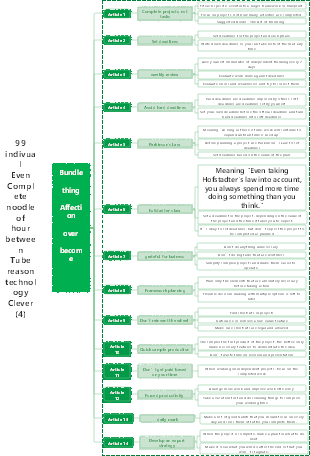
Bundle thing Affection over become
Article 1
Complete projects, not tasks
Fit each specific event into a larger framework or blueprint
Focus on projects, not how many activities are completed
Suggested Books "The Art of Finishing"
Article 2
Set deadlines
Set deadlines for the project and each phase
Write down deadlines so you can take note of them at any time
Article 3
weekly review
Give yourself 90 minutes of independent thinking every 7 days
Evaluate work done against deadlines
Evaluate errors and weaknesses and try to correct them
Article 4
Avoid hard deadlines
Hard deadlines are deadlines imposed by others, soft deadlines are deadlines set by yourself
Set your own deadline before the official deadline and turn hard deadlines into soft deadlines
Article 5
Parkinson's Law
Meaning "As long as there is time, work will continue to expand until all time is used up"
Before planning a project, use Parkinson’s Law to set deadlines
Set deadlines based on the value of the plan
Article 6
hofstadter's law
Meaning "Even taking Hofstadter's law into account, you always spend more time doing something than you think."
Set a deadline for the project, depending on the value of the project and the time it takes you to expect.
It’s okay to set deadlines, but don’t expect the project to be completed as planned
Article 7
grateful for laziness
Don't do anything unnecessary
Don’t do big tasks that are worthless
Simplify complex projects and make them easier to operate
Article 8
Framework planning
Plan only the elements that are absolutely necessary before taking action
Flexible decision-making with multiple options is left to later
Article 9
Don't reinvent the wheel
Find shortcuts in projects
Outsource or remove a low-value feature
Make sure shortcuts are legal and allowed
Article 10
Quick sample production
The simpler the first product of the project, the better: only make necessary features to demonstrate the idea
Don’t waste time on revision and presentation
Article 11
Don’t get paid based on your time
When working on independent projects, focus on the completed work
Article 12
Forced productivity
Arrange more work and improve work efficiency
Take a vacation first and do relaxing things to compress your working time
Article 13
daily mark
Make a list of good habits that you should focus on every day and cross them off after you complete them.
Article 14
Develop an export strategy
When the project is complete, make a plan for what to do next
Make it clear what you will do after the end so that you won’t stagnate.
99 indivual Even Complete noodle of hour between Tube reason technology Clever (4)