MindMap Gallery Initial Access database
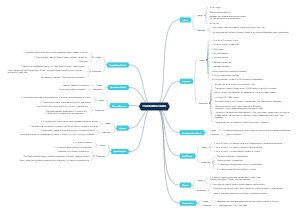
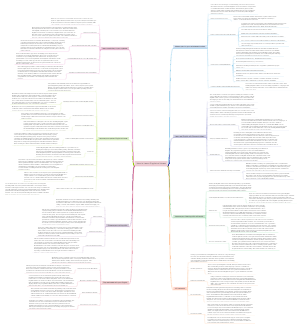
Secondary vocational school student, majoring in computer science, Access database application technology. In the first project, I first learned about Access database, understanding database, basic operations, database objects, and database design.
Edited at 2024-01-16 16:34:27This is a mind map about bacteria, and its main contents include: overview, morphology, types, structure, reproduction, distribution, application, and expansion. The summary is comprehensive and meticulous, suitable as review materials.
This is a mind map about plant asexual reproduction, and its main contents include: concept, spore reproduction, vegetative reproduction, tissue culture, and buds. The summary is comprehensive and meticulous, suitable as review materials.
This is a mind map about the reproductive development of animals, and its main contents include: insects, frogs, birds, sexual reproduction, and asexual reproduction. The summary is comprehensive and meticulous, suitable as review materials.
This is a mind map about bacteria, and its main contents include: overview, morphology, types, structure, reproduction, distribution, application, and expansion. The summary is comprehensive and meticulous, suitable as review materials.
This is a mind map about plant asexual reproduction, and its main contents include: concept, spore reproduction, vegetative reproduction, tissue culture, and buds. The summary is comprehensive and meticulous, suitable as review materials.
This is a mind map about the reproductive development of animals, and its main contents include: insects, frogs, birds, sexual reproduction, and asexual reproduction. The summary is comprehensive and meticulous, suitable as review materials.
First introduction to Access database
Understand the database
A database is a warehouse for storing data in a computer, including characters, numbers, sounds, images, etc. It is the basis of a database management system.
Database related concepts
Database DB; is an organized, shareable, structured collection of related data stored on a computer storage device. It is the core and main management object of the database management system.
Data is stored in the form of a two-dimensional table
A database may have one table or multiple tables and other database objects
Database management system DBMS; is a system for managing databases. It is a software interface between users and databases. Its main function is to unify management and control the establishment, use and maintenance of databases.
Commonly used data management systems include: Access, SQL Server, Oracle, MySQL, etc. Access is the simplest and easiest to master database management system.
Database system DBS; is a computer system that introduces database technology. A database system consists of a database and its management system.
The database system generally consists of 5 parts: database, database management system, computer hardware system, database administrator and user.
data model
Hierarchical model; a data model that represents data and its relationships in a tree structure is called a hierarchical model.
Network model; a data model that uses a network structure to represent data and its relationships is called a network model.
Relational model; a data model that represents data and its relationships in a two-dimensional table format is called a relational model.
Related concepts of relationship
Relationship; a relationship is a two-dimensional table, and each relationship has a relationship name. In this software a relationship is a table.
Tuple; each row in a relationship is called a tuple. A relationship can contain multiple tuples, but identical tuples are not allowed. In this software a tuple is a record in the table
Attributes; each column in a relationship is called an attribute, and the same attribute name is not allowed in a relationship. In this software, attributes are fields of the table.
Domain; the value range of an attribute is called the domain. For example, the domain of the "date of birth" field can only be a date, and the domain of the "unit price" field is generally a number, etc.
Key; a key, also called a keyword, is an attribute or collection that uniquely identifies a tuple. In this software, a key consists of one or more fields, and the key used to identify a record is called the primary key.
Basic operations of Access2013
Software startup and exit
start up
Select the "Start">"Microsoft Office 2013">"Access2013" menu command to start this software
Launched via desktop shortcut. If it has been created, double-click the icon to open it.
quit
The "Close" button on the far right side of the title bar of the main window of this software's user interface on a stand-alone computer
Double-click the control menu icon on the far left side of the title bar of this software.
user interface
Title bar, quick access toolbar, ribbon, tab group, navigation form, workspace, status bar
Access database objects
database object
Table; Table is the core and foundation of the database. It is mainly used to store data information. The operations of other database objects are performed on the basis of the table.
A database can contain multiple tables, and the relationships between tables include one-to-one, one-to-many, and many-to-many.
Query; the purpose of establishing a database system is not just to simply store data, but to analyze and research the data on the basis of storing the data.
Form: Form is the main interface between the database and users. Users can use forms to design various user interfaces for displaying, inputting or modifying table contents, and can input, edit, query and display data conveniently and quickly.
Report; the function of the report is to analyze and print data. Specifically used to output database objects.
Macro; a collection of one or more operation commands in the database, each operation command implements a specific function. A macro can be a single macro or a group of related macros composed of multiple macros.
Module object; a module is an object used for Visual Basic macro language programming.
Database design
Database design steps
Planning tables in the database
There should be no duplicate information in the table. It should be noted that the tables in the database are different from the data tables in regular file applications.
Each piece of information is only saved in one table to facilitate data updates and maintain data consistency.
Each table should contain only information about the same topic to facilitate data maintenance.
Determine the required fields in the table
The fields in the table should contain all the information needed by the project.
Each field is directly related to the subject of the table.
The field does not contain the result of the expression evaluation.
Try to save data information in smaller logical units.
Determine the primary key of the table
Determine table relationships
Optimize design